Overview
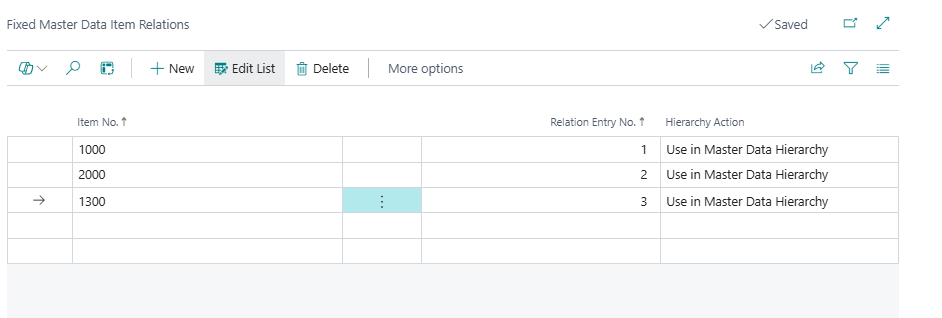
Fixed Master Data Item Relations stores manual overrides that pin items to specific hierarchy nodes or explicitly exclude them from specific nodes, independently of the automatic item-to-hierarchy mapping performed by the Update Master Data Item Relations report. Each row associates one item with one Master Data Relation node and declares a Hierarchy Action that determines whether the item should be shown at that node or suppressed.
Fixed records are permanent — they survive every automatic recalculation. They are the mechanism behind the Add Item to Hierarchy and Remove Item from Hierarchy actions on the Master Data Hierarchy page, and they give administrators fine-grained control over exceptions to the automatically derived hierarchy placement.
When Is This Page Used
This page is used to inspect, correct, or manually create the fixed item-hierarchy overrides for specific items or nodes. It is typically opened in context — filtered to a specific Relation Entry No. — from the Master Data Hierarchy or Master Data Relations pages, when an administrator wants to see which items have been manually pinned to or excluded from a particular hierarchy node. It can also be used to directly edit or delete fixed records when an override is no longer needed.
Who Are Typical Users
System administrators and implementation consultants managing the MDI hierarchy. Data administrators investigating why a specific item does or does not appear at an expected hierarchy position.
Accessing the Page
This page has no UsageCategory and is not searchable from the BC search bar. It is accessed via:
- Master Data Hierarchy page → Fixed Master Data Item Relations action — opens filtered to the Relation Entry No. of the selected hierarchy node.
- Master Data Relations page → Fixed Master Data Item Relations action — opens filtered to the Entry no. of the selected relation row.
The page can also be opened unfiltered from those actions if no row is selected, showing all fixed records across all nodes.
Page Components
List Fields
The primary key is Item No. + Relation Entry No., so each combination of item and relation node can have at most one fixed record.
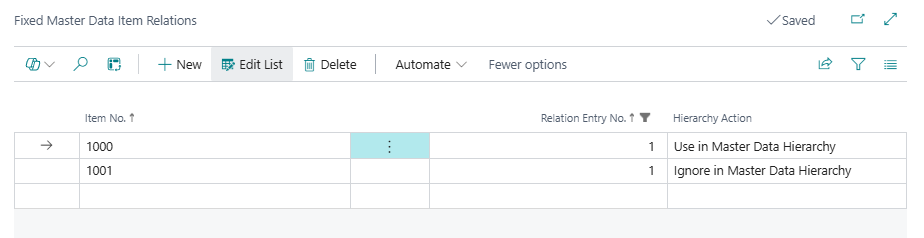
| Field | Purpose | Example | Key Information |
|---|---|---|---|
| Item No. | The BC item that this fixed rule applies to. | 1000 |
Linked to the Item table. Required. |
| Relation Entry No. | The Entry no. of the Master Data Relations record (hierarchy node) that this rule targets. | 42 |
References SCB Master Data Relations."Entry no.". Together with Item No., this is the primary key — only one fixed record can exist per item-node combination. |
| Hierarchy Action | The override instruction for this item at this node. | Use in Master Data Hierarchy |
Four values from the SCB MDI Hierarchy Actions enum — see the table below for full details. This field determines the effect of the record during hierarchy recalculation. |
Hierarchy Action Values
| Value | Effect during Update Item Relations |
|---|---|
| Use in Master Data Hierarchy | Forces this item to appear at the specified node in the hierarchy, regardless of whether its MDI attribute values would naturally place it there. A Master Data Item Relations record is inserted for this node with Hierarchy Creation = Fixed. |
| Ignore in Master Data Hierarchy | Prevents this item from appearing at the specified node, even if its MDI attribute values would automatically place it there. When the mapping logic attempts to insert an item relation for this node, it checks for an Ignore record first and skips the insertion if one exists. |
| Archive Use in Master Data Hierarchy | Variant of Use — present in the enum for archival/historical tracking but not actively processed differently from Use in current code. |
| Archive Ignore in Master Data Hierarchy | Variant of Ignore — present in the enum for archival/historical tracking but not actively processed differently from Ignore in current code. |
Actions
This page has no actions. Rows are managed directly in the list — inserted, modified, or deleted by hand, or created automatically by the Add Item to Hierarchy and Remove Item from Hierarchy actions on the Master Data Hierarchy page.
Key Behaviours
Fixed records are created automatically by hierarchy actions. When a user runs Add Item to Hierarchy on the Master Data Hierarchy page, the system inserts (or updates) a Fixed record with Hierarchy Action = Use in Master Data Hierarchy for the selected item and node. When Remove Item from Hierarchy is used, a Fixed record with Hierarchy Action = Ignore in Master Data Hierarchy is inserted (or the existing record is updated to Ignore). In both cases, if a record already exists for that item-node combination, it is updated rather than duplicated.
Fixed records survive automatic recalculations. The Update Master Data Item Relations report processes all non-blocked items and re-derives their hierarchy positions from MDI attribute values. At the end of each item's processing, it additionally loops through all Use fixed records for that item and inserts corresponding Master Data Item Relations records with Hierarchy Creation = Fixed. The Ignore records act as a gate inside the insertion logic: before inserting any auto-derived item relation, the code checks whether an Ignore fixed record exists for that item-node combination, and skips the insertion if one is found. This means fixed overrides always take precedence over automatic placement.
A Use record can coexist with an auto-derived placement. If an item's attributes naturally place it at a node and a Use fixed record also exists for that node, the item appears once at that node with Hierarchy Creation = Fixed (the fixed insert runs after the auto pass and the auto relation is superseded). If the item's attributes would not place it there, the Use record ensures it still appears.
Deletion of a relation cascades here. When a Master Data Relations record is deleted, the system deletes all associated Fixed Master Data Item Relations records for that node (as part of the delete confirmation flow). Similarly, when Remove Empty Master Data Relations cleans up unused nodes, it checks for the absence of both Master Data Item Relations and Fixed Master Data Item Relations records before deleting a relation — a node with any fixed record is considered populated and will not be removed.
Direct editing is an advanced operation. Most fixed records are created and managed through the Master Data Hierarchy page actions. Editing records directly here — particularly changing the Hierarchy Action or Relation Entry No. — bypasses the safeguards built into those actions and should be followed by a Refresh Hierarchy with Items or Update Item Relations run on the Master Data Hierarchy page to ensure the hierarchy display reflects the change.
Related Pages
| Page | Relationship |
|---|---|
| Master Data Hierarchy | The primary interface for creating and removing fixed records via the Add Item to Hierarchy and Remove Item from Hierarchy actions. Also provides the Fixed Master Data Item Relations action to open this page filtered to the selected node. |
| Master Data Relations | Provides the Fixed Master Data Item Relations action opening this page filtered to the selected relation's Entry no.. The Fixed Item Relations exists FlowField on each relation row reflects whether any records exist here for that node. |
| Master Data Item Relations | The auto-generated item-to-hierarchy mapping table. Fixed records with Hierarchy Action = Use produce entries here with Hierarchy Creation = Fixed after each Update Item Relations run. Fixed records with Hierarchy Action = Ignore suppress entries here. |
| Update Master Data Item Relations (report) | Rebuilds the Master Data Item Relations table, incorporating all active fixed overrides from this table in the process. |