Overview
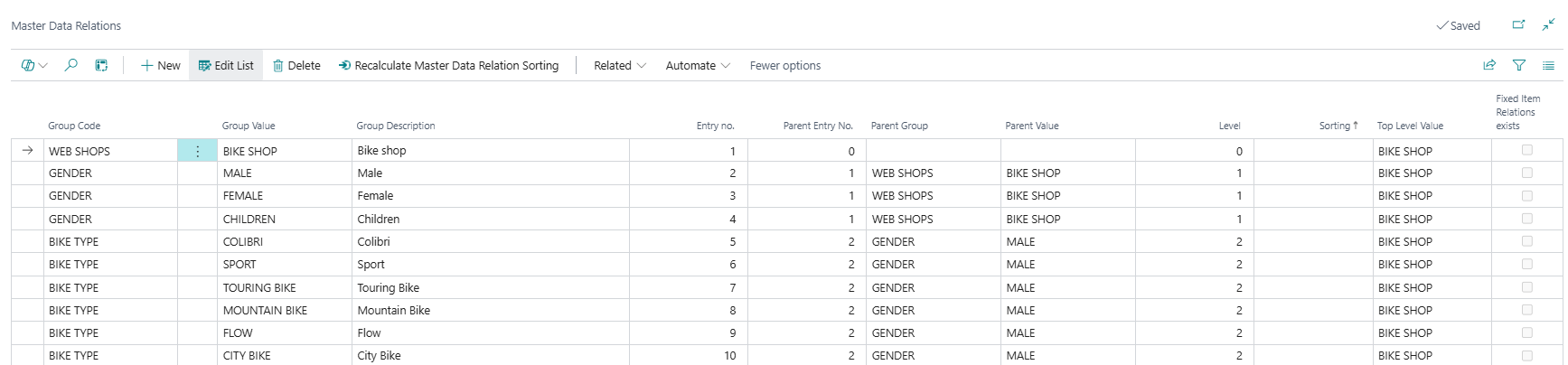
Master Data Relations is the structural backbone of the MDI hierarchy. Each row in this list represents one node in the hierarchy tree — a specific Information Value (e.g. a season, a category, or a subcategory) positioned at a defined level under a specific parent. Together, the rows in this list encode the complete parent-child tree that the Master Data Hierarchy page renders as a browseable view.
This is a configuration and maintenance page. It is where the raw hierarchy structure is built, adjusted, and inspected. The Master Data Hierarchy page is the user-facing view; this page is the underlying data it is built from.
When Is This Page Used
This page is used when building or restructuring the hierarchy tree directly — for example, when adding a new sub-category to the structure, reorganising the parent-child relationships between values, adjusting sort order, or cleaning up empty relation records. It is also the place to go when troubleshooting an unexpected hierarchy result, since it shows the exact entry numbers and parent links that determine how the tree is assembled.
Who Are Typical Users
Implementation consultants building or restructuring the MDI hierarchy. System administrators performing hierarchy maintenance. Data administrators investigating incorrect hierarchy structures.
Accessing the Page
This page has no UsageCategory and is not searchable from the BC search bar. It is accessed via:
- Master Data Hierarchy page → Hierarchy - Relations group → Master Data Relations action.
Page Components
List Fields
The list is sorted by Sorting in ascending order by default. Rows can be inserted, modified, and deleted directly.
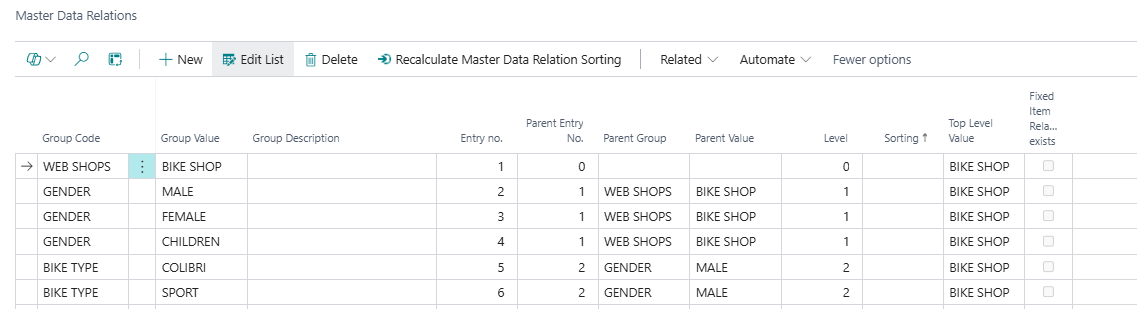
| Field | Purpose | Example | Key Information |
|---|---|---|---|
| Group Code | The Information Code that this node belongs to — the attribute type for this hierarchy level (e.g. SEASON, CATEGORY, SUBCATEGORY). |
CATEGORY |
Must exist in Master Data Groups. Validation enforces this: inserting a Group Code not present in Master Data Groups raises an error. Cannot be changed after insert without affecting the hierarchy. |
| Group Value | The specific Information Value that this node represents — the actual category item at this level (e.g. OUTERWEAR, KNITWEAR). |
OUTERWEAR |
Must be a valid value under the specified Group Code. For top-level nodes (where Group Code equals the Master Data Group Top Level defined in MDI setup), the combination of Group Code + Group Value must be unique — no two top-level relations can have the same Group Value. Duplicate combinations at the same parent are also blocked. |
| Group Description | The description of the Information Value. Stored as a copy here for display purposes. | Outerwear |
Read-only (Editable = false). Populated automatically from the Information Value when a Group Value is set or when Update Master Data Relation Description is run. If the Information Value description changes later, this field does not update automatically — it must be refreshed via the action. |
| Entry no. | The unique integer identifier for this relation record. Used to link child nodes to their parents. | 42 |
System-assigned on insert (next available number). This is the key field used in Parent Entry No. references by child rows. Cannot be zero. |
| Parent Entry No. | The Entry no. of this node's parent relation. Zero (blank) for top-level nodes. | 15 |
Setting this field automatically populates Parent Group and Parent Value from the referenced parent record, and calculates the Top Level Value and Top Level Entry No.. Validation checks that the parent-child combination does not already exist, that the parent entry exists, and (unless Ignore Test of Parent Group is enabled in MDI setup) that the Group Code is valid for the level immediately below the parent's Group Code in the Master Data Groups schema. |
| Parent Group | The Information Code of the parent node. Populated automatically from the parent relation record. | SEASON |
Read-only (Editable = false). Set automatically when Parent Entry No. is validated. |
| Parent Value | The Information Value of the parent node. Populated automatically from the parent relation record. | SS25 |
Read-only (Editable = false). Set automatically when Parent Entry No. is validated. |
| Level | The depth of this node in the hierarchy, starting from 0 at the top level. | 1 |
Set automatically during sort recalculation. Level 0 = top-level nodes (where Parent Entry No. = 0). Level increases by 1 for each parent step down. Displayed on the Master Data Hierarchy page for navigation orientation. |
| Sorting | Controls the display order of this node relative to its siblings in the hierarchy. Higher values appear later. | 400 |
Editable. Default is Entry no. × 100 when auto-assigned. Can be manually adjusted to reorder nodes. Gaps of 100 between values leave room for insertions without requiring a full recalculation. The Recalculate Master Data Relation Sorting action can normalise all sorting values across the entire table. |
| Top Level Value | The Group Value of the root-level ancestor of this node — the top-level category tree this relation belongs to. | SS25 |
Calculated automatically when Parent Entry No. is set. Allows all nodes within a given hierarchy branch to be identified by their top-level value. |
| Fixed Item Relations exists | Indicates whether any items have been manually pinned to this node via Fixed Master Data Item Relations. | Yes |
FlowField from the Fixed Master Data Item Relations table. Useful for identifying which nodes have hand-curated item assignments before making structural changes. |
Actions
Top-Level Navigation Actions
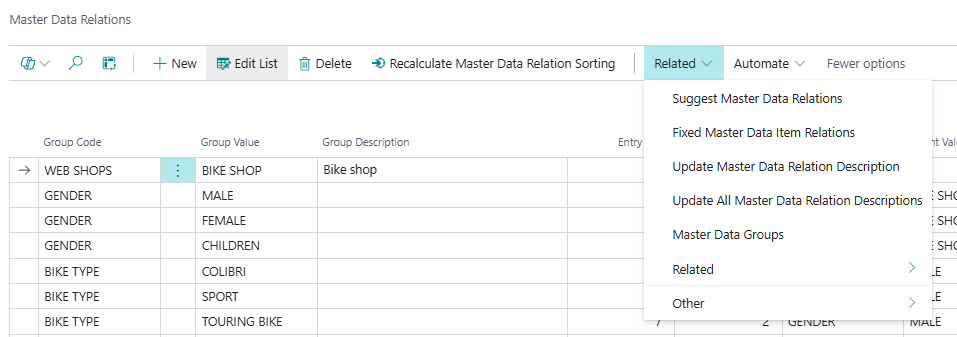
| Action | What It Does | When to Use | Prerequisites |
|---|---|---|---|
| Recalculate Master Data Relation Sorting | After a confirmation prompt ("This will update all sorting on Master Data Relations. Are you sure you want to continue"), renumbers the Sorting and Level fields for all relation records. Processes top-level nodes first (by current sorting), then recursively descends through each subtree, assigning Sorting values in increments of 100. Confirms with "All sortings are updated" on completion. | After manual edits to sorting values have left gaps or inconsistencies, or after significant structural changes to ensure levels are calculated correctly throughout the tree. Sorting = 100 is the first value for the root level. | None. Confirmation required. |
| Suggest Master Data Relations | Automatically generates a full set of Master Data Relations by creating one record for every Information Value under every Group Code defined in Master Data Groups, building the complete parent-child structure recursively. Only runs if no existing relations are present (or exactly one record exists, which it deletes before running). Raises an error if relations already exist to prevent accidental overwrite. | When setting up a new hierarchy from scratch — after Master Data Groups has been configured with all the needed levels and Information Values have been created. Not for use on an existing hierarchy. | Master Data Groups must be fully configured with at least one top-level entry. No existing Master Data Relations (or exactly one record). |
| Fixed Master Data Item Relations | Opens the Fixed Master Data Item Relations list filtered to the currently selected row's Entry no. | To review or manage manually pinned items for a specific hierarchy node. | A row must be selected. |
| Update Master Data Relation Description | Updates the Group Description field on the currently selected row by looking up the current description from the Information Value table. | When an Information Value's description has changed and the stored copy in this row needs to be refreshed for a specific record. | A row must be selected. |
| Update All Master Data Relation Descriptions | Updates the Group Description field on every row in the table by re-looking up each row's current Information Value description. | When Information Value descriptions have been changed in bulk and all stored descriptions need to be synchronised. | None. |
| Master Data Groups | Opens the Master Data Groups list defining the hierarchy level schema. | To review or adjust which Information Codes form the hierarchy levels and in what sequence. | None. |
Related Group Actions
| Action | What It Does | When to Use | Prerequisites |
|---|---|---|---|
| Remove Empty Master Data Relations | Removes all relation records that have no items assigned beneath them (no Master Data Item Relations and no Fixed Master Data Item Relations for that entry, and no child relations). If one or zero rows are selected, prompts to run across all relations; if multiple rows are selected, confirms for that count. Processes from the deepest level upward. Reports how many records were deleted. | To clean up relation nodes that were created but never populated with items — for example after a hierarchy restructuring leaves orphaned branches. | Confirmation required. |
Key Behaviours
Deleting a relation cascades to item assignments. When a relation record is deleted, the system checks whether any Master Data Item Relations records point to it. If they exist, a confirmation is shown: "This will also delete [count] Master Data Item Relations. Do you wish to continue?" On confirmation, all associated item relations are deleted, including any Fixed Item Relations records for that node. Deletion is blocked if the node has child relations — you can only delete leaf nodes: "You can only delete specifications in the bottom of the hierarchy level."
Parent-child validation enforces the Master Data Groups schema. When a Parent Entry No. is set, the system validates that the Group Code of the new child record is at the level immediately below the parent's Group Code in the Master Data Groups schema (unless Ignore Test of Parent Group is enabled in Master Data Information Setup). This prevents structurally invalid trees where a Level 2 node is accidentally placed under a Level 0 node, skipping a level. The checks also prevent duplicate entries: the same Group Code + Group Value combination under the same parent is blocked.
Group Description is a stored snapshot, not a live lookup. The Group Description field is populated when a relation is created or when the update description actions are run. It does not update automatically if the Information Value description changes later. In environments where Information Value descriptions are regularly updated, running Update All Master Data Relation Descriptions periodically keeps this field current.
Sorting gaps of 100 are intentional. The auto-assigned sorting (Entry no. × 100) leaves large gaps between values so that new records can be inserted between existing ones with a manual sorting value, without needing a full recalculation. The Recalculate Master Data Relation Sorting action compresses and normalises these values back to increments of 100 when needed.
Suggest Master Data Relations is a one-time bootstrap tool. It creates a complete Cartesian structure: one relation record for every possible combination of parent and child Information Values as defined in Master Data Groups. For a hierarchy with many values at each level, this can produce a large number of records. It is intended for initial setup and is blocked from running on an existing hierarchy to prevent accidental data loss.
The Entry no. field is the join key for the entire hierarchy system. The Parent Entry No. on each row references the Entry no. of its parent. The same entry number is used as Relation Entry No. in both Master Data Item Relations and Fixed Master Data Item Relations, and as Relation Entry no. in the Master Data Hierarchy display table. Changing an entry number after other records have been linked to it would break those links — the field is not editable once set.
Related Pages
| Page | Relationship |
|---|---|
| Master Data Hierarchy | The user-facing hierarchy view, built by reading and assembling this table. The Master Data Relations action on that page opens this list. Changes here are reflected in the hierarchy after the next refresh. |
| Master Data Groups | Defines which Information Codes form the hierarchy levels and in what order. Master Data Relations records must use Group Codes that exist in Master Data Groups. Accessible via the Master Data Groups action. |
| Master Data Item Relations | Records which items are placed at which hierarchy nodes (auto-generated by the Update Item Relations report). Each record references a relation by its Entry no. Deleted automatically when a relation is deleted. |
| Fixed Master Data Item Relations | Records manually pinned item-to-node assignments. Accessible filtered to the selected node via the Fixed Master Data Item Relations action. Also deleted when a relation is deleted (after confirmation). |
| Master Data Information Setup | Contains the Ignore Test of Parent Group flag, which disables the parent-level validation on insert/modify. Also contains the Master Data Group Top Level setting used to identify top-level relation records. |