Overview
The Master Data Language page is a list page used to manage language-specific (translated) descriptions for Information Codes, Information Values, and Information Setup entries. For each record in the system, users can define one translated description per language code, enabling the system to automatically insert the correct language variant of a description on documents, printouts, and interfaces based on the active language. It also supports attaching language-specific files (such as localized images or documents) to individual translation records.

When Is This Page Used
This list page is used whenever an administrator or configurator needs to add, review, or edit translated descriptions for a specific Information Code, Information Value, or Information Setup entry. The page always opens pre-filtered to the specific record and context it was called from, so users only see the language translations relevant to that particular record. It is typically opened as a sub-page or navigation action from the parent record rather than browsed independently.
Who Are Typical Users
- Master Data Administrator — maintains translated descriptions as part of multilingual master data configuration.
- Implementation Consultant — sets up language translations during initial system deployment for multilingual environments.
- Data Steward / Localization Coordinator — responsible for ensuring all active language codes have correct and up-to-date descriptions for each value.
Accessing the Page
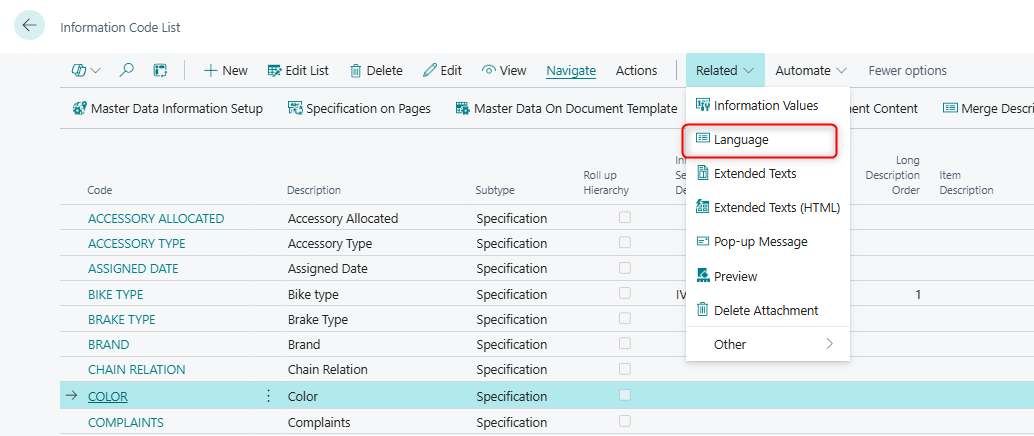
The Master Data Language page is accessed from either Information Code List og Information Value List

| Source Page | Action Name | Context Passed |
|---|---|---|
| Information Code List | Language | Filtered to the selected Information Code, Information Table = Information Code |
| Information Code Card | Language | Filtered to the selected Information Code, Information Table = Information Code |
| Information Value List | Language | Filtered to the selected Information Code and Information Value, Information Table = Information Value |
| Information Setup (on master data records) | Language | Filtered to the specific master data record, Information Code, and Information Value, Information Table = Information Setup |
Page Components
Fields
Each row in the list represents the translated description for a single language code. The page is opened with filters pre-applied, so the Information Code, Information Value, and Information Table context is set automatically and not directly editable from this view.

| Field | Purpose | Example | Key Information |
|---|---|---|---|
| Language Code | The language for which this translation applies. | DA-DK, DE-DE, FR-FR |
Mandatory. Must match a language code defined in the Business Central Language table. Each language code may only appear once per record context. |
| Description | The translated description for this language. | Rød (Danish for "Red") |
Free text up to 250 characters. This is the value the system inserts on documents when the corresponding language is active. |
The following field is present in the underlying table but is hidden by default in the list:
| Field | Purpose | Key Information |
|---|---|---|
| File Placement | The filename or path of a language-specific attachment (e.g., a localized image). | Clicking (DrillDown) on this field opens the file upload/management dialog. If the language record has not yet been saved, the system automatically inserts the record before opening the file dialog. Supports Database, Azure Blob, SharePoint, OneDrive, and FTP storage depending on system configuration. |
The underlying Master Data Language table also contains the following technical key fields that carry context from the parent record. These are set automatically by the system when the page is opened and are not directly visible or editable by the user:
| Field | Purpose |
|---|---|
| Table | The integer ID of the Business Central table the parent record belongs to (e.g., Item, Customer). |
| No. | The RecordID of the specific parent record this translation belongs to. |
| Information Code | The Information Code of the parent entry. |
| Information Value | The Information Value of the parent entry (relevant when context is Information Value or Information Setup). |
| Information Table | The context type: Information Code, Information Value, or Information Setup. Determines which level the translation belongs to. |
| Value | An additional code field carried from the parent Information Value entry. |
| Key Field 1–10 | Internal fields used to reconstruct the RecordID of the parent record from its key field values. Used for system integration purposes. |
Actions
Function
| Action | What It Does | When to Use | Prerequisites |
|---|---|---|---|
| Extended Texts | Opens the plain-text extended text editor for the current language record, allowing additional multi-line plain text to be linked to this translation. | Use when a language-specific description requires more text than fits in the Description field. | The language record must already be saved (have a valid SystemId). If the record has not been saved yet, the system shows an error prompting the user to create the record first. |
| Extended Texts (HTML) | Opens the HTML extended text editor (shortcut: Ctrl+E) for rich-text extended content linked to this translation. | Use when the language-specific extended content requires HTML formatting, such as for web display or rich document output. | Same as above — the language record must already be saved. |
Default Setup & Templates
No default Master Data Language records are installed automatically by the extension's installation codeunit. Translations are entirely customer-specific and depend on the languages active in the customer's Business Central environment. All translation records must be created manually by entering a Language Code and the corresponding Description for each Information Code, Information Value, or Information Setup entry that requires multilingual support.