Overview
Master Data Extended Text is an embedded list component (ListPart) used exclusively as a sub-part within the Master Data Extended Texts card page. It presents one or more plain-text description lines that together form the extended text content for a single Information Code, Information Value, or Information Entry context. Because each line stores up to 250 characters, the multi-row design allows descriptions of unlimited length to be composed, stored, and retrieved as a continuous block of text.
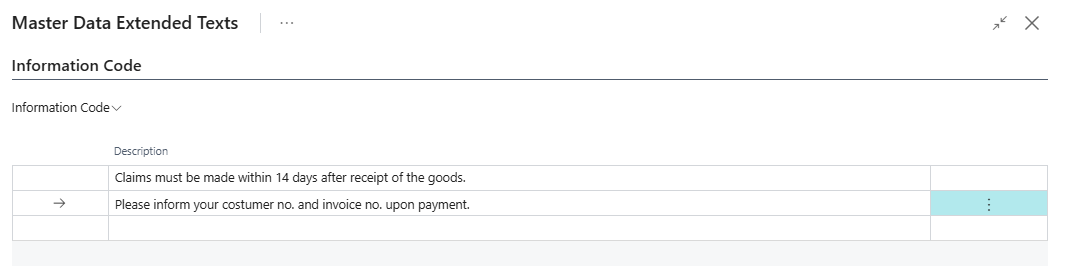
When Is This Component Used
This ListPart is not a standalone page and cannot be opened directly. It is always displayed as an embedded section inside the Master Data Extended Texts card page, which appears as a modal dialog when a user selects the Extended Texts action from any of the supporting pages. The component becomes active and editable for the specific context level (Information Code, Information Value, or Information Entry) that was selected when the dialog was opened — the other two sections in the dialog are shown as read-only for reference.
Who Are Typical Users
- Master Data Administrator — writes and maintains extended text descriptions for Information Codes and Values.
- Implementation Consultant — configures extended text content during initial setup.
- Data Steward / Product Manager — maintains rich textual content linked to product attributes and specifications.
Accessing the Page
The Master Data Extended Text is accessed from the Information Code List and Information Value List


The Extended Texts action is available from the following pages:
| Source Page | Context Level Set as Editable |
|---|---|
| Information Code List | Information Code |
| Information Code Card | Information Code |
| Information Value List | Information Value |
| Master Data Language | Information Language (language-specific translation) |
| Information Setup | Information Entry |
| Information Setup Card | Information Entry |
When the dialog opens, the Master Data Extended Texts card page shows up to three sections — Information Code, Information Value, and Information Entry — each rendered using a separate instance of this ListPart. Only the section corresponding to the calling context is editable; the others are visible for reference but read-only.
Page Components
How Extended Text Lines Work
Each row in the list represents a single 250-character segment of the extended description. The system automatically assigns an incrementing Entry No. to each line when a new row is inserted. When the description is read back — for example, to populate a document field or a long description — all lines belonging to the same context are concatenated in Entry No. order to reconstruct the full continuous text.
The ListPart operates on a temporary (in-memory) copy of the data. Changes made in the list are only persisted to the database when the user closes the parent Master Data Extended Texts dialog using the OK action. If the dialog is cancelled, no changes are saved.
Fields
| Field | Purpose | Example | Key Information |
|---|---|---|---|
| Description | A single line (segment) of the extended text, up to 250 characters. | This item is made from high-grade stainless steel and |
The only user-editable field visible in the list. Multiple rows are concatenated in sequence to form the full extended description. |
The following fields are present in the list but are hidden by default. They carry the context identifiers that link each text line to its parent record and are set automatically by the system:
| Field | Purpose | Key Information |
|---|---|---|
| Entry No. | The sequential line number within the extended text block. | Read-only. Auto-assigned on insert. Determines the order in which lines are concatenated when the full description is assembled. |
| Type | The integer ID of the Business Central table the parent record belongs to. | Read-only. Set from the filter applied when the parent dialog was opened. |
| No. | The RecordID of the specific parent record (e.g., Item, Customer) this text belongs to. | Read-only. Populated when the context is Information Entry. Empty for Information Code and Information Value contexts. |
| Information Code | The Information Code this text is associated with. | Read-only. Carried from the parent context filter. |
| Information Value | The Information Value this text is associated with (when applicable). | Read-only. Empty for Information Code-level text. |
| Information Table | The context level: Information Code, Information Value, Information Setup, or Information Language. | Read-only. Determines which level the text belongs to and controls which section of the parent dialog this line appears in. |
| Language Code | The language this extended text applies to. | Read-only. Empty for language-neutral text; set to a specific language code when opened from the Master Data Language page. |
| Value | An additional code field carried from the parent Information Value entry. | Read-only. Used in multi-value scenarios. |
Actions
This ListPart has no actions of its own. All navigation and save operations are handled by the parent Master Data Extended Texts card page. Users interact with the content by directly adding, editing, or deleting rows in the list, and confirm changes by closing the parent dialog with OK.
Relationship to Extended Texts (HTML)
In addition to Extended Texts (plain text), supporting pages also offer an Extended Texts (HTML) action. This opens the Master Data Extended Text Description dialog instead, which presents the same underlying extended text data as a rich HTML editor. Both the plain-text and HTML approaches read from and write to the same SCB New Master Data Ext Text table — the difference is only in the editing interface. The HTML editor assembles all lines into a single continuous text block for editing and then splits the result back into 250-character segments on save.
Default Setup & Templates
No default extended text records are installed by the extension's installation codeunit. All extended text content is customer-specific and must be entered manually per Information Code, Information Value, Information Entry, or language translation record as required.