Release Date: 24. February 2026
 Release Summary
Fixes logic error where forecast shortfalls were ignored during active planning
Restores creation of valid planning lines in Reverse Planning, Simple MRP, Direct Replenishment, and Move Demand Dates
Default “Ignore Forecast” setting changed to consider forecasts unless explicitly disabled
New planning templates added for improved shortage analysis (critical items and safety stock)
Improved Danish translations in the Reverse Planning app
Requires Business Central version 27.0 or later
 Bug Fixes
Simple MRP, Direct Replenishment, Move Demand Dates
Reverse Planning and planning processes now evaluate forecast correctly and no longer suppress valid planning lines when “Ignore Forecast” is defaulted to Yes.
This hotfix corrects how Reverse Planning, Simple MRP, Direct Replenishment, and Move Demand Dates handle forecast and planning data when evaluating inventory shortfalls.
Previously, Reverse Planning contained a logic error that meant forecast shortfalls (blue graph, Inventory after Forecast) were never evaluated when planning was also active (green graph, Inventory after Planning). As soon as planning was included, the forecast check was effectively skipped, both in the main loop and when using Trigger on End Inventory. This could prevent Reverse Planning lines from being created even when forecast clearly pulled inventory below the configured trigger level (e.g. Safety Stock).
In addition, several processes — including SCB Item Availability Setup (6082600), Simple MRP, Direct Replenishment, and Move Demand Dates — incorrectly defaulted Ignore Forecast to Yes on insert and in related flows. In combination with Include Planning Lines = No, this caused Simple MRP to produce no planning lines at all, despite existing demand/supply, leading to misleading configuration and missing replenishment suggestions.
With this fix:
Reverse Planning
When Trigger on Actual Demand Orders only is enabled, only base inventory (red graph, Inventory) is evaluated.
When Trigger on Actual Demand Orders only is disabled:
If planning data is available, the green graph (Inventory after Planning) is checked instead of base inventory; if not, the red graph is used as fallback.
If forecast data is available, the blue graph (Inventory after Forecast) is always evaluated independently and can trigger a line even when planning shows sufficient supply.
The same independent checks now apply when Trigger on End Inventory is enabled, using the last date in the Graphical Inventory Profile.
Planning processes (Simple MRP, Direct Replenishment, Move Demand Dates)
The wrong defaulting of Ignore Forecast is removed so that forecast is not silently ignored unless explicitly configured.
Simple MRP now generates planning lines correctly, even when Include Planning Lines = No and Ignore Forecast = Yes, unless a clearly defined business rule says otherwise.
These changes restore reliable planning behaviour, ensure that forecast is considered consistently across Reverse Planning and related processes, and prevent valid replenishment proposals from being suppressed by incorrect defaults.
 Redesign
Planning Templates
Improved default planning templates for Reverse Planning.
The default planning templates used in Reverse Planning have been updated to follow Abakion’s recommended best-practice setup. The previous default templates for finding critical and shortage items have been replaced by a new set of templates that give a clearer and more consistent basis for shortage analysis, including support for multi-level (LLC) planning.
The following six templates are now included by default:
CRITICAL ITEMS ON END INVENTORY
Finds items where the projected end inventory in the selected horizon will go below zero, so planners can focus on items that will run out or become negative.CRITICAL ITEMS IN PERIOD
Identifies items that will go below zero at any time within the planning period, highlighting near-term negative inventory situations that require action.CRITICAL ITEMS IN ALL LLC ON END INVENTORY
Performs the same “go below zero” end-inventory check across all low-level codes (LLC) in the BOM structure, so planners can see negative inventory risks not only on finished goods, but also on underlying components in the entire product structure.ITEMS BELOW SAFETY STOCK
Flags items where the projected inventory falls below their defined safety stock, helping planners maintain the desired safety buffer and avoid service-level issues.ITEMS BELOW SAFETY STOCK WITH FORECAST ON END INV. *
Uses both actual demand and demand forecast to calculate the projected end inventory and identifies items where this will fall below safety stock. This allows planners to include the combination of actual demand and forecast when checking if future inventory will stay above the safety buffer.ITEMS BELOW SAFETY STOCK WITH FORECAST IN PERIOD *
Uses both actual demand and demand forecast within the planning period and highlights items whose inventory will fall below safety stock at any time during the period, giving an early warning when the combination of actual demand and forecast creates a future shortage.
For the templates marked with *, the Demand Forecast is inherited by default from the Current Demand Forecast field on Inventory Setup, provided that an Inventory Setup exists where this field is defined.
In addition, the Suggest Date Template BACKWARD FROM ZERO - FORWARD FROM OTHER has been added to the END INVENTORY TO ZERO WITH MODIFIERS Suggest Quantity Template to better support the updated planning logic in Reverse Planning.
The new planning templates can be received by using the Refresh Templates function from the Planning Templates list in Reverse Planning.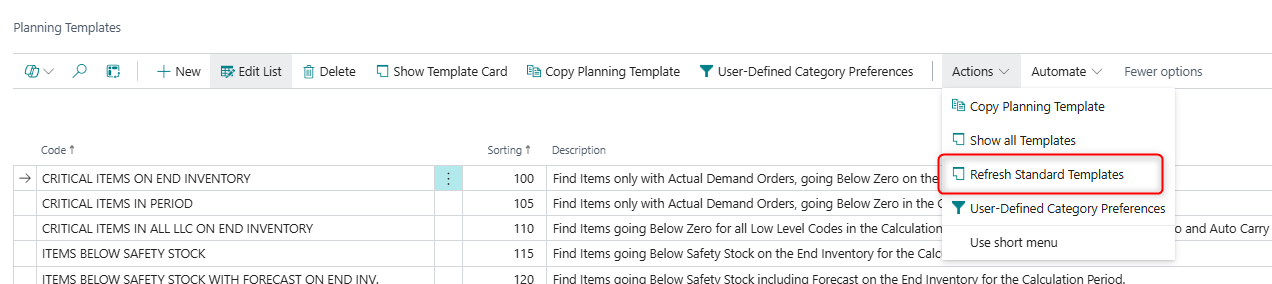
Business Central version 27.0 or later is required to update to this version of Reverse Planning.
Translations
Improved Danish translations in Reverse Planning
We have reviewed and updated the Danish translations used in the Reverse Planning app to ensure more consistent and user-friendly wording across fields, captions, and tooltips.
These changes are purely linguistic and do not alter any existing functionality or configuration in the app.