
Release Date: 26. January 2026
 Release Summary
Key new features (Preview):
Automatic order splitting based on Maximum Order Quantity
Reverse planning controls to avoid planning before the start date, with warnings or automatic date adjustment
Reverse Planning Worksheet improvements:
Footer totals for Volume, Weight, and Amount (LCY)
New cost and discount columns aligned with purchase order pricing logic
New bulk update Vendor No. function
Planning accuracy & activation enhancements:
Support for Rolled Up Lead Time with activation prompt and filters
Prompt to run Low Level Code calculation during activation
Usability & configuration improvements:
Prevent blank Replenishment System selection
View and edit Item/SKU filters directly on Planning Templates
Use Suggest Quantity Templates for faster, consistent MRP setup
Bug fixes:
Supply dates now align with demand forecasts
Planning dates no longer appear before the start date
Fixed language-related DateFormula issues (incl. Danish)
Resolved Purchase Quote creation error from Reverse Planning Worksheet
Technical updates & refactoring:
Essential license users can now include Transfer Supply
Updated to latest Business Central BC25/BC28 item availability and lead-time APIs
Overall benefit: Improved planning accuracy, transparency, configurability, and compatibility with latest Business Central versions
 New Feature
Split Orders by Maxiumum Order Quantity
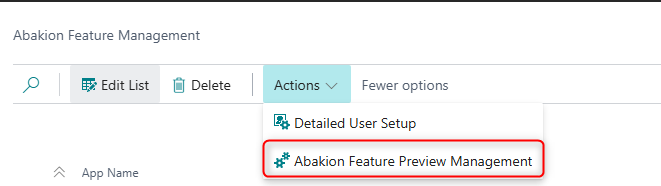
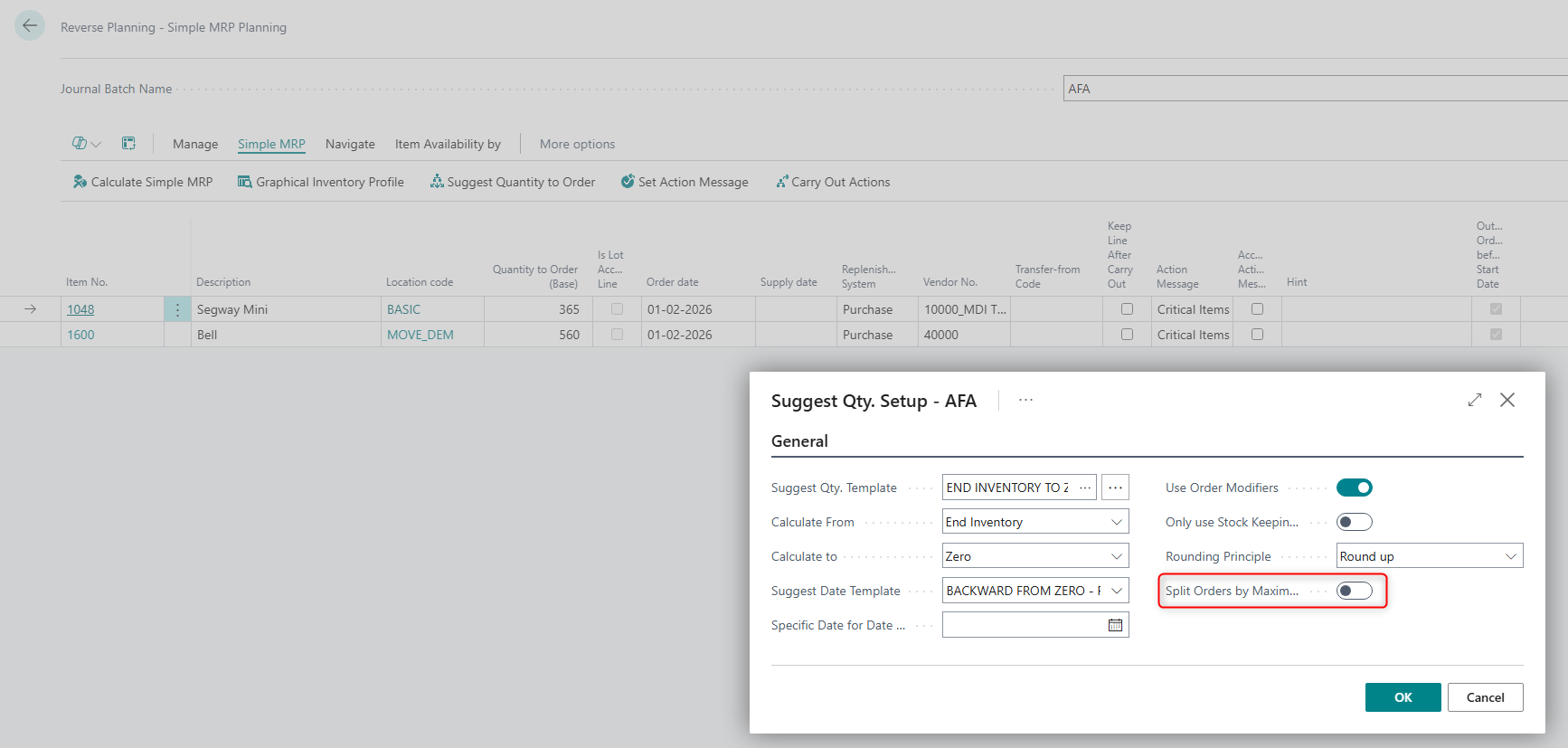
Split Orders by Maximum Order Qty. (Preview) – Simple MRP
This preview feature in Simple MRP allows you to split supply orders based on the Maximum Order Quantity defined for the item. When a calculated supply exceeds the Maximum Order Qty., the system can create multiple smaller orders instead of a single large one.
By enabling this feature, the Split Orders by Maximum Order Qty. field becomes visible in the Suggest Quantity to Order section.
This capability is currently released as a preview and is still being enhanced. Behavior, performance, and configuration options may change in upcoming versions. We recommend testing this feature carefully in a sandbox environment before relying on it in critical production scenarios.

Avoid Planing in the Past
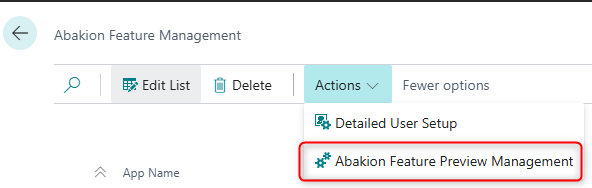
Preview: New Reverse Planning controls for avoiding orders before the planning start date
This release introduces a preview feature in Reverse Planning and Simple MRP that gives planners more control over order dates and clearer visibility when suggestions fall before the allowed planning horizon.
Key capabilities:
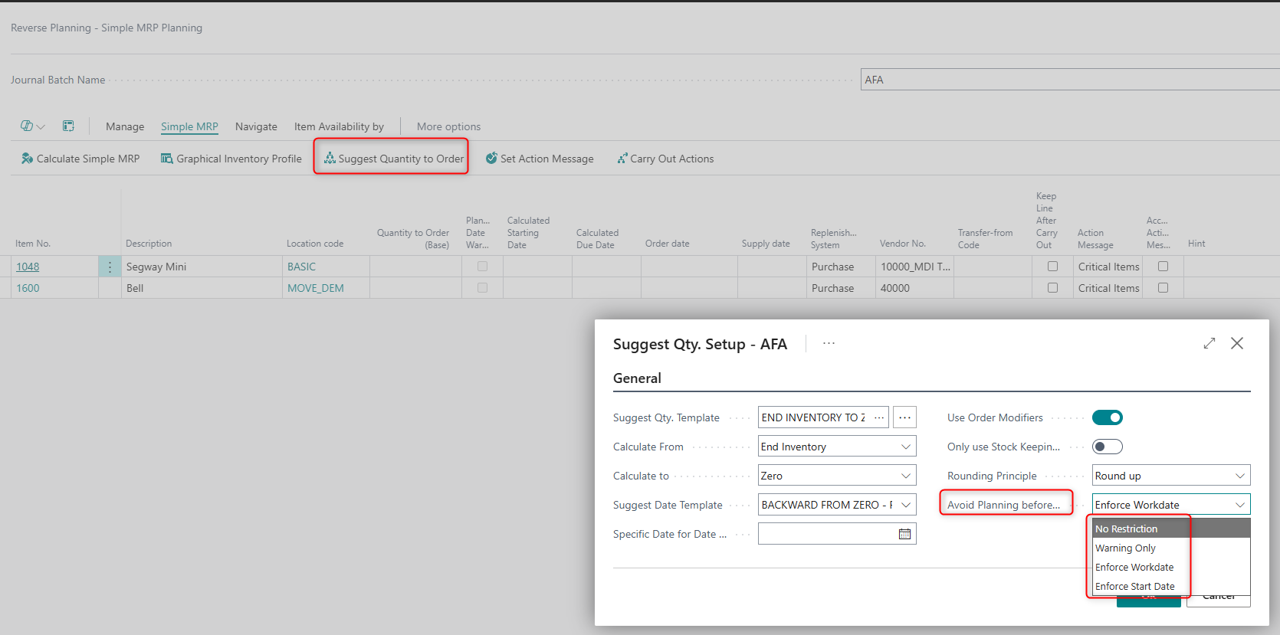
Configurable planning behaviour via the new enum “Avoid Planning before Start Date” on:
SCB Suggest Qty. Setup (6082841 / page 6082973)
SCB RPL Suggest Qty. Template (6223255 / page 6223956)
The setting lets you:
Keep the current behaviour (No Restriction)
Only flag lines where the calculated start date is before the allowed start, or (Warning only)
Automatically move the Order Date forward to either the Work Date or the planning start date, while marking the line with a warning.
Enhanced date tracking and warnings in Reverse Planning
New fields “Calculated Starting Date”, “Calculated Due Date” and “Calculated with Start Date” track the interval used when running Simple MRP.
A new Boolean “Planning Date Warning” highlights planning lines where the effective start date conflicts with the configured start boundary.
Aligned proposals in Simple MRP and Direct Replenishment
Date proposals now respect the chosen “Avoid Planning before Start Date” behaviour already at suggestion time, so planners can immediately see and act on lines that would otherwise start too early.
This functionality is released as a preview and is still under enhancement. It is intended for early adopters who want to test the new planning controls and provide feedback before the behaviour is finalized for general availability.


Reverse Planning Worksheet
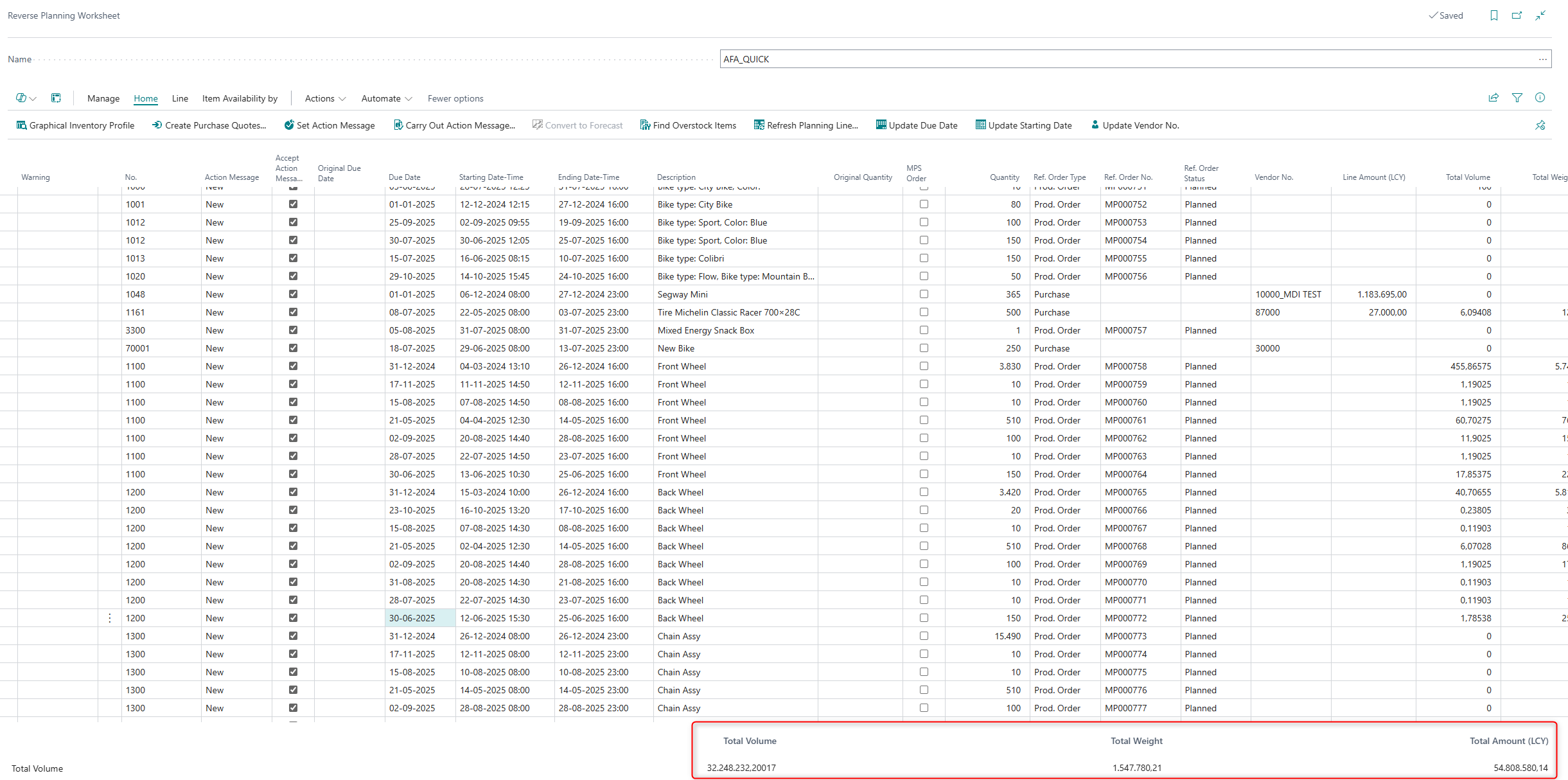
Summary fields now displayed in the footer of the Reverse Planning Worksheet
The Reverse Planning Worksheet now displays Total Volume, Total Weight, and Total Amount (LCY) in the page footer, calculated from the specified SCB fields and based only on visible (filtered) lines. This aligns the worksheet with the General Journals experience and improves usability for Purchasers.
Add new cost and discount columns to the Reverse Planning Worksheet, aligned with purchase order price calculation logic, so purchasers can see accurate line amounts directly in the worksheet.
This release enhances the Reverse Planning Worksheet to give purchasers the same level of cost transparency they know from purchase orders.
New columns have been added on each line, including:
Line Discount Amount Excl. VAT
Line Amount Excl. VAT
Direct Unit Cost Excl. VAT (LCY)
Line Discount Amount Excl. VAT (LCY)
Line Amount Excl. VAT (LCY)
All values are calculated using the most specific Purchase Price, following the standard logic used when creating new purchase orders. This ensures that discounts and amounts are consistent across Reverse Planning and purchase documents, and that purchasers can rely on the worksheet for accurate pricing and discount information without manual calculations.

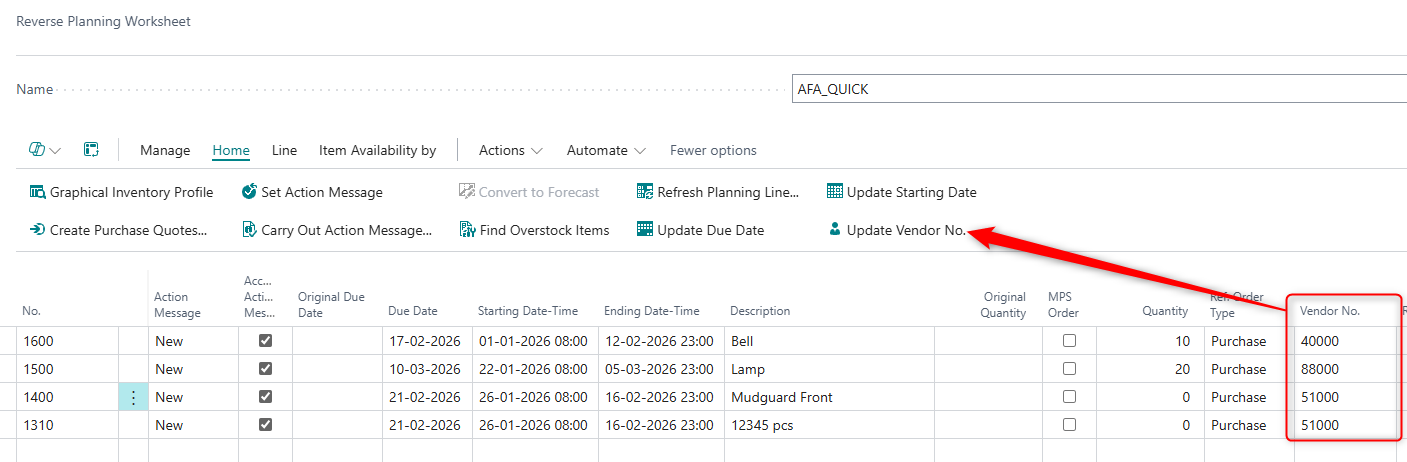
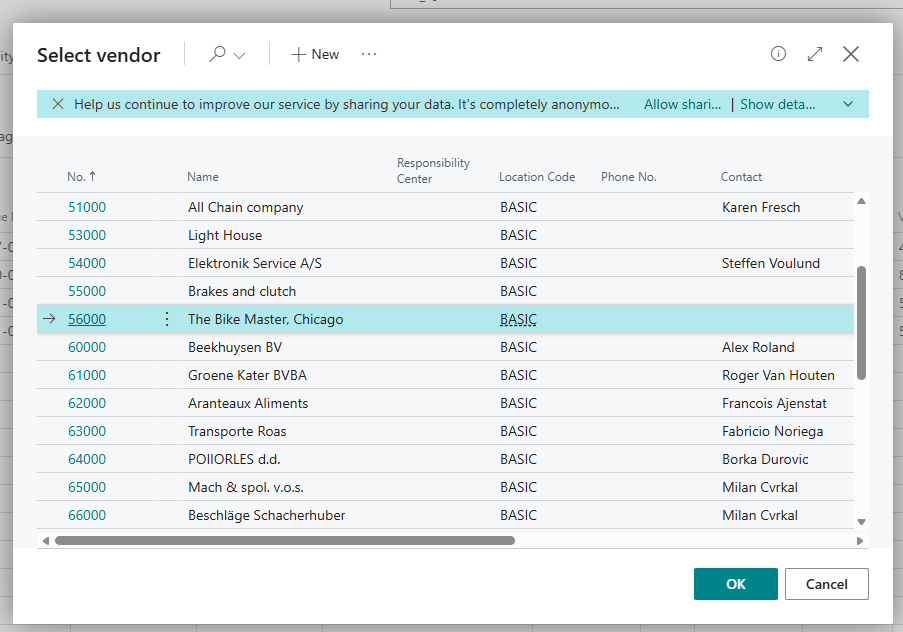
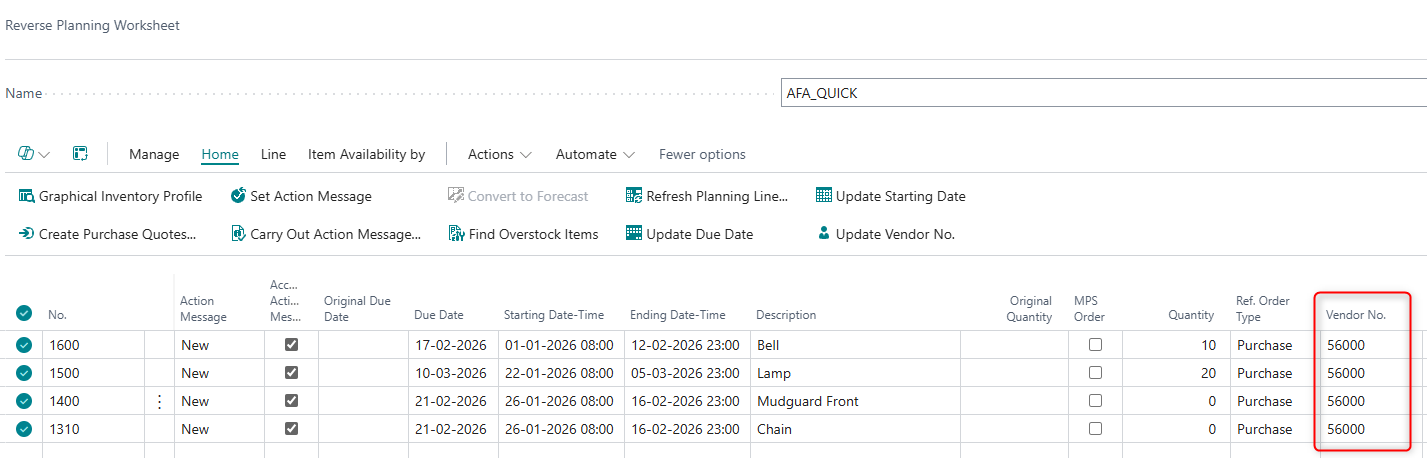
New "Update Vendor No." function added to Reverse Planning Worksheet
Planners can now bulk update Vendor No. across selected lines in the Reverse Planning Worksheet. The system ensures that the Vendor is properly set up in the Vendor/Item relationship before applying changes.
Activation
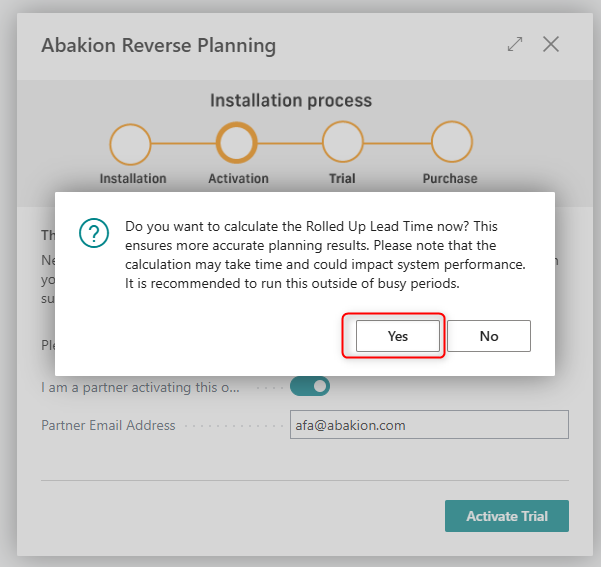
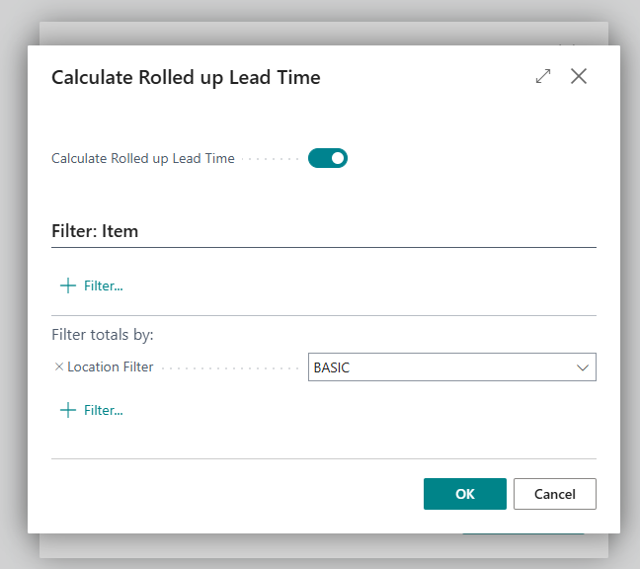
Enhancement to Reverse Planning: Rolled Up Lead Time Calculation Prompt and Filter Options
The Reverse Planning app now supports improved planning accuracy by leveraging Rolled Up Lead Time in its calculations. To ensure this value is correctly maintained, the system will prompt users during installation or activation. Users can specify filters before calculating Rolled Up Lead Time, providing greater control over which items are included in the calculation.
Prompt users to run the Low Level Code calculation when activating the Reverse Planning app to ensure accurate planning results.
When installing or activating the Reverse Planning app, users are now prompted to run the standard Low Level Code calculation. This helps ensure that item structures are up to date before planning starts, reducing the risk of incorrect suggestions caused by missing or outdated Low Level Codes.
If the user chooses to run the calculation, it is executed immediately and a confirmation message is shown when it completes. If the user skips it, the app continues activation and displays an information message explaining that inaccurate Low Level Codes may impact planning accuracy. The prompt is only shown once per activation flow unless the user explicitly triggers it again.
 Improvements
Simple MRP
Prevent blank selection in the Replenishment System field in Simple MRP Planning.
The Simple MRP Planning page has been updated so that the Replenishment System field no longer allows a blank value. Previously, the dropdown included an empty option, even though items and SKUs must always have a valid replenishment method.
With this change:
The blank option has been removed from the Replenishment System dropdown.
Only valid replenishment options (such as Purchase, Production, and Transfer) can be selected.
This reduces the risk of incorrect data entry and improves the accuracy of MRP planning and calculations
Planning Templates
View and edit Item/SKU filter strings directly on Planning Templates
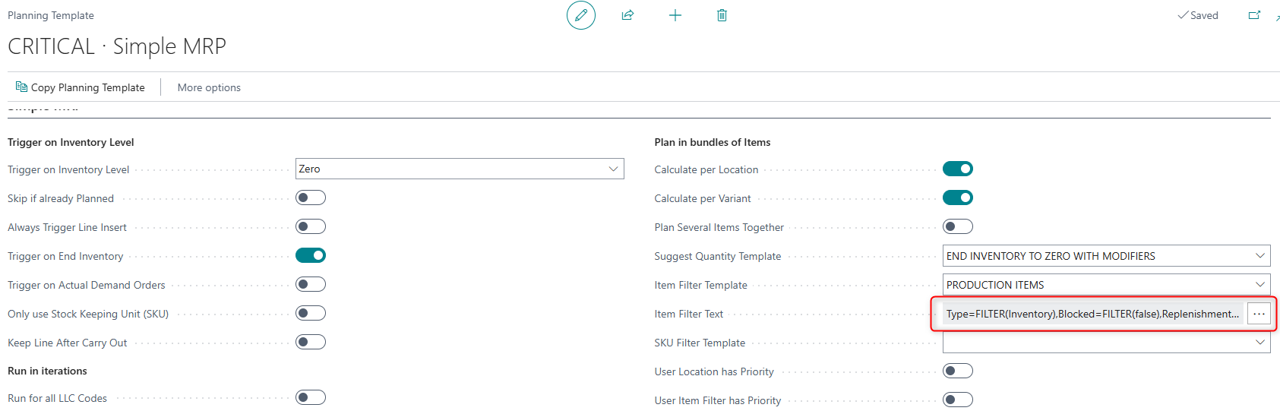
We have enhanced the Reverse Planning “Planning Template” so planners can see and maintain the actual filter criteria without leaving the page.
When an Item Filter Template or SKU Filter Template is selected on a Planning Template, a new FlowField below the field shows the current filter string.
Clicking the filter string opens the standard filter builder dialog, where the user can adjust the filter.
Changes are saved back to the underlying filter template and therefore apply to all Planning Templates that use that template.
This gives planners faster validation and adjustment of planning scope, better visibility of active filters, and consistent behavior with the Simple MRP Request page
Suggest Qty. to Order
Use Suggest Quantity Templates in Suggest Qty. Setup for faster and more consistent MRP configuration.
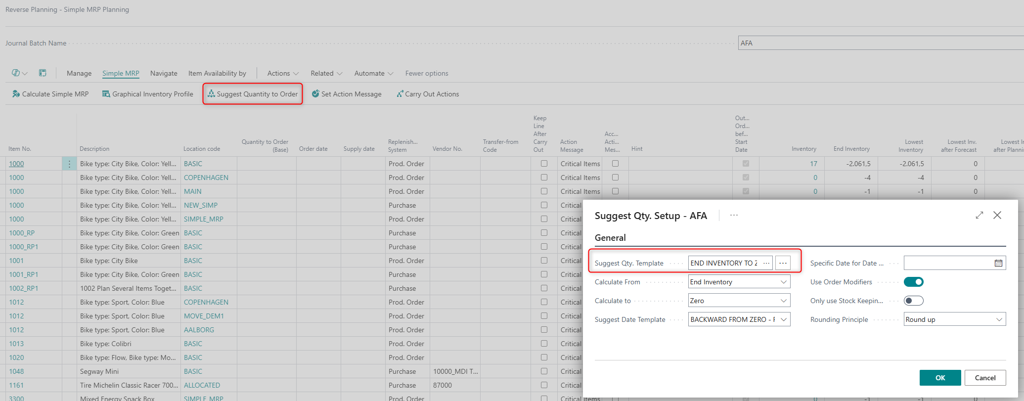
We have added support for Suggest Quantity Templates directly in the Suggest Qty. Setup page.
You can now:
Select a Suggest Quantity Template using a lookup on the new Template field. All relevant settings (Calculate From/To, Order Modifiers, etc.) are automatically populated from the selected template.
Open and edit the selected template via the assist-edit button. When you confirm your changes, the updated template values are applied to the setup.
Manually adjust individual fields after loading a template. These manual changes are preserved when you close and reopen the Suggest Qty. Setup page.
Rely on automatic alignment with planning: when you run Calculate Simple MRP, the Suggest Qty. Setup is updated with the template defined in the Planning Template, ensuring consistent calculation settings.
This improves speed of setup, ensures consistent calculation parameters across users, and still allows full flexibility to fine-tune settings per scenario
 Bug Fixes
Simple MRP
Ensured that “First Date Below Safety Stock,” “First Date Below Zero,” and “First Date Below Reorder Point” in Simple MRP never show a date earlier than the “Calculated with Start Date” for Production, Purchase, and Transfer orders.
Previously, the following fields in the Simple MRP calculation could display dates earlier than the selected “Calculated with Start Date”:
First Date Below Safety Stock
First Date Below Zero
First Date Below Reorder Point
This could happen when inventory went below the defined inventory levels based on entries that occurred before the Start Date, causing an inconsistent and confusing planning picture.
The logic in the CalculateReversePlanning procedure (Reverse Planning codeunit) has been updated so that these three dates are now validated against the Start Date. If any of them would fall before the “Calculated with Start Date,” they are automatically adjusted to the Start Date.
This ensures consistent and predictable behavior on the Simple MRP planning pages and related Production, Purchase, and Transfer order planning, and prevents dates earlier than the Start Date from being shown in these three fields
Fixed issue where Supply Date did not match Demand Forecast date in Simple MRP.
Resolved a bug in the Simple MRP module where the Supply Date was incorrectly set to a later date than the Demand Forecast. The system now ensures that the Supply Date aligns with the Demand Forecast date, improving planning accuracy and reducing manual adjustments.
Planning Templates
Planning Templates now correctly interpret DateFormula fields based on each user’s selected Business Central language, ensuring templates work for Danish (and other non-English) users without errors.
Previously, Planning Templates in Reverse Planning assumed an English (ENU) format when parsing DateFormula fields. This caused validation and parsing errors for users working in Danish (DAN) and potentially other languages, meaning standard planning templates could not be used out-of-the-box without manually adjusting the DateFormulas.
The implementation has been updated so that all calls to CreatePlanningTemplate in codeunit 6223553 “SCB RPL Create Setup Data” are now language‑neutral. DateFormulas on Planning Templates are evaluated according to the user’s selected Business Central language, removing the need for manual corrections and ensuring consistent behavior across locales.
Reverse Planning Worksheet
Fixed issue where error "You must select an existing item." was shown when creating a Purchase Quote from the Reverse Planning Worksheet, even when an item was selected.
Resolved a bug that prevented users from creating Purchase Quotes from the Reverse Planning Worksheet. Previously, the system incorrectly displayed the error "You must select an existing item." despite a valid item being selected. Users can now generate Purchase Quotes as expected from the worksheet.
 Refactors
Planning Templates
Make the “Include Transfer Supply” option available on the SCB RPL Planning Template for Essential license users.
Previously, the Include Transfer Supply field on the SCB RPL Planning Template (6223972, Card) was only visible for users with a Premium Business Central license.
With this change, the Include Transfer Supply (32, Boolean) field is now also visible and usable for Essential license users. This ensures consistent Reverse Planning functionality across license tiers, allowing Essential users to control whether inbound transfer supply is included in planning calculations without requiring a Premium license.
General
Updated Reverse Planning to use the new Microsoft Business Central BC25/BC28 item availability and lead-time functions, resolving compile errors and keeping the app compatible with the latest Base App refactoring.
This release updates the Reverse Planning app to align with Microsoft’s refactored Base App in BC25/BC28. Several legacy function calls in Item Availability and Lead-Time Management were removed by Microsoft, which caused compile errors in Reverse Planning (e.g. missing PlannedEndingDate and ShowItemAvailFromReqLine / ByEvent / ByPeriod / ByVariant / ByLocation / ByBOM).
The implementation has been refactored to use the new standard Microsoft functions introduced in the Base App, while keeping existing behaviour unchanged from a user perspective.
Key changes
Replaced obsolete calls to Microsoft.Inventory."Lead-Time Management" with the new redesigned functions for calculating planning/ending dates.
Replaced obsolete calls to Microsoft.Inventory.Availability."Item Availability Forms Mgt" with the new redesigned item availability functions.
Ensured all Quick Journal (Reverse Planning) availability views continue to work:
Availability by Event
Availability by Period
Availability by Variant
Availability by Location
Availability by BOM Level
Impact on users
No functional change is expected. All planning and item availability features should work exactly as before.
The change is technical and ensures compatibility with the latest Business Central (BC25/BC28) refactoring and avoids future deprecation issues.