Release Date: 26. January 2026
 Release Summary
Enhancements
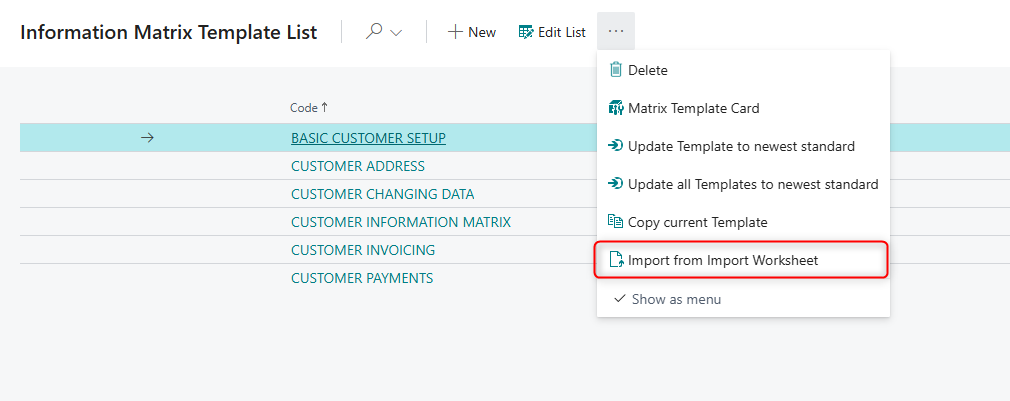
Improved interoperability between Information Matrix and Import Worksheet, enabling seamless copying or importing of Template Cards.
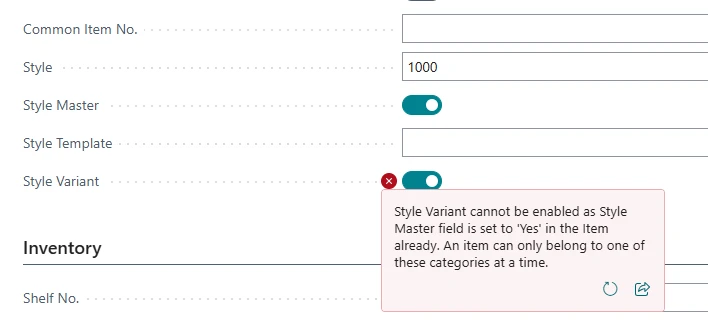
Added validation preventing simultaneous selection of Style Master and Style Variant for the same item, ensuring consistent Master Data Variant categorization.
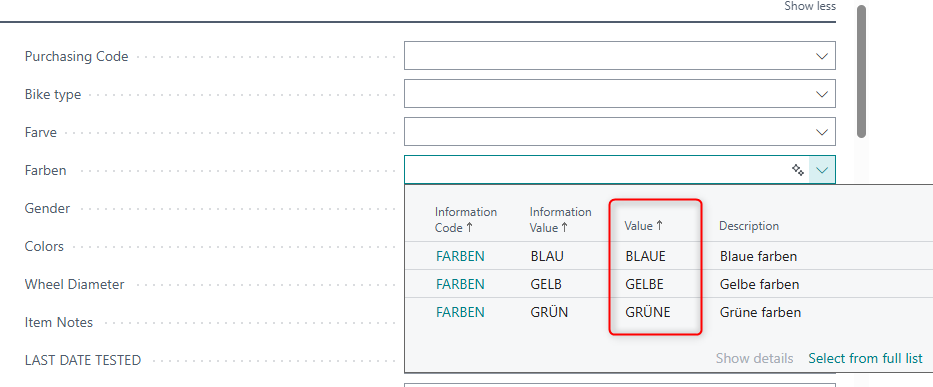
Updated Information Value lookup in Specifications on Pages to display the “Value” field for clearer user interaction.
Bug Fixes
Resolved errors affecting the “Show Details” function for Information Codes.
Improved Master Data flow in sales and purchase documents for more reliable data handling.
Functional Redesign
Overhauled Special Order and Drop Shipment processes to align with standard Business Central behavior.
Overall Impact
Improved usability, data integrity, and consistency across the platform.
 New Feature
Import Worksheet & Information Matrix
Template Card interoperability between Information Matrix and Import Worksheet
Master data users can now copy or import Template Cards between the Information Matrix and Import Worksheet modules. This enhancement improves usability and ensures consistent setup across both modules.

 Improvements
Item Variants
Prevent selecting both Style Variant and Style Master for the same item in Master Data Variant Handling.
Previously, it was possible to mark the same item as both Style Master and Style Variant in the Master Data Variant Handling setup, which could lead to inconsistent item categorization and issues in variant handling.
With this improvement, the system now validates the configuration so that an item can only be assigned as either a Style Master or a Style Variant, but not both at the same time. If a user attempts to select both options for the same item, an error message is shown and the conflicting selection is blocked.
This ensures clear and consistent categorization of items and improves the integrity of variant-related master data.
 Bug Fixes
Specification on Pages
Information Value lookup now shows the “Value” field in Specifications on Pages
Previously, when selecting Information Values in a Specification on Pages field, the lookup did not display the Value from the Information Values list. This Value was only visible when opening the Information Values from the Information Code List, making it harder for users to identify the correct entry during lookups.
With this update, the Information Value lookup in Specifications on Pages now shows the same Value field as presented in the Information Code List. This aligns the lookup view with the Information Code List, making it easier and more reliable to choose the correct Information Value when defining or editing specifications.
Fixed an error when opening Show Details for Information Codes configured as Specification on Pages, ensuring the details page opens correctly instead of showing “The record is not open.”
When using Information Codes configured as Specification on Pages, clicking Show Details on the related record could result in the error message: “The record is not open.” instead of opening the details page.
This has been corrected so that Show Details now opens the Information Code details page as expected, following standard Business Central behavior.
Improved Master Data flow on sales and purchase documents, and ensured Specifications on Pages are shown correctly across documents.
This release includes several corrections to how Master Data Information and Specifications on Pages behave on sales and purchase documents:
Master Data descriptions added on Sales Quotes now flow correctly to Sales Invoices.
Master Data flow and replication on Sales Return Orders has been corrected.
Master Data replication for purchase documents has been fixed, ensuring that descriptions and Master Data on documents are shown as expected.
Specifications on Pages fields are now visible on relevant purchase documents (including Purchase Blanket Orders and Purchase Invoice Subform).
The behaviour for Assembly Orders has been aligned so that Master Data on Documents is correctly shown when transferred from Sales Orders.
These changes make the Master Data Information setup behave more consistently across documents and pages, reducing manual corrections and improving traceability.
 Refactors
Attachments
Fixes an error in BC28 where the “Attached Documents” control was missing on the Sales Order page extension.
In BC28, the Master Data Information Sales Order page extension failed to compile due to the missing “Attached Documents” control on the Sales Order page, resulting in error AL0270. The page extension has been refactored to correctly reference available controls, ensuring successful compilation and consistent handling of attached documents on Sales Orders.
 Redesign
Special Order & Drop Shipment
Align Special Order and Drop Shipment handling in Master Data with standard behavior and move functionality to Abakion Feature Management.
Previously, the Master Data Special Order and Drop Shipment functionality did not fully follow standard Business Central behavior when creating purchase orders from sales orders via the Requisition Worksheet. The purchase order used the location from the customer card as the delivery address, even when a different location was specified on the sales order. This caused issues when multiple sales lines for the same customer were intended for different locations (for example, warehouse vs. office), and also led to differences in how many purchase orders were created compared to standard, as well as missing Master Data information on some pages.
With this redesign, the solution now leverages standard Special Order and Drop Shipment behavior and extends it to transfer Master Data Information from Master Data on Documents. The feature has been moved to Abakion Feature Management and must be explicitly enabled by users. When enabled, purchase orders created from sales orders respect the location defined on each sales line, behave consistently with standard Business Central (including the number of purchase orders created), and still transfer the relevant Master Data information.
This improves data correctness for delivery locations, ensures predictable behavior aligned with standard, and maintains the added value of Master Data Information on documents.
