Overview
The Specification Search Setup and Item Specification Search Strings pages together form the administration layer for the Specification Search feature. The setup card defines which item data fields are included in each item's search index and how that index is maintained. The strings list is the resulting index itself — one row per item or item variant, each holding a pre-calculated Search String that the end-user Item Specification Search page filters against when users type a query.
Because the search runs against pre-built strings rather than live tables, searches are fast regardless of catalogue size. These two pages are where administrators configure, verify, and rebuild that index.

When Are These Pages Used
Specification Search Setup is opened during initial deployment to define which fields feed the search strings (item number, description, vendor, MDI attributes, etc.), and returned to whenever the search scope needs to change. After saving changes, the page prompts for an immediate full recalculation so the new configuration takes effect across the entire item catalogue.
Item Specification Search Strings is used to inspect what a specific item's current search string contains, verify that a recalculation has taken effect, and manually trigger recalculation when needed. It is the primary troubleshooting tool when users report that a known item is not appearing in search results.
Who Are Typical Users
System administrators and implementation consultants configuring or troubleshooting the MDI app. Neither page is intended for day-to-day business use.
Accessing the Pages
Specification Search Setup has UsageCategory = Administration and is directly searchable from the BC search bar — search for Specification Search Setup.
Item Specification Search Strings has no UsageCategory and is not searchable. It is reached in two ways:
- From Specification Search Setup via the Item Specification Search Strings action.
- From Item Specification Search (the end-user search page) via the Item Specification Search Strings action in its action bar.
Prerequisite for both pages: The Specification Search feature must be enabled in Abakion Feature Management. If it is not enabled, opening Specification Search Setup shows an error with a direct navigation link to Feature Management.
Specification Search Setup
Fields
This card holds a single company-wide configuration record. All fields take effect the next time search strings are recalculated.
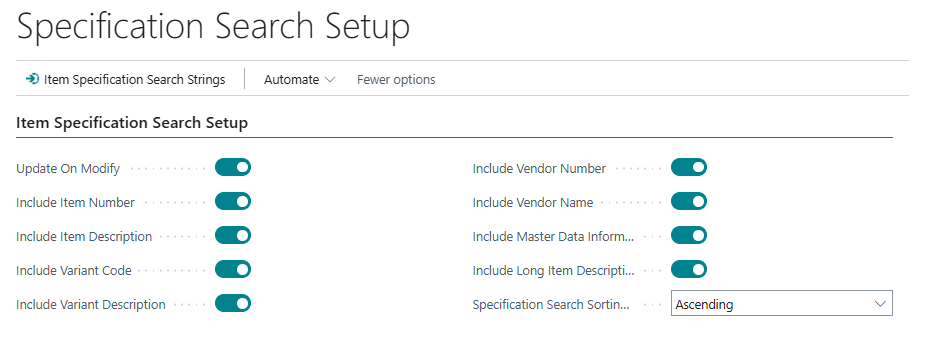
| Field | Purpose | Example | Key Information |
|---|---|---|---|
| Update On Modify | When enabled, the system recalculates the search string for an item or variant automatically whenever that item's data or its MDI Information Entries are changed. When disabled, strings are only updated by running the Calculate Item Specification String action manually or on a schedule. | Enabled | Default: enabled. Disable in environments where items are modified very frequently (e.g., bulk imports or automated processes) to avoid a performance impact on every write. |
| Include Item Number | Adds the item's No. field to the search string, prefixed with Item : . Also adds a cleaned version with special characters stripped so searches without separators still match. |
Enabled | Default: enabled. Special characters stripped: space, ?, &, -, _, /, \, ` |
| Include Item Description | Adds the item's Description field. Also adds a cleaned version with special characters stripped. | Enabled | Default: enabled. |
| Include Variant Code | Adds the variant's Code to the string, plus the combined ItemNo-VariantCode token as a separate searchable entry. |
Enabled | Default: enabled. The combined format means searching for 1000-RED matches items where item no. is 1000 and variant code is RED. Only applies to variant-level rows. |
| Include Variant Description | Adds the item variant's Description to the string. | Enabled | Default: enabled. Only applies to variant-level rows. |
| Include Vendor Number | Adds the vendor number from the item's Vendor No. field. | Enabled | Default: enabled. Requires the item to have a vendor assigned. |
| Include Vendor Name | Adds the vendor's Name to the string. | Enabled | Default: enabled. Looks up the vendor record from the item's Vendor No. field. |
| Include Master Data Information | Adds all MDI attribute values (Information Entries) attached to the item and its variants. | Enabled | Default: enabled. This is the primary MDI-specific toggle — without it, Specification Search does not search across MDI attribute values such as colour, material, or season. |
| Include Long Item Description | Adds the SCB Long Description of the item and, for variants, the variant's SCB Long Description. | Enabled | Default: enabled. Long descriptions can be substantial; this toggle has the largest individual impact on string length relative to the 2048-character cap. |
| Specification Search Sorting Order | Controls whether results on the Item Specification Search page are displayed in Ascending or Descending order. | Ascending |
Default: Ascending. Options: Ascending, Descending. |
Actions
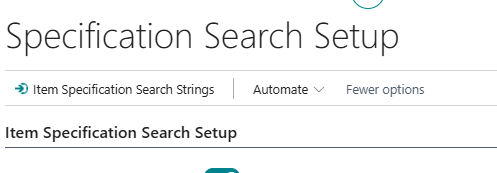
| Action | What It Does | When to Use | Prerequisites |
|---|---|---|---|
| Item Specification Search Strings | Opens the Item Specification Search Strings list. | To inspect current search string content or manually trigger recalculation. | None. |
Behaviour on Close
If any field is changed during a session, closing the card triggers a confirmation: "When you change the setup, we recommend recalculating the specification strings. Would you like to update them now?" Confirming runs the Calculate Item Search String report immediately across all items. Declining leaves existing strings unchanged until the next manual or scheduled recalculation.
Item Specification Search Strings
Fields
Each row represents one item or item variant. An item with no variants produces one row (blank Variant Code). An item with variants produces one row for the item itself plus one row per variant.

| Field | Purpose | Example | Key Information |
|---|---|---|---|
| No. | The item number this row belongs to. | 1000 |
Part of the primary key (together with Variant Code). Rows are managed entirely by the recalculation logic — not manually editable. |
| Variant Code | The variant code for variant-level rows. Blank for the item-level row. | RED |
Part of the primary key. |
| Item Description | A stored copy of the item's Description field. | Cotton T-Shirt |
Populated during recalculation, not updated in real time between recalculations. |
| Long Item Description | A stored copy of the item's or variant's SCB Long Description. | Premium weight cotton tee with ribbed collar |
Read-only. Populated only if Include Long Item Description is enabled in setup. |
| Inventory | Calculated total inventory for the item across all locations and variants. | 142 |
FlowField from Item Ledger Entries. Provided for orientation — not part of the search string. |
| Search String | The full pre-calculated search text for this row. All enabled data fields are concatenated with comma separators. | Item : 1000, 1000, Cotton T-Shirt, RED, 1000-RED, Vendor A, Cotton, Blue |
Maximum 2048 characters. This is exactly what Specification Search filters against. Read-only. |
Actions
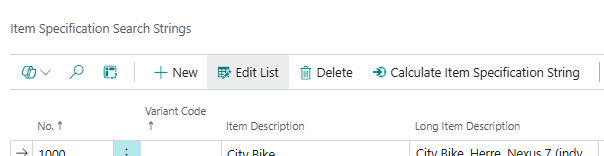
| Action | What It Does | When to Use | Prerequisites |
|---|---|---|---|
| Calculate Item Specification String | Opens the Calculate Item Search String report request page, then rebuilds search strings for all items or a filtered subset. When run without an item filter, all existing rows are deleted first and fully rebuilt from scratch. Shows a progress indicator and confirms with "Specification Strings calculated successfully." on completion. | After changing setup fields, after bulk item or MDI data imports, or on a schedule when Update On Modify is disabled. | The report request page allows filtering by No. to limit recalculation to specific items. Running without a filter performs a full rebuild — existing strings for all items are deleted before rebuilding. |
Key Behaviours
Full rebuild vs. partial update. When Calculate Item Specification String runs without an item number filter, all existing search string records are deleted before rebuilding. When run with an item filter, only the filtered items are recalculated and all other rows remain unchanged. Use a filtered run to quickly refresh specific items without the cost of a full catalogue rebuild.
Blocked items are excluded. Items marked as Blocked in BC have their search string row deleted during recalculation rather than updated. Blocked items produce no rows in the list and do not appear in Specification Search results.
Update On Modify hooks into MDI data changes. When Update On Modify is enabled, recalculation is triggered not only when item fields change but also when MDI Information Entries for an item are inserted or modified. This means any attribute value update — from the Item Card, worksheets, or automated processes — fires a string rebuild for the affected item. In high-volume import scenarios, disabling Update On Modify and scheduling nightly batch recalculation is strongly recommended.
The Search String is the diagnostic ground truth. When troubleshooting a missing result, the Search String column for the relevant row is the definitive source. If the expected keyword is not present in that string, Specification Search will not find it regardless of what data the item actually holds. Common causes for missing content: the relevant Include toggle is off in setup, the value consists only of special characters that were stripped during cleaning, or the string has reached the 2048-character limit and the relevant content was truncated.
Hidden MDI Field columns. The underlying table stores up to 10 individual MDI attribute values in separate columns (SCB MDI Field 1 through SCB MDI Field 10), labelled dynamically with the caption of the Information Code mapped to each field position for the Item table. These are populated during recalculation but are not shown in the default page layout. They can be added to the list view through BC page personalisation for more detailed per-attribute inspection.
Related Pages
| Page | Relationship |
|---|---|
| Item Specification Search | The end-user search page that filters against the Search String values maintained here. Also provides a direct link to the Item Specification Search Strings list. |
| Calculate Item Search String (report) | Triggered by the Calculate Item Specification String action. Rebuilds search strings for all or filtered items. |
| Abakion Feature Management | The Specification Search feature must be enabled here before either of these pages can be opened. |