Overview
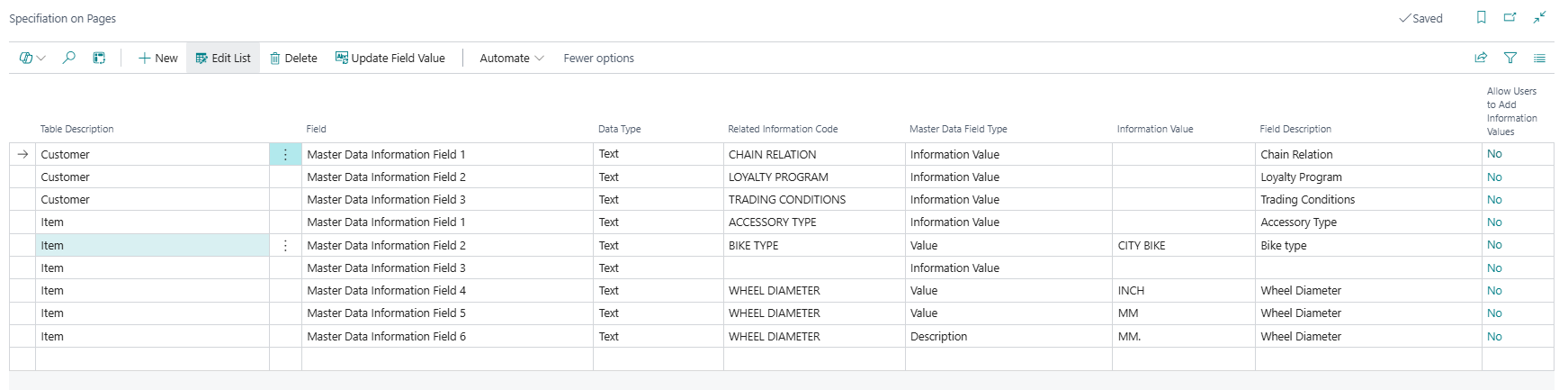
The Specification on Pages page is the central setup page for the Specification on Pages feature of Master Data Information. It defines the mapping between dedicated specification fields added to Business Central tables and the Information Codes that supply their values. Each line in this list tells the system which specification field on a given table is connected to which Information Code, how the value from the Information Entry or document record should be written into that field, and whether users are allowed to add new Information Values on the fly from the field. Once configured, the specified fields appear directly on the relevant card and document pages, enabling users to view and edit master data information attributes inline without navigating to a separate Information Setup sub-page.
When Is This Page Used
This list page is used during initial system setup and whenever the Specification on Pages feature needs to be extended to additional tables or fields. Administrators open it to create, review, or modify the mapping between specification fields and Information Codes, to control how values are projected onto card pages and document lines, and to run the Update Field Value action when existing records need to be synchronised after a configuration change. It is also the target of a navigation link shown in error messages when a user attempts a lookup from a specification field that is not yet correctly configured.
Who Are Typical Users
- Master Data Administrator — configures and maintains the mapping between specification fields and Information Codes.
- Implementation Consultant — sets up Specification on Pages during project deployment to surface master data attributes directly on item cards, customer cards, sales lines, or other relevant pages.
- System Administrator — runs the update actions after changes to the setup to resynchronise values between specification fields and underlying Information Entries or document records.
Accessing the Page
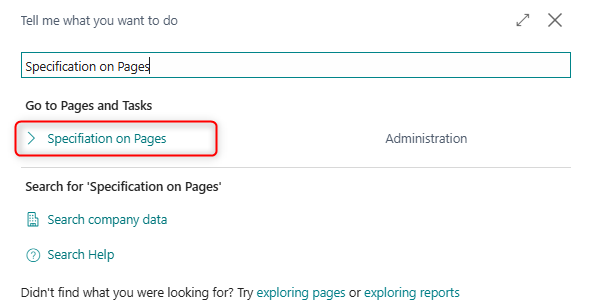
The Specification on Pages page has UsageCategory = Administration and ApplicationArea = All, meaning it is directly searchable from the Business Central search menu. It can also be reached through the following navigation paths:
| Source Page | Action Name |
|---|---|
| Information Code List | Specification on Pages |
| Information Code Card | Specification on Pages |
| Business Central Search (Tell Me) | Search for Specification on Pages |
The page also appears as a navigation action in the error dialog shown when a user attempts a lookup on a specification field for which no valid setup exists, providing a direct link to create the missing configuration.
Page Components
How Specification on Pages Works
The feature relies on dedicated SCB MDI Field fields that are pre-built into supported Business Central tables by the extension. Each such field is a placeholder that can be connected to exactly one Information Code. When a user enters or changes a value in the field on a card or document page, the system writes the value back to the underlying Information Entry (for master data tables) or Master Data on Documents (for document tables) record. Conversely, when the record is read, the current value from those tables is projected back into the specification field so it stays in sync.
The Master Data Table Type is determined automatically based on the target table: tables associated with sales, purchase, assembly, production, and warehouse documents are classified as Master Data on Documents; all other tables are classified as Information Entry.
Fields
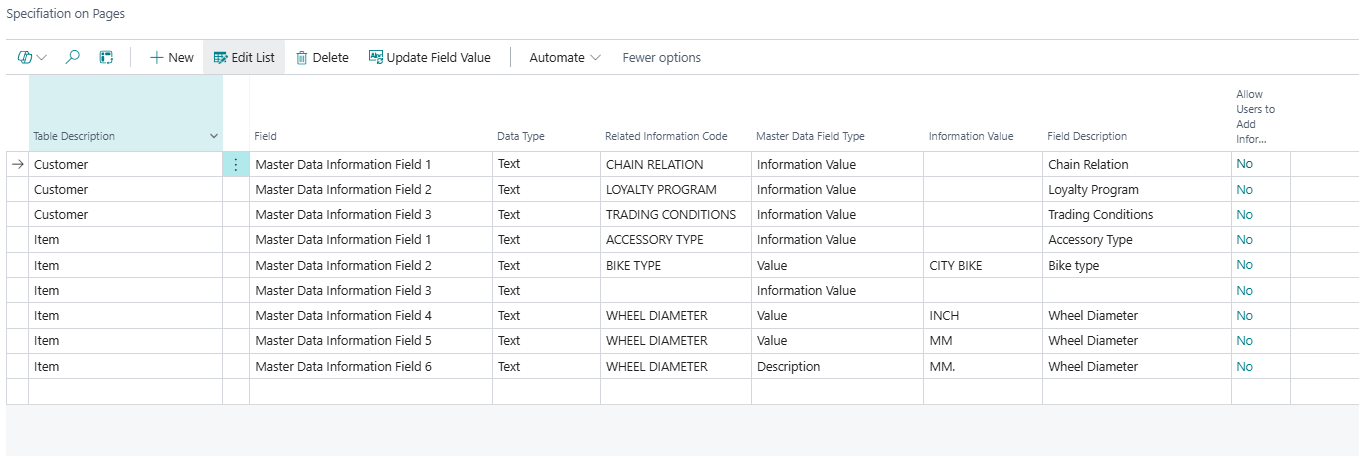
| Field | Purpose | Example | Key Information |
|---|---|---|---|
| Table Description | The name of the Business Central table that contains the specification field. | Item, Customer, Sales Line |
Looked up from all available tables. Selecting a table automatically resolves the Table No., Master Data Table Type, and Master Data Document Type. |
| Field | The caption of the specific SCB MDI Field in the selected table that this line maps to. | Master Data Information Field 1 |
Only fields whose internal name contains SCB MDI FIELD are available for selection. Clicking the lookup opens the Master Data Fields List to select from the available unmapped specification fields for the chosen table. |
| Data Type | The Business Central data type of the selected specification field. | Text, Code, Decimal, Boolean, Date |
Read-only. Resolved automatically when a field is selected. Must be compatible with the Validation Datatype set on the linked Information Code — the system enforces a match and shows an error if they are incompatible. |
| Related Information Code | The Information Code whose values this specification field will display and accept. | COLOR, WEIGHT, VENDOR_ITEM_NO |
Mandatory. Must exist in the Information Code table. Determines which Information Values are available when the user looks up the field on a card page. |
| Master Data Field Type | Specifies which data component from the Information Entry or document record is projected into the specification field. | Information Value, Value, Description |
Controls what the field shows and what gets stored. Information Value = the Information Value code; Value = the technical value code; Description = the descriptive label. Boolean fields are restricted to Value only. The File option exists in the enum but is not currently fully supported. |
| Information Value | When Master Data Field Type is Value or Description and the same Information Code is used on multiple lines (multi-value scenario), this field pins the line to a specific Information Value. | RED, LARGE |
Only applicable when the Information Code has Allow Multiple Information Values enabled. Must be blank when Master Data Field Type is Information Value. Each combination of Information Code and Information Value can only appear once per table. |
| Field Description | A descriptive label for the specification field, shown as the field caption on the target page. | Color, Net Weight |
Populated automatically from the linked Information Code's description when the Related Information Code is selected. Can be edited. |
| Allow Users to Add Information Values | Indicates whether users can create new Information Values directly from the specification field on a card page by entering a value that does not yet exist. | Yes / No |
Read-only FlowField — resolved automatically from the Allow Users to Add Inf. Values setting on the linked Information Code. Change this setting on the Information Code itself. |
The following fields are present in the table but are hidden by default in the list. They are set automatically by the system and do not require manual input:
| Field | Purpose | Key Information |
|---|---|---|
| Field Name | The internal field name (e.g., SCB MDI Field 1) of the specification field in the target table. |
Read-only in normal use. The system validates that only fields whose name contains SCB MDI FIELD can be used. |
| Validation Code Exist | Indicates that the target field in the Business Central table has a custom validation trigger. | When true, the system blocks the Update Field Value and Update Specification Entries from Card Page Fields actions for this line and shows an error, because writing directly to such fields bypasses the validation code. |
| Master Data Table Type | Classifies the target table as either Information Entry or Master Data on Documents. | Set automatically: document-related tables (Sales, Purchase, Assembly, Production, Warehouse) are classified as Master Data on Documents; all others as Information Entry. Controls which underlying table stores the specification values. |
| Master Data Document Type | For document tables, further classifies the target as a Header or Line record. | Set automatically based on the table number. Relevant only when Master Data Table Type is Master Data on Documents. |
| Table No. | The integer ID of the target table. | Set automatically when Table Description is entered. |
Actions
Processing
| Action | What It Does | When to Use | Prerequisites |
|---|---|---|---|
| Update Field Value | Reads all existing Information Entry or Master Data on Documents records for the configured Information Code on the selected line and writes their current values into the corresponding specification fields on the master or document records. Clears existing field values first, then repopulates from the underlying entries. | Use after adding a new Specification on Pages line for an Information Code that already has existing entries — this backfills the specification field for all records that already have values in the Information Entry table. Also used to resynchronise values after a configuration change. | Related Information Code, Field Name, and Table No. must be filled in on the selected line. The field must not have Validation Code Exist = true. |
| Update Specification Entries from Card Page Fields (hidden) | Reads all master records in the target table where the specification field is non-blank and writes those field values back into the Information Entry or Master Data on Documents table. | Use when data was entered directly in the specification fields on card pages before the Specification on Pages setup existed, and the underlying Information Entry records need to be created retrospectively. This action is hidden by default. | Same prerequisites as Update Field Value. User must confirm a warning before the action proceeds, as any blank specification field values will delete the corresponding Information Entry. |
Deletion Behaviour
When a Specification on Pages line is deleted, the system checks whether any records in the target table currently have a non-blank value in the mapped specification field. If so, the user is prompted to confirm before proceeding. On confirmation, the system clears the specification field values from all affected master records and removes the link from any related Information Entry or Master Data on Documents records, ensuring the database is left in a consistent state.
Data Type Compatibility
The Data Type of the selected specification field must be compatible with the Validation Datatype configured on the linked Information Code. The system enforces this at the time the Related Information Code or Field Name is set and raises an error if they do not match. The following data type pairings are validated: Decimal, Integer, Boolean, Date, DateTime, and DateFormula. Text and Code fields do not have a validation datatype restriction.
Multiple Values for the Same Information Code
If the Information Code has Allow Multiple Information Values enabled, the same Information Code can be mapped to more than one specification field on the same table — for example, to surface multiple colour variants or weight classes as separate fields. In this scenario, each line must use Master Data Field Type = Value or Description and must have a distinct Information Value to distinguish which value maps to which field. Mixing Information Value type with Value or Description type for the same Information Code on the same table is not permitted.
Default Setup & Templates
No default Specification on Pages records are installed by the extension's installation codeunit. All mappings are customer-specific and must be configured manually to match the tables and specification fields relevant to the customer's Business Central implementation.