Overview
The Information Code List is the central configuration page for defining all Information Codes used in the Master Data Information app. Each Information Code represents a specification, attribute, text field, or file attachment category that can be assigned to master data records such as items, customers, or vendors. This page is where administrators create and manage the full set of codes that drive the specification and enrichment features throughout the system.

When is this Page Used
Users open the Information Code List to browse, create, modify, and manage all Information Codes in the system. It is used when setting up new product attributes or specification categories, adjusting how existing codes contribute to merged descriptions, configuring validation rules, or managing integration with Business Central Item Attributes. It is the primary entry point for all Information Code configuration and is typically visited during initial setup and whenever the specification structure needs to be extended or changed.
Who are Typical Users
- System Administrator – Sets up and maintains the full library of Information Codes and their configuration.
- Implementation Consultant – Configures Information Codes during project setup and customizes them to fit customer requirements.
- Master Data Manager – Reviews and maintains the Information Code structure to ensure data quality and consistency.
- Product Data Specialist – Manages specification codes used to enrich item master data.
Accessing the Page
The Information Code List is accessible in the following ways:
- Search / Tell Me:

Page Components
Fields
The list displays the following columns. The first two columns (Code and Description) are frozen, keeping them visible while scrolling horizontally.
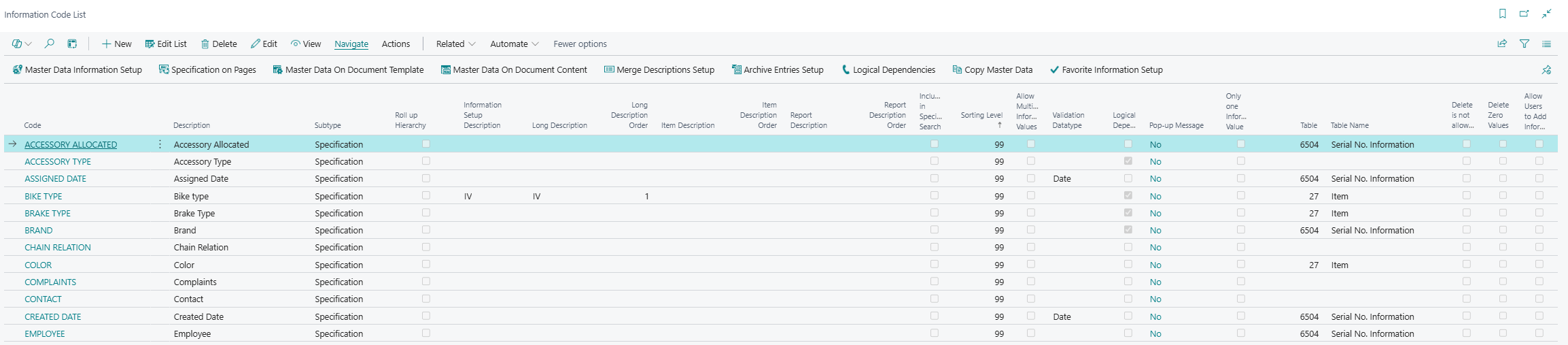
Identification & Type
These fields define the unique identity of the Information Code and how the system classifies and routes it.
| Field | Purpose | Example | Key Information |
|---|---|---|---|
| Code | Unique identifier for the Information Code. | COLOR |
Mandatory. Automatically generates a Web Name on entry. Maximum 20 characters. |
| Description | Human-readable label for the Information Code as it appears to users. | Color |
Maximum 250 characters. |
| Subtype | Classifies the intended use of the code. | Specification |
Options: (blank), Specification (attribute), Text (long text), File (attachments). Defaults to Specification on new records. Changing this offers to update all existing entries. |
| Type (Table) | Restricts the Information Code to a specific Business Central table, making it available only on that master data entity. | 27 (Item) |
If left blank, the code is available across all supported master data types. |
| Table Name | Read-only display of the name of the table selected in Type. | Item |
Populated automatically when Type is set. Not editable. |
Attachment
These fields are only visible when file-related features are enabled.
| Field | Purpose | Example | Key Information |
|---|---|---|---|
| Attachment (File Placement) | Shows the filename or location of an image or file attached to the Information Code. Supports drill-down to view or replace the file. | product-icon.png |
Not editable directly in the list. Use the drill-down to upload a file. Displays Select File... on new records. |
| File Storage Type | Indicates where the attached file is stored. | Database |
Options: Database, Azure Blob, SharePoint, OneDrive, FTP. Read-only in the list. |
Description Merging
These fields control whether and how an Information Code participates in the automated generation of merged descriptions on master data and documents.
| Field | Purpose | Example | Key Information |
|---|---|---|---|
| Information Setup Description (Create Description) | Specifies the merge description template used when building the description line within the Information Setup section on a master data record. | IV |
Links to the Merge Descriptions Setup. |
| Long Description (Include in Long Description) | Defines which merge template is used when this code contributes to the Long Description on the Item Card. | IC_IV |
Links to Merge Descriptions Setup. Changing this value offers to propagate the change to all existing entries and Information Values. |
| Long Description Order | Sets the sort order of this code within the Long Description merge. | 10 |
Blank zero. If not set, codes are sorted alphabetically. Changing prompts to update existing entries and optionally recalculate all descriptions. |
| Item Description (Include in Type Description) | Defines the merge template used when this code contributes to the standard Item Description field. | IC_IV |
Links to Merge Descriptions Setup. Propagation prompt applies. |
| Item Description Order | Sets the sort order of this code within the Item Description merge. | 20 |
Blank zero. Changing prompts to update existing entries and optionally recalculate. |
| Report Description (Include in Report Description) | Defines the merge template used when this code contributes to the Report Description in Master Data on Documents. | V_IV |
Links to Merge Descriptions Setup. Propagation prompt applies. |
| Report Description Order | Sets the sort order of this code within the Report Description merge. | 30 |
Blank zero. Changing prompts to update existing entries. |
Behaviour & Rules
These fields control how the Information Code behaves in data entry, validation, and processing.
| Field | Purpose | Example | Key Information |
|---|---|---|---|
| Sorting Level | Controls the display order of Information Codes in the Information Setup and Master Data on Documents pages. | 10 |
Default value is 99. Lower numbers appear first. Changing prompts to update all existing entries. |
| Roll up Hierarchy | Enables the code to participate in the hierarchy roll-up feature. | Enabled | Boolean. |
| Allow Multiple Information Values (Allow multiple Config Values) | Allows the same Information Code to appear more than once on a master data record, each time with a different Information Value. | Enabled | Useful for attributes with multiple simultaneous values, e.g., multiple certifications. |
| Only one Information Value | Restricts each Information Value under this code to appear only once across all master data records. | Enabled | Validation checks for duplicates before enabling. |
| Validation Datatype | Enforces a specific data type when users enter values for this code. | Decimal |
Options: (blank), Decimal, Integer, Dateformula, Boolean, Date, DateTime. Also used for validation in the Specification on Pages feature. |
| Logical Dependencies | Indicates that this Information Code is involved in the Logical Dependencies feature, which links related Information Values across codes. | Enabled | Boolean. Links to the Logical Dependencies setup page. |
| Delete is not allowed (Delete Not Allowed) | Prevents users from deleting this Information Code, protecting critical codes from accidental removal. | Enabled | When enabled, any attempt to delete the record produces an error. |
| Delete Zero Values | When enabled, entering 0 in the Information Matrix or via Specification on Pages will delete the entry rather than store a zero value. | Enabled | Boolean. Affects how zero inputs are handled across the Information Entry table. |
| Allow Users to Add Information Values (Allow Users to Add Inf. Values) | Permits end users to create new Information Values directly from a field added to a page via the Specification on Pages feature. | Enabled | Boolean. Gives users flexibility without requiring administrator involvement. |
Search & Specification
| Field | Purpose | Example | Key Information |
|---|---|---|---|
| Include in Specification Search (Include in Item Search String) | Marks the code to be included when calculating the Specification Search String for the Item Search feature. | Enabled | Only visible when the Specification Search feature is enabled. |
Pop-up Message
| Field | Purpose | Example | Key Information |
|---|---|---|---|
| Pop-up Message | Indicates whether a Pop-up Message is configured for this Information Code. Clicking the assist button opens the Pop-up Message Types list filtered to this code. | Enabled | Read-only boolean indicator. Configured via the Pop-up Message action or the assist-edit button on this column. |
Item Attribute Integration
These fields are only visible when the Item Attribute Integration feature is enabled in the app setup.
| Field | Purpose | Example | Key Information |
|---|---|---|---|
| Item Attribute Name | The name of the Business Central Item Attribute to synchronize with this Information Code. | Color |
Entering a name validates against existing Item Attributes. If not found, a new Item Attribute is created. Each attribute can only be linked to one Information Code. |
| Item Attribute Integration with (Item Attribute Integr. With) | Specifies which field in the Information Value (Information Value, Value, or Description) is synchronized with the Item Attribute value. | Information Value |
Requires the Type field to be set to the Item table (27). |
| Continuous Item Attribute Integration (Contin. Item Attr. Integration) | When enabled, changes in either the Information Entry or Item Attribute Value are automatically synchronized in real time. | Enabled | Requires Type = Item. If disabled, synchronization must be triggered manually via the Synchronize Item Attributes action. |
Web / Webshop (Hidden by Default)
These fields are hidden in the default view and intended for webshop integration scenarios.
| Field | Purpose | Example | Key Information |
|---|---|---|---|
| Export to webshop | Flags the code for export to the connected webshop. | Enabled | Hidden (Visible = false). |
| Web Name | The technical name used to identify the Information Code in the webshop. | NAVCOLOR |
Hidden. Auto-generated from Code on creation. |
| Filter on Web | Enables this code as a filter option in the webshop. | Enabled | Hidden. |
| Web value option | Determines which combination of fields (Information Value, Value, Description) is exported as the web value. | Value-Description |
Hidden. Options: Information Value, Value, Description, and various combinations. |
Actions
Related (Navigation) Actions
These actions open related configuration pages, typically filtered to the currently selected Information Code.

| Action | What it does | When to use | Prerequisites |
|---|---|---|---|
| Information Values | Opens the Information Value List filtered to the selected Information Code. Shortcut: Shift+Ctrl+V. | When setting up or reviewing the available values for a code (e.g., the list of colours for a Color code). | An Information Code must be selected. |
| Language | Opens the Master Data Language page filtered to the selected Information Code, allowing translated descriptions to be maintained. | When the system operates in multiple languages and translated code descriptions are needed on documents. | An Information Code must be selected. |
| Extended Texts | Opens the Extended Text editor for adding supplementary text to the Information Code description. | When additional plain-text explanation is needed beyond the standard description. | An Information Code must be selected. |
| Extended Texts (HTML) | Opens the HTML Extended Text editor for rich-text descriptions. Shortcut: Ctrl+E. | When HTML-formatted extended descriptions are required. | An Information Code must be selected. |
| Pop-up Message | Opens the Pop-up Message Types page filtered to the selected Information Code, for configuring pop-up alerts on documents. | When configuring automatic pop-up messages to appear on Sales or Purchase documents for specific customers, vendors, or items. | An Information Code must be selected. |
| Preview | Exports and previews the file or image attached to the Information Code. | When verifying the content of an attachment without opening the card. | The Attachment field must not be empty. |
| Delete Attachment | Removes the attachment from the Information Code, clearing the file blob, file placement, and storage type. | When the attached file is no longer relevant and needs to be removed. | An attachment must exist on the record. |
Navigate (Setup) Actions
These actions open global configuration pages for the Master Data Information app. They are promoted in the Navigate group in the action bar.

| Action | What it does | When to use |
|---|---|---|
| Master Data Information Setup | Opens the general setup page for the Master Data Information app. | To review or change global app settings. |
| Specification on Pages | Opens the Specification on Pages list, which controls where Information Codes are surfaced as fields on Business Central pages. | When configuring which pages should display specification fields. |
| Master Data On Document Template | Opens the Master Data on Document Template configuration page. | When setting up document layout templates that include Information Code data. |
| Master Data On Document Content | Opens the Master Data on Document Content setup. | When configuring which Information Codes flow from master data to documents. |
| Merge Descriptions Setup | Opens the Description Setup page for configuring how Information Code values are merged into descriptions. | When setting up or modifying merge description templates. |
| Archive Entries Setup | Opens the Archive Setup page for configuring which Information Code changes are logged. | When enabling change history tracking for specific codes. |
| Logical Dependencies | Opens the Logical Dependencies configuration list. | When setting up rules that link Information Values across different Information Codes. |
| Copy Master Data | Opens the Copy Master Data Actions setup page. | When configuring default data to be copied when using the Copy Master Data function. |
| Favorite Information Setup | Opens the Favorite Information configuration page. | When setting up preferred or default Information Codes for specific contexts. |
Actions Group

| Action | What it does | When to use | Prerequisites |
|---|---|---|---|
| Update Merge Descriptions | Runs the Recalculate Long Description report, recalculating all merged descriptions for items based on the current Information Code setup. | After making changes to description merge configuration that should be applied retroactively to all existing items. | Merge description setup must be configured. |
| Synchronize Item Attributes | Synchronizes the Information Values of the selected code with the corresponding Business Central Item Attributes. | During initial Item Attribute integration setup, or after changes when Continuous Integration is not enabled. | The Item Attribute Integration feature must be enabled and the code must be linked to an Item Attribute. Only visible when Item Attribute feature is active. |
Related Pages
Information Code Card
The Information Code Card opens automatically when a user selects a record in the Information Code List. It provides a full detail view of a single Information Code with all fields organized in FastTabs, offering a more structured editing experience than the list view.
Information Value List
Opened via the Information Values action filtered to the current code. The Information Value List defines the predefined selectable values available for a given Information Code — for example, the specific colours or sizes that can be assigned to items under a Color or Size code.
Master Data Language
Opened via the Language action. Allows translation of the Information Code description into multiple languages so that documents automatically display the correct language-specific description.
Pop-up Message Types
Opened via the Pop-up Message action or the assist-edit button on the Pop-up Message column. Used to configure which pop-up messages are triggered for a given Information Code on Sales or Purchase documents.
Logical Dependencies List
Opened via the Logical Dependencies action. Defines dependency rules that determine how the selection of one Information Value on one code affects the available or required values on another code.
Specification on Pages List
Opened via the Specification on Pages action. Controls which Business Central pages have Information Code fields embedded directly into their layouts, enabling inline specification data entry.
Merge Descriptions Setup
Opened via the Merge Descriptions Setup action. Defines the templates that govern how Information Code values are concatenated to form descriptions such as the Long Description, Item Description, and Report Description on master data records and documents.
Master Data on Document Content
Opened via the Master Data On Document Content action. Configures which Information Codes flow through to documents (sales orders, purchase orders, etc.) using the Master Data on Documents feature.
Archive Entries Setup
Opened via the Archive Entries Setup action. Configures which Information Codes have their changes tracked and stored in the archive, enabling a complete change history for master data specifications.