
Sales Configurator
Overview
Sales Configurator enables companies to sell and produce configurable items in Microsoft Dynamics 365 Business Central without an explosion of master data. Instead of maintaining separate items for every product variant, users define configuration attributes on sales lines and let the app automatically build the correct supply order hierarchy — production orders, purchase orders, and assembly orders — with intelligent BOM substitution based on configuration criteria. The app also supports sales price calculation through the hierarchy, allowing cost and profit margins to roll up from components to the finished goods sales price.
When is this App used
Users work with Sales Configurator whenever they need to:
- Sell configurable products — enter configuration attributes directly on sales quote or sales order lines instead of creating a unique item for every variant.
- Generate supply order hierarchies — automatically create and link production orders, assembly orders, and purchase orders from a single sales line, cascading through the full BOM structure.
- Calculate sales prices from cost — roll up component costs, routing costs, overhead, and profit margins through the hierarchy to arrive at a unit price on the sales line.
- Control configuration consistency — validate that configuration attributes are complete and consistent across items and BOMs, and resolve conflicts when mismatches occur.
- Track orders across the hierarchy — view and navigate the full tree of linked supply orders spawned from a sales line.
Who are typical users
| Role | How they use the app |
|---|---|
| Sales Order Processor | Enters configuration attributes on sales quotes/orders, triggers supply order creation, and updates sales prices. |
| Production Planner | Reviews and manages the production order hierarchy, handles orders in hierarchy (create, refresh, replan, delete). |
| Product Engineer / Item Manager | Sets up configuration templates, information codes, filter combinations, and marks items for hierarchy inclusion. |
| Finance / Pricing Analyst | Configures profit percentages, cost roll-up principles, and sales price calculation methods. |
| Administrator | Manages the Configurator Setup, feature toggles, and permission sets. |
Accessing the App
| Method | Details |
|---|---|
| Search | The Configurator Setup page is searchable via the Business Central search bar (Administration category). |
| Search | The Configurator Profit Pct. page is searchable (Administration category). |
| Search | The Sales Order Lines List page is searchable (Tasks category). |
| Assisted Setup | The installation wizard (Abakion Sales Configurator) guides first-time activation and trial. |
| From Sales Documents | Configuration actions appear directly on the Sales Order, Sales Quote, and their subform lines. |
| From Item Card | Configuration, templates, and hierarchy marking are available on the Item Card. |
| From Production Orders | Hierarchy actions and reference numbers appear on Simulated, Planned, Firm Planned, Released, and Finished Production Order pages. |
| From Assembly Orders | Hierarchy and pricing actions appear on the Assembly Order page. |
| From Purchase Orders/Quotes | The Reference No. field appears on Purchase Order and Purchase Quote pages. |
| From Production BOM | Configuration management actions appear on the Production BOM page. |
| From Planning Worksheet | Action message management actions appear on the Planning Worksheet. |
App Pages & Components
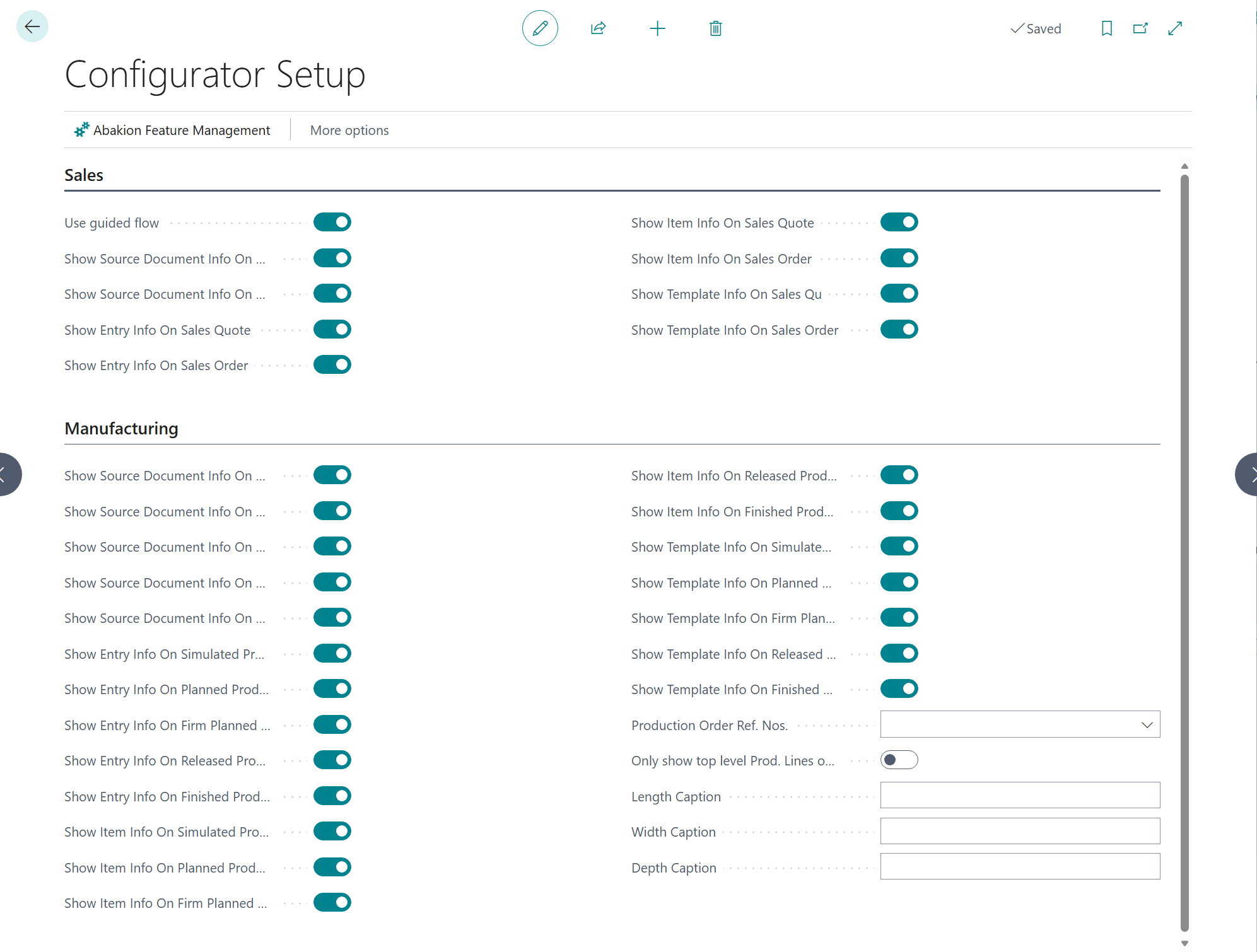
Configurator Setup
Caption: Configurator Setup
Type: Card (Administration)
This is the central setup page for the app. It controls which information panels are visible on sales documents and production orders, and how prices and costs are calculated.
Fields
Sales
These toggles control which informational factboxes are shown on Sales Quote and Sales Order pages.
| Field | Purpose | Key Information |
|---|---|---|
| Use guided flow | Enables step-by-step configuration flow for sales lines | When enabled, the app guides users through configuration entry |
| Show Source Document Info On Sales Quote | Shows source document details on sales quotes | Toggle on/off per document type |
| Show Source Document Info On Sales Order | Shows source document details on sales orders | Toggle on/off per document type |
| Show Entry Info On Sales Quote / Order | Shows configuration entry info panel | Toggle on/off per document type |
| Show Item Info On Sales Quote / Order | Shows item information panel | Toggle on/off per document type |
| Show Template Info On Sales Quote / Order | Shows template information panel | Toggle on/off per document type |
Manufacturing
These toggles control which informational factboxes appear on production orders at each status level (Simulated, Planned, Firm Planned, Released, Finished).
| Field | Purpose | Key Information |
|---|---|---|
| Show Source Document Info On [status] PO | Shows source document details on production orders | One toggle per production order status |
| Show Entry Info On [status] PO | Shows configuration entry info on production orders | One toggle per production order status |
| Show Item Info On [status] PO | Shows item info on production orders | One toggle per production order status |
| Show Template Info On [status] PO | Shows template info on production orders | One toggle per production order status |
| Production Order Ref. Nos. | Number series for reference numbers assigned to production orders in the hierarchy | Links to No. Series table |
| Only show top level Prod. Lines on Sales Documents | Filters production order component/routing parts on sales documents to top level only | Reduces visual clutter on sales documents |
| Length Caption / Width Caption / Depth Caption | Custom captions for physical dimension fields on components | Overrides default field captions across the app |
Price Calculation (visible when Sales Price Calculation feature is enabled)
| Field | Purpose | Key Information |
|---|---|---|
| Default Sales Price Calc. Method | How sales prices are calculated | Options: Through Hierarchy (rolls up from components) or Use Current Line |
| Get Purchase Cost From | Source for purchase line costs | Options: According to Costing Method or Always from Purchase Line Unit Cost |
| Get Component Cost From | Source for component costs | Options: Item Unit Cost or Purchase Prices |
| Default Profit % | Default profit margin applied to cost calculations | Decimal (0–5 decimal places) |
| Cost Roll Up Principle | How costs aggregate through the hierarchy | Options: Rolled Up or Single Level |
Actions
| Action | What it does | When to use |
|---|---|---|
| Abakion Feature Management | Opens the feature management page for the app | To enable/disable optional features like Sales Price Calculation |
Sales Order / Sales Quote Subform (Extensions)
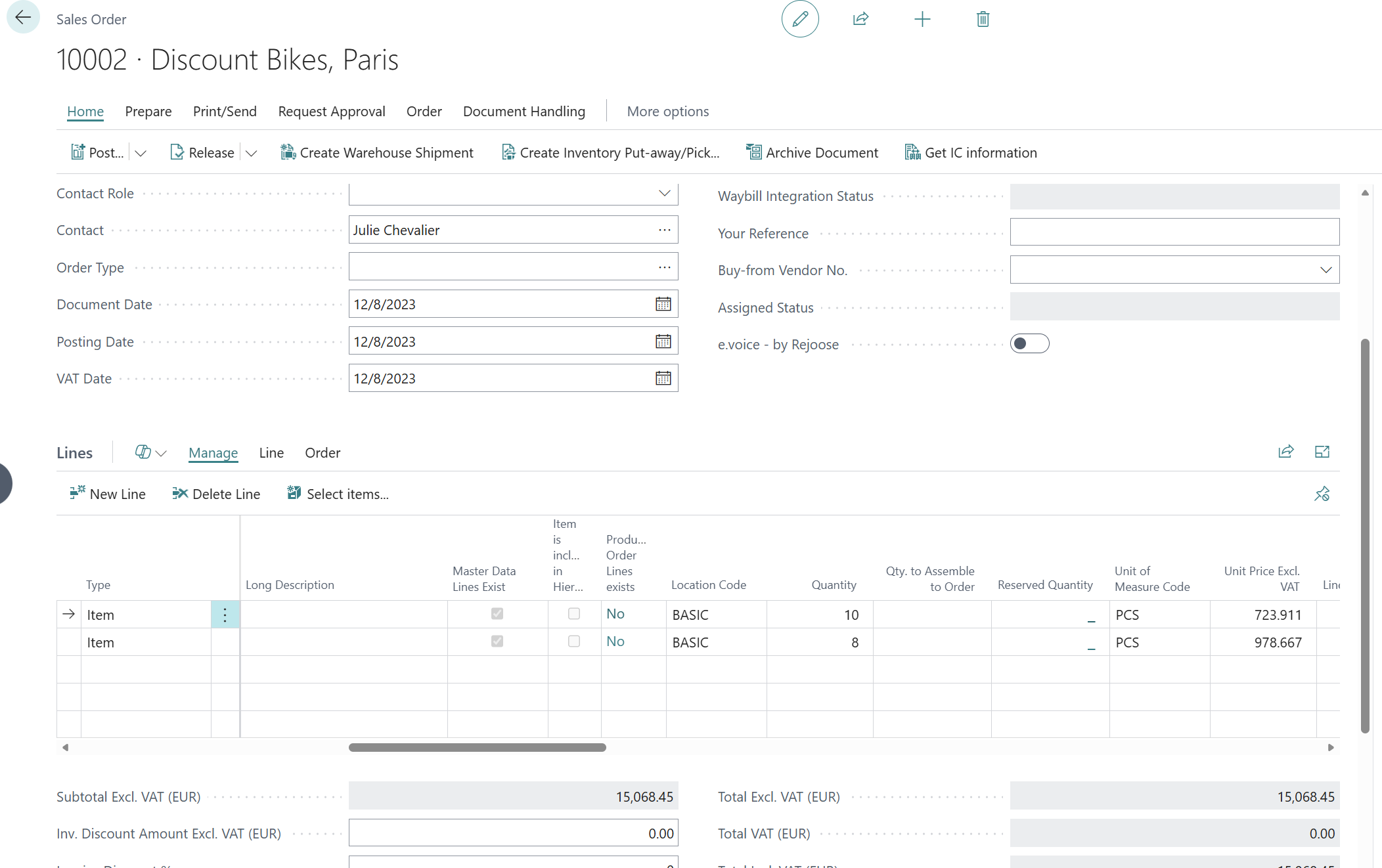
Sales Configurator adds a dedicated Configurator action group to the sales line subform on both Sales Order and Sales Quote pages. These are the primary actions users interact with daily.
Actions
| Action | What it does | Shortcut | Prerequisites |
|---|---|---|---|
| Configuration | Opens the configuration entry for the selected sales line | Shift+Ctrl+K | Line must have an item |
| Create Supply Order | Creates the full supply order hierarchy (production, purchase, assembly orders) from the sales line | Shift+Ctrl+P | Item must be marked Include in Hierarchy |
| Delete Supply Order | Deletes all supply orders linked to the sales line | — | Supply orders must exist |
| Open Supply Order | Opens the top-level supply order linked to the sales line | Shift+Ctrl+O | Supply order must exist |
| Orders in hierarchy | Calculates and displays the full order hierarchy tree | — | Supply orders must exist |
| Show Order Hierarchy | Opens a visual hierarchy view of all linked orders | — | Supply orders must exist |
| Get Expected Standard Cost | Calculates the expected standard cost through the hierarchy | — | Supply orders must exist |
| Update Sales Price | Calculates and updates the unit price on the sales line based on cost roll-up and profit margins | Shift+Ctrl+U | Sales Price Calculation feature enabled |
| Insert BOM Line | Inserts a BOM component line into the linked production order | — | Production order must exist |
| Insert Routing line | Inserts a routing line into the linked production order | — | Production order must exist |
Fields Added to Sales Lines
| Field | Purpose | Key Information |
|---|---|---|
| Include in Hierarchy | Indicates the item on this line participates in hierarchy creation | Read-only indicator |
| Prod. Order Exist | Indicates a production order is linked to this line | Read-only indicator |
| Profit % | Profit margin for this line's price calculation | Editable; 0–99.99999% |
| Component Profit % | Profit margin applied to components | Editable; visible with price calculation feature |
| Routing Profit % | Profit margin applied to routing operations | Editable; visible with price calculation feature |
| Component Cost | Calculated component cost | Hidden by default |
| Routing Cost | Calculated routing cost | Hidden by default |
| Overhead Rate | Calculated overhead | Hidden by default |
| Indirect Cost | Calculated indirect cost | Hidden by default |
Item Card (Extension)
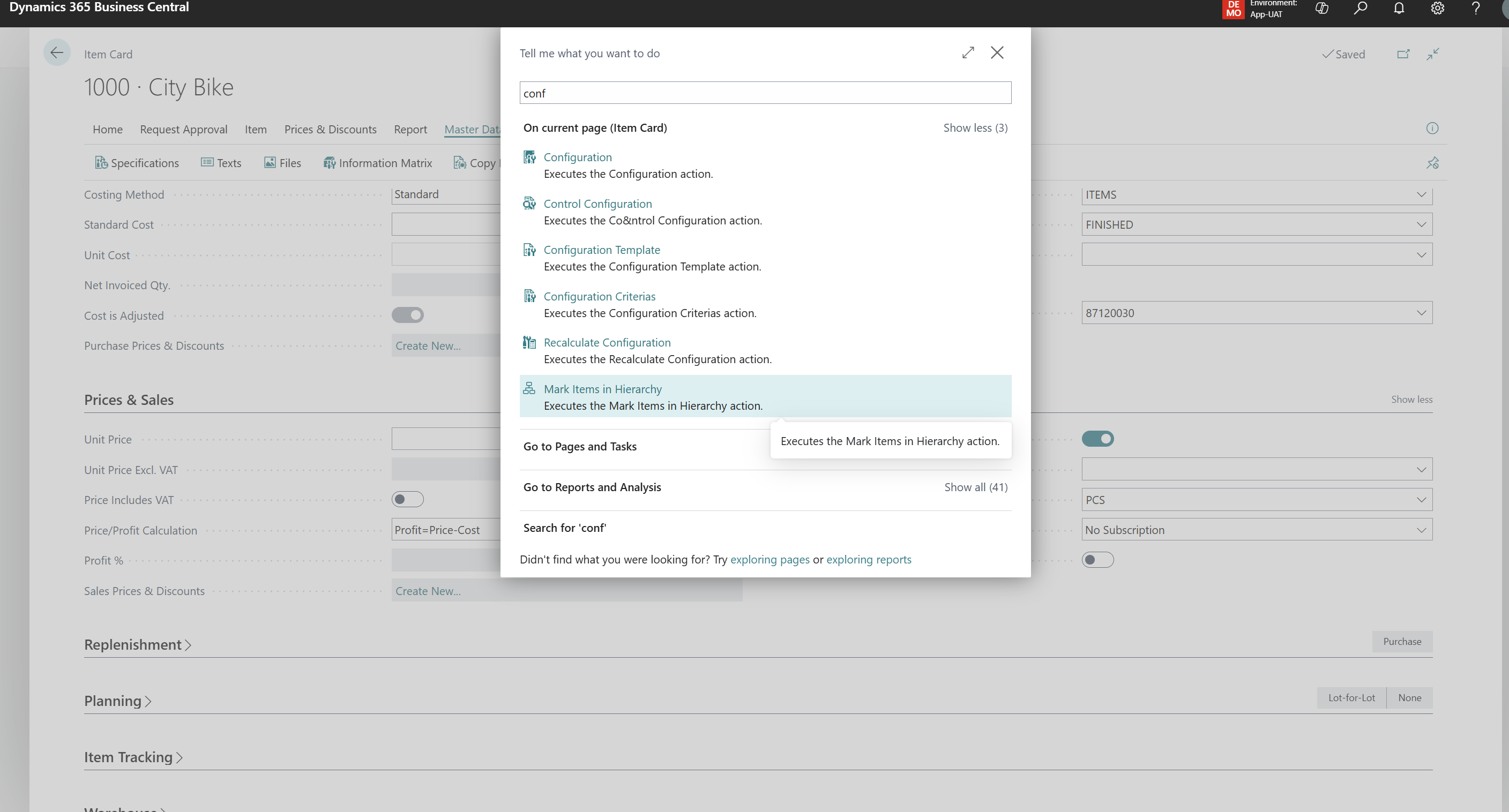
Sales Configurator adds configuration management to the Item Card.
Fields
| Field | Purpose | Key Information |
|---|---|---|
| Include in Hierarchy | Marks this item as eligible for automatic supply order hierarchy creation | Must be enabled for the item to participate in configurator workflows |
Actions
| Action | What it does | When to use |
|---|---|---|
| Configuration | Opens the configuration attribute setup for this item | To define or view configuration codes and values |
| Recalculate Configuration | Recalculates configuration specificity and resolves conflicts | After changing BOM structure or configuration rules |
| Configuration Template | Opens the Item Information Template list | To assign configuration templates to the item |
| Control Configuration | Runs the configuration control check and displays missing/conflicting entries | To validate configuration completeness |
| Configuration Criterias | Opens configuration criteria for the item | To define which configuration codes apply |
| Mark Items in Hierarchy | Recursively marks all BOM sub-items as Include in Hierarchy | When setting up a new configurable item with a deep BOM |
Production BOM (Extension)
Configuration actions are available on the Production BOM page for managing configuration attributes at the BOM level.
Actions
| Action | What it does | When to use |
|---|---|---|
| Configuration | Opens the configuration attribute setup for this BOM | To define BOM-level configuration codes and values |
| Recalculate Configuration | Recalculates configuration specificity | After changes to BOM lines or configuration rules |
| Configuration Template | Opens the Item Information Template list | To manage templates linked to this BOM |
| Control Configuration | Runs validation and shows missing/conflicting entries | To check BOM configuration completeness |
| Search Line Configuration | Searches configurations across BOM lines | To find which BOM lines have specific configurations |
Production Orders (Extensions)
Sales Configurator extends all production order pages (Simulated, Planned, Firm Planned, Released, Finished) with hierarchy management.
Fields Added
| Field | Purpose | Key Information |
|---|---|---|
| Reference No. | Unique identifier linking this production order to the sales line hierarchy | Auto-assigned from number series; supports AssistEdit |
| Customer Name | Customer from the originating sales order | Read-only; visible on released production orders |
Actions (on Production Order pages)
| Action | What it does | When to use |
|---|---|---|
| Handle Orders in Hierarchy | Opens menu: Create/Refresh, Refresh only, Replan, or Delete the order hierarchy below this order | To manage the supply chain below a production order |
| Show Order Hierarchy | Displays the hierarchy tree from this order downward | To visualize the supply chain |
| Show Order Hierarchy from the top | Displays the full hierarchy tree starting from the top-level item | To see the complete picture |
Fields Added to Prod. Order Components
| Field | Purpose | Key Information |
|---|---|---|
| Manual Cost | Override cost for this component | Editable; visible with price calculation feature |
| Cost Price per | Calculated cost price per unit | Visible with price calculation feature |
| Markup Factor | Markup multiplier | Editable; visible with price calculation feature |
| Profit % | Profit margin for this component | Editable; visible with price calculation feature |
| Sales Price per | Calculated sales price per unit | Visible with price calculation feature |
Actions on Prod. Order Components
| Action | What it does | When to use |
|---|---|---|
| Handle Orders in Hierarchy | Manages sub-hierarchy from this component | To create/refresh orders for a specific component |
| Show Order Hierarchy / from the top | Displays hierarchy from this component or top | To navigate the hierarchy |
| Get Sales Price to this level | Calculates sales price rolled up to this production order level | To review pricing at intermediate levels |
| Update Sales Price on Sales Line | Pushes the calculated price back to the originating sales line | To finalize pricing after cost review |
Assembly Order (Extension)
Similar to production orders, the Assembly Order page gains hierarchy and pricing capabilities.
Fields & Actions
| Field | Purpose |
|---|---|
| Reference No. | Links the assembly order to the sales hierarchy |
| Cost Price per / Markup Factor / Profit % / Sales Price per | Pricing fields (visible with price calculation feature) |
| Action | What it does |
|---|---|
| Handle Orders in Hierarchy | Manages the hierarchy below this assembly order |
| Show Order Hierarchy / from the top | Displays hierarchy views |
| Mark Items in Hierarchy | Marks sub-items for hierarchy inclusion |
| Get Sales Price to this level | Calculates rolled-up price to this level |
Purchase Order / Purchase Quote (Extensions)
| Field | Purpose | Key Information |
|---|---|---|
| Reference No. | Links this purchase document to the supply order hierarchy | Read-only; assigned during hierarchy creation |
Orders in Hierarchy
Caption: Orders in Hierarchy
Type: List (read-only)
Displays the full tree of supply orders linked to a sales line, with indentation showing parent-child relationships.
Fields
| Field | Purpose | Key Information |
|---|---|---|
| Replenishment System | Type of supply order (Purchase, Prod. Order, Assembly) | Used as indentation control |
| Order No. | The supply order number | — |
| Order Status | Current status of the supply order | Calculated from the linked document |
| Order Description | Description of the order | — |
| Source No. | Source item number | — |
| Item No. / Item Description | The item being produced or purchased | — |
| Component | Whether this is a component line | Can be toggled visible/hidden |
| Location Code | Warehouse location | — |
| Quantity / Due Date | Order quantity and due date | — |
| Subcontractor | Subcontractor for routing operations | Can be toggled visible/hidden |
| Purchase Document No. / Vendor No. | Purchase details for purchase-type lines | — |
| Operation No. / Ending Date | Routing operation details | — |
| Reference No. | Hierarchy reference number | Links all orders in the chain |
| Variant Code / Unit of Measure Code / Bin Code | Additional logistics fields | — |
Actions
| Action | What it does | When to use |
|---|---|---|
| Show Document | Opens the actual supply order document (Production Order, Purchase Order, or Assembly Order) | To navigate from the hierarchy view to the source document |
| Show/Hide Components | Toggles visibility of component and subcontractor lines | To simplify or expand the hierarchy view |
Prefill Template
Caption: Prefill Template
Type: Card
Used to search for and prefill configuration entries from existing items, templates, or previous documents.
Fields
Prefill Item (conditional)
| Field | Purpose |
|---|---|
| Item No. | Item to copy configuration from |
| Item Description | Description of the source item |
Prefill Template (conditional)
| Field | Purpose |
|---|---|
| Template Code | Configuration template to apply |
| Template Description | Description of the template |
Prefill Entry (conditional)
| Field | Purpose |
|---|---|
| Get Type / Get Status / Get Document No. / Get Line No. | Identifies a previous document line to copy configuration from |
Related Document (conditional)
| Field | Purpose |
|---|---|
| Type / Document No. / Status / Line No. | The target document receiving the configuration |
Subforms
- Search Criteria and Configuration — displays the configuration codes and values being searched/applied.
- Match — shows matching configuration entries found.
Actions
| Action | What it does | When to use |
|---|---|---|
| Search Match | Searches for matching configuration entries based on the selected criteria | To find and apply existing configurations |
Configuration Entry
Caption: Configuration Entry
Type: List
Displays all configuration attribute entries for a given document line, showing the configuration codes, values, and their sources.
Fields
| Field | Purpose | Key Information |
|---|---|---|
| Type | Source document table | Conditionally visible |
| Document No. | Source document number | Conditionally visible |
| Status | Document status | Conditionally visible |
| Line No. | Document line number | Conditionally visible |
| Customer Demand | Customer-specific demand reference | — |
| Item No. | The configured item | — |
| Configuration Code | The configuration attribute code | e.g., Color, Size, Material |
| Configuration Value | The selected value for this code | e.g., Red, Large, Steel |
| From Type / From No. | Where this configuration originated | Inherited from item, BOM, or template |
| Value | Numeric or text value | — |
| Description | Description of the configuration entry | — |
| Specificity | How specific this entry is in the hierarchy | Used for conflict resolution |
| Print Description | Description printed on documents | — |
Configuration Mismatches
Caption: Configuration Mismatches
Type: List (read-only)
Displays mismatches between expected and found configuration values during validation, helping users identify and resolve configuration conflicts. Shows side-by-side comparison of expected vs. found values for Configuration Code, Configuration Value, Value, Min. Value, Max. Value, plus the source (From Type/No.) and Specificity of each entry.
Configuration Conflict Actions
Caption: Configuration Conflict Actions
Type: List
When configuration conflicts are detected, this page allows users to decide how to resolve each conflict.
Fields
| Field | Purpose |
|---|---|
| Item No. | The item with the conflict |
| Action Description | Description of the conflict |
| Action | The chosen resolution: Replace, Create New, or Keep |
| Template Code / Configuration Code / Configuration Value / Value | The conflicting configuration details |
Actions
| Action | What it does | When to use |
|---|---|---|
| Replace all | Sets all conflict actions to Replace | To overwrite all existing values with new ones |
| Create New for all | Sets all conflict actions to Create New | To keep existing values and create new entries |
| Keep all | Sets all conflict actions to Keep | To keep all existing values unchanged |
Configuration Filter Combination
Caption: Configuration Filter Combination
Type: List
Defines which configuration filter values apply to which items, creating the rules for BOM line substitution.
Fields
| Field | Purpose | Key Information |
|---|---|---|
| Configuration Code | The configuration attribute | Links to Information Code table |
| Configuration Filter | The filter criterion | Links to Configuration Filter table |
| Filter Value | The specific filter value | Links to Configuration Filter Value table |
| Item No. | The item this combination applies to | Links to Item table |
Configuration Filter Value
Caption: Configuration Filter Value
Type: List
Defines the available filter values for a configuration code.
Fields
| Field | Purpose |
|---|---|
| Configuration Code | The parent configuration attribute |
| Filter Value | The filter value code |
| Filter Description | User-friendly description of the filter value |
| Item No. | The item this filter value applies to |
Configurator Profit Pct.
Caption: Configurator Profit Pct.
Type: List (Administration)
Defines profit percentages and sales price calculation methods per item, work center, or machine center — overriding the default from Configurator Setup.
Fields
| Field | Purpose | Key Information |
|---|---|---|
| Type | The entity type | Options: Item, Work Center, Machine Center |
| No. | The entity number | Lookup based on type |
| Profit % | Profit margin for this entity | Decimal, 0–5 decimal places |
| Sales Price Calc. Method | Price calculation method override | Options: Through Hierarchy, Use Current Line |
Item Information Template
Caption: Item Information Template
Type: List
Links items and production BOMs to configuration templates, defining which templates apply to which master data.
Fields
| Field | Purpose |
|---|---|
| Type | Entity type (Item or Production BOM Header) |
| No. | Item or BOM number |
| Template Code | The configuration template code |
Actions
| Action | What it does |
|---|---|
| Configuration Templates | Opens the configuration template list |
| Control Information | Runs the configuration control report and shows results |
Information Control
Caption: Information Control
Type: List
Displays the results of a configuration control check — showing which configuration attributes are Entered, Missing, or Not Required for an item.
Fields
| Field | Purpose | Key Information |
|---|---|---|
| Type / No. | The entity being checked | — |
| Template Code | The configuration template | — |
| Information Code | The configuration attribute | — |
| Information Type | How the value is specified | Options: Optional, Exact, Interval, Filter, Measured |
| Information Value | The expected value | — |
| From Type / From No. | Where the configuration originated | — |
| Status | Validation result | Entered, Missing, or Not Required |
| Value / Min. Value / Max. Value | The actual values | — |
| Specificity | Conflict indicator | Blank, Less specific, or Conflict |
Actions
| Action | What it does |
|---|---|
| Control Information | Runs the configuration control report |
| Hide "Not required" | Filters the list to show only Missing and Entered statuses |
Sales Order Lines List
Caption: Sales Order Lines List
Type: List (Tasks)
A cross-order view of all sales order lines with full configurator integration — allowing users to manage configurations, supply orders, and hierarchy across multiple sales orders from one place.
Includes all standard sales line fields plus configurator-specific fields (Include in Hierarchy, Prod. Order Exist) and the full Configurator action group (same actions as on the sales order subform).
Additional Actions
| Action | What it does |
|---|---|
| Show Document | Opens the parent sales order |
| Reservation Entries | Shows item reservation entries |
| Item Tracking Lines | Opens item tracking |
| Release / Reopen | Changes the sales order status |
Planning Worksheet (Extension)
| Action | What it does | When to use |
|---|---|---|
| Set Action Message | Sets the action message on selected planning lines | To approve planned actions |
| Remove Action Message | Clears the action message on selected planning lines | To cancel planned actions |
Stockkeeping Unit Card (Extension)
| Field | Purpose | Key Information |
|---|---|---|
| Include in Sales Configurator Hierarchy | Marks this SKU for hierarchy inclusion | Inherits from the parent item on creation |
Reports
| Report | Caption | Purpose | When to use |
|---|---|---|---|
| Configuration Control | SCB Configuration Control | Validates configuration completeness for items/BOMs against their templates | Run from Item Card or Item Information Template to check for missing configurations |
| Recalculate Configurations | SCB Recalculate Configurations | Recalculates configuration specificity and resolves conflicts across the BOM hierarchy | After changing BOM structures, adding new configuration rules, or when conflicts are suspected. Option to Recalculate all configurations |
| Update Prod. Order | SCB Update Prod. Order | Copies routing and component lines from a finished/released production order to another | To replicate a proven production setup to a new order |
Default Setup & Templates
On installation, the app:
- Creates a default Configurator Setup record with all visibility toggles set to true (all information panels visible on all document types).
- Assigns the "SCB Sales Config" permission set to all users automatically.
- Launches the Assisted Setup wizard ("Abakion Sales Configurator") which guides users through:
- Email registration and optional partner identification
- 30-day free trial activation
- Links to the Sales Configurator How-To Section and UseDynamics videos
| Default Setting | Value | Purpose |
|---|---|---|
| All Show Source Document Info toggles | Enabled | Information panels visible everywhere by default |
| All Show Entry Info toggles | Enabled | Configuration entry panels visible by default |
| All Show Item Info toggles | Enabled | Item information panels visible by default |
| All Show Template Info toggles | Enabled | Template information panels visible by default |
| Default Sales Price Calc. Method | Through Hierarchy | Prices roll up from components by default |
| Get Purchase Cost From | Always from Purchase Line Unit Cost | Uses actual purchase line cost |
Key Enumerations Reference
| Setting | Options | Used on |
|---|---|---|
| Sales Price Calc. Method | (blank), Through Hierarchy, Use Current Line | Configurator Setup, Configurator Profit Pct. |
| Cost Roll Up Principle | Rolled Up, Single Level | Configurator Setup |
| Get Component Cost From | Item Unit Cost, Purchase Prices | Configurator Setup |
| Get Purchase Cost From | According to Costing Method, Always from Purchase Line Unit Cost | Configurator Setup |
| Information Type | (blank), Optional, Exact, Interval, Filter, Measured | Information Control, configuration entries |
| Handling Action | Refresh, Replan, Delete | Orders in Hierarchy menu |
| Config Setup Status | Entered, Missing, Not Required | Information Control validation |
| Profit Pct. Type | Item, Work Center, Machine Center | Configurator Profit Pct. |
| Supply Line Type | Component, Routing | Internal hierarchy tracking |
| Order Type | ItemOrder, ProjectOrder | Internal order classification |