Overview
The Favorite Information page defines named Favorite configurations that control which Information Code values are surfaced as quick-view attributes in the Information Fact Box on master data pages such as the Item Card, Customer Card, and Vendor Card. Each Favorite record gives a named code to a set of up to ten attribute slots, each tied to a specific Information Code and display format, allowing different teams or users to see the most relevant attributes for a record at a glance without opening the full specifications view.
The feature uses a three-tier structure: this page defines the named Favorite Code and which master data table it applies to; the Favorite Information Setup page defines the individual attribute slots within each Favorite Code; and the User Favorite Information page assigns a Favorite Code to a specific user or role profile, so the right attributes are shown automatically to each person.
When Is This Page Used
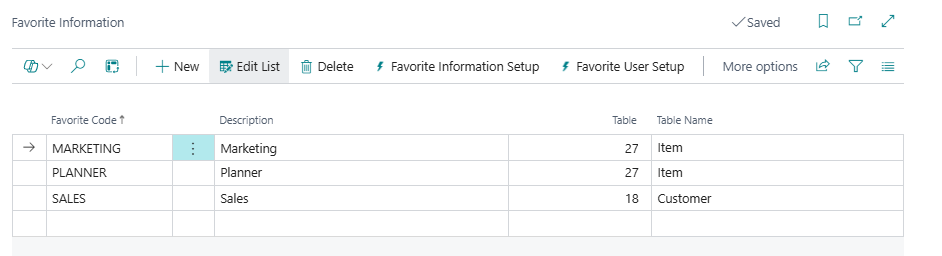
This list page is used when administrators need to create, review, or manage Favorite configurations — the named templates that control what appears in the Information Fact Box. Administrators open it to add new Favorite Codes for a given table, then drill into Favorite Information Setup to define the individual attribute slots, and into User Favorite Information to assign the Favorite Code to users or profiles.
Who Are Typical Users
- Master Data Administrator — creates Favorite Codes for each relevant master data table and defines which Information Codes appear in each slot.
- Implementation Consultant — sets up Favorites during deployment to tailor the Information FactBox display to each user role or department.
- System Administrator — assigns Favorite Codes to users or profiles via the User Favorite Information page reached from this page.
Accessing the Page
The Favorite Information page has UsageCategory = Lists and ApplicationArea = All, making it directly searchable from the Business Central search menu. It can also be reached from:
| Source Page | Action Name |
|---|---|
| Business Central Search (Tell Me) | Search for Favorite Information |
| Master Data Information Setup → Favorite Information Setup | Navigate action |
| Information Code List → Favorite Information Setup | Navigate action |
| Information Setup (list) → Favorite Informations | Navigate action |
| Information Setup Card → Favorite Informations | Navigate action |
How the Favorite Feature Works at Runtime
When a user opens a page that includes the Information Fact Box (such as the Item Card), the following resolution happens automatically:
- The system looks up the current user's entry in User Favorite Information for the relevant table (e.g., table 27 for Items).
- If no user-specific entry exists, it falls back to the entry for the user's assigned Role Center profile.
- If no profile entry exists either, it falls back to the default Role Center's profile, and then to any entry with a blank User ID.
- Once the Favorite Code is resolved, the system reads the Favorite Information Setup lines for that code, sorted by Favorite Number.
- For each setup line, it queries the Information Entry records for the current master record and extracts the value in the format specified by Information Code Type.
- The FactBox displays up to ten attribute values. Each slot shows with or without its label depending on the Show Caption flag on that setup line.
Users can also click any displayed value in the FactBox to open the full Information Setup filtered to the relevant Information Code and record, and can use the Change Favorite Setup action in the FactBox to switch to a different Favorite Code without leaving the card page.
Page Components
Fields
This list shows one row per Favorite Code. A Favorite Code applies to a single master data table, so separate Favorite Codes must be created for Items, Customers, Vendors, and other table types.

| Field | Purpose | Example | Key Information |
|---|---|---|---|
| Favorite Code | The unique identifier for this Favorite configuration. | ITEM-SALES, VENDOR-STD, CUST-QUICK |
Code up to 20 characters. This is the value referenced in Favorite Information Setup and User Favorite Information. |
| Description | A plain-language label describing the purpose of this Favorite Code. | Standard item view for sales team, Quick customer attributes |
Up to 80 characters. Used to identify the configuration in lookups and assignment pages. |
| Table | The integer table ID of the master data table this Favorite Code applies to. | 27 (Item), 18 (Customer), 23 (Vendor) |
Validated against the BC table catalog (AllObjWithCaption). Each Favorite Code can only apply to one table. Users are assigned this Favorite Code only for records from this table type. |
| Table Name | The resolved display name of the Table value. | Item, Customer, Vendor |
Calculated at runtime using GetTableName; not stored in the database. Read-only — for display purposes only. |
Actions
| Action | What It Does | When to Use | Prerequisites |
|---|---|---|---|
| Favorite Information Setup | Opens the Favorite Information Setup list filtered to the Favorite Code of the selected row. This is where the individual attribute slots (positions 1–10) are defined for the selected Favorite. | Use after creating a new Favorite Code to define which Information Codes appear in each numbered slot in the FactBox. | A row must be selected in the list. |
| Favorite User Setup | Opens the User Favorite Information list filtered by the Table of the selected row, showing all user and profile assignments for that table. | Use to assign the selected Favorite Code (or another code for the same table) to specific users or Role Center profiles. | A row must be selected in the list. |
Related Pages
Favorite Information Setup
The Favorite Information Setup page (opened via the Favorite Information Setup action) defines the individual attribute slots within a Favorite Code. Each row maps one numbered position (1–10) in the Information Fact Box to a specific Information Code and controls how its value is displayed.

Fields
| Field | Purpose | Example | Key Information |
|---|---|---|---|
| Favorite Code | The parent Favorite Code this setup line belongs to. | ITEM-SALES |
Validated against the Favorite Information table. Pre-filled when opened via the Favorite Information Setup action. |
| Favorite Number | The position (slot) in the FactBox where this attribute appears. | 1, 2, 3 |
Integer, 1–10 only. Each number can appear at most once per Favorite Code. The FactBox renders slots in ascending number order. |
| Information Code Type | Controls how the value from the Information Entry is formatted and displayed in the FactBox. | Description, Information Value, Value |
Nine options listed below. Determines which field(s) from the Information Entry are combined to produce the displayed text. |
| Information Code Selection | The specific Information Code whose entries are read for this slot. | COLOR, WEIGHT, BRAND |
Validated against the SCB New Information Code table. Clearing this field also clears Information Code Filter. Use the lookup to browse available codes — the lookup is filtered to the table defined on the parent Favorite Code. |
| Information Code Filter | An optional filter on the Information Value field of the Information Entry, used when a single Information Code has multiple values and only one specific value should appear. | RED, LARGE |
Up to 30 characters. When filled, only Information Entries where Information Value matches this filter are considered for this slot. Cleared automatically when Information Code Selection changes. |
| Show Caption | Controls whether the field label (the Information Code's caption) is shown above the value in the FactBox. | Yes / No |
Defaults to Yes. When disabled, the value is displayed without a label — useful for values that are self-explanatory. |
Information Code Type Options
The Information Code Type field controls exactly what text is assembled from the matching Information Entry and displayed in the FactBox slot:
| Option | What Is Displayed |
|---|---|
| (blank) | Nothing is displayed for this slot. |
| Description | The Description field of the matching Information Entry. |
| Information Value | The Information Value field of the matching Information Entry (the option code). |
| Value | The Value field of the matching Information Entry (the typed data value, formatted for the current culture). |
| Information Value - Value | Information Value followed by Value, separated by a space. |
| Value - Information Value | Value followed by Information Value, separated by a space. |
| Information Value - Description | Information Value followed by Description, separated by a space. |
| Description - Information Value | Description followed by Information Value, separated by a space. |
| Value - Description | Value followed by Description, separated by a space. |
| Description - Value | Description followed by Value, separated by a space. |
User Favorite Information
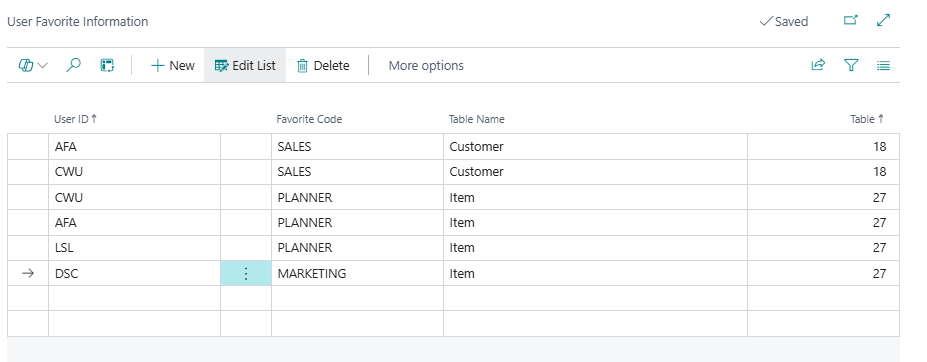
The User Favorite Information page (opened via the Favorite User Setup action) assigns a Favorite Code to a specific user or Role Center profile for a given table. When the Information FactBox loads for a user, it reads this table to determine which Favorite Code to use.
Fields
| Field | Purpose | Example | Key Information |
|---|---|---|---|
| User ID | The user account or Role Center profile that this Favorite assignment applies to. | ANNE, SALES-REP, ACCOUNTANT-PROFILE |
Validated against BC User accounts and All Profile role center profiles. If the entered value is not found as a user, the system checks whether it exists as a profile ID. Blank is also accepted (acts as a global fallback). |
| Favorite Code | The Favorite Code assigned to this user or profile for the specified table. | ITEM-SALES, ITEM-PURCHASE |
Validated against the Favorite Information table. When set, the Table field is automatically populated from the selected Favorite Code's table. |
| Table | The integer table ID this assignment applies to. | 27, 18, 23 |
Read-only on this page — automatically populated when Favorite Code is selected. Shown for reference to confirm the correct table is targeted. |
| Table Name | The resolved display name of the Table value. | Item, Customer, Vendor |
Calculated at runtime — not stored. Read-only. |
Fallback Resolution Order
When the system looks up which Favorite Code to use for a given user and table, it checks in this order and uses the first match found:
- Direct user assignment — User ID matches the current user's login name.
- Profile assignment — User ID matches the Role Center profile assigned to the current user.
- Default Role Center profile assignment — User ID matches the default Role Center's profile ID.
- Blank entry — User ID is empty, acting as a universal default for all users not otherwise assigned.
Default Setup & Templates
No default Favorite Information records, Favorite Information Setup lines, or User Favorite Information assignments are created by the extension's installation. All three layers of the hierarchy must be configured manually to suit the implementation's specific Information Codes and user roles.