Overview
The Suggest Quantity Templates page provides a centralized location for managing quantity suggestion templates used in the Reverse Planning application. These templates define how suggested order quantities are calculated based on different inventory calculation methods and business rules. Each template specifies the starting calculation point (e.g., End Inventory, Lowest Inventory) and the target level (e.g., Zero, Safety Stock, Reorder Point), along with modifiers and rounding rules.
When is this List Page used?
This list page is used when users need to:
- Browse and review all available quantity suggestion templates
- Create new quantity calculation templates for different planning scenarios
- Edit existing templates to adjust calculation logic, order modifiers, or rounding principles
- Configure templates that will be referenced in Planning Templates for automated planning processes
- Set up templates for different replenishment strategies (Simple MRP, Direct Replenishment, etc.)
Who are typical users?
- Supply Chain Managers - who configure planning templates and define replenishment strategies
- Planning Coordinators - who set up and maintain quantity calculation methods for different item categories
- Inventory Managers - who establish rules for how order quantities should be calculated based on inventory levels
- System Administrators - who manage and maintain system-wide planning templates
Accessing the page
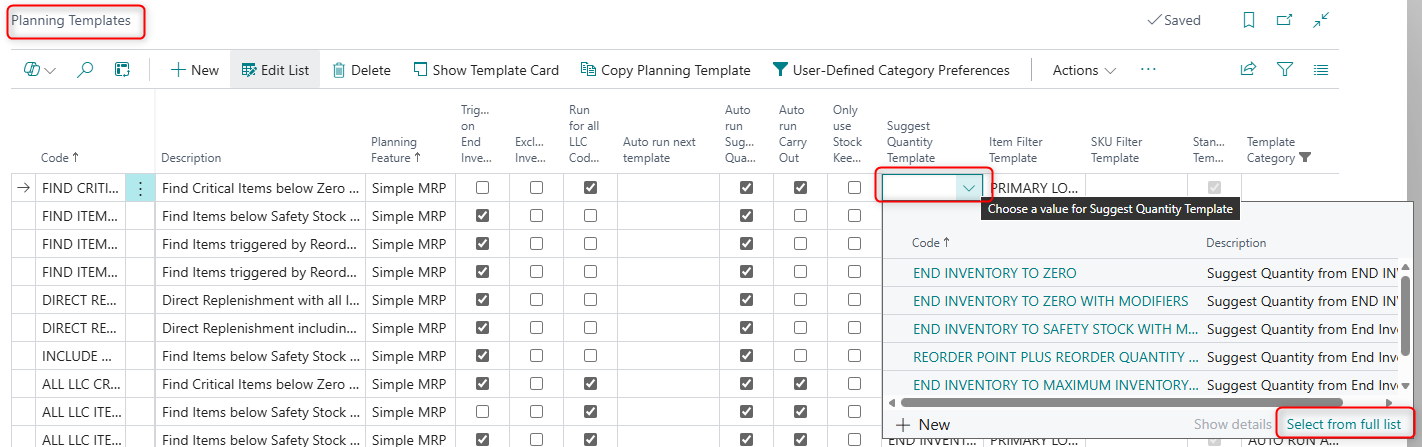
- From the Planning Template List
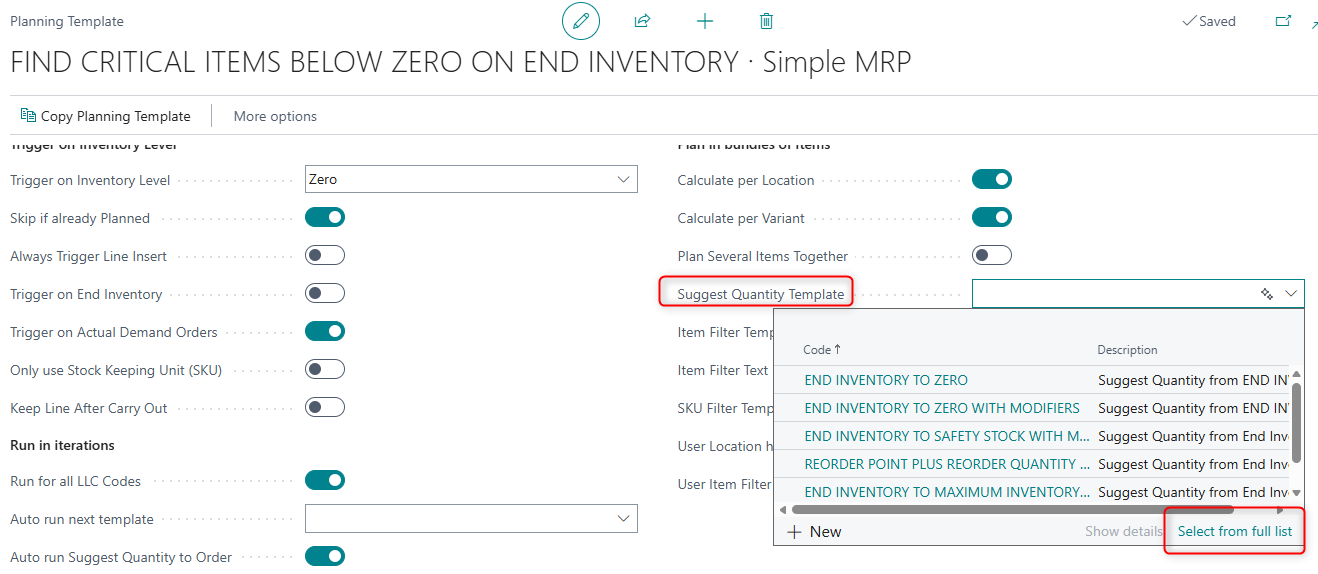
- From the Planning Template Card
Page Components
Fields
General Section
The page displays all quantity suggestion templates

| Field | Purpose | Example | Key Information |
|---|---|---|---|
| Code | Unique identifier for the template | END INVENTORY TO ZERO WITH MODIFIERS | Primary key field used to reference the template in planning configurations. Maximum 50 characters. |
| Description | User-friendly explanation of what the template does | Suggest Quantity from End Inventory to Safety Stock with Order Modifiers | Maximum 250 characters. Helps users understand the template's purpose at a glance. |
| Calculate From | Starting point for quantity calculation | End Inventory, Lowest Inventory, Zero | Options: Zero, Lowest Inventory, End Inventory, Lowest Inventory after Forecast. Defines the baseline from which to calculate the needed quantity. |
| Calculate To | Target level for quantity calculation | Safety Stock, Reorder Point, Zero | Options: Safety Stock, Reorder Point, Reorder Quantity, Reorder Point plus Reorder Quantity, Maximum Inventory, Zero. Determines the inventory level to achieve. |
| Suggest Date Template | Related date template for scheduling suggestions | BACKWARD FROM ZERO - FORWARD FROM OTHER | Relates to Suggest Date Templates to determine when suggested orders should be scheduled. Optional field. |
| Specific Date for Triggers | Date used for date trigger calculations | 2024-12-15 | Only editable when Suggest Date Template is specified. Used in conjunction with date templates for specific date-based planning scenarios. |
| Use Order Modifiers | Whether to apply order modifiers (min/max order quantities, order multiples) | True/False | When enabled, the system respects item order modifiers like Minimum Order Quantity, Maximum Order Quantity, and Order Multiple when calculating suggested quantities. |
| Only Use SKU | Restrict calculation to Stock Keeping Unit data only | True/False | When enabled, only SKU (Stockkeeping Unit) planning parameters are used, ignoring item card settings. |
| Rounding Principle | How to round calculated quantities | Round up, Round down | Enum from Abakion App Manager Core. Determines whether calculated quantities should be rounded up, down, or use another rounding method. |
Default Setup & Templates
The Reverse Planning application automatically creates six default Suggest Quantity Templates during installation. These templates provide common quantity calculation scenarios used in various planning strategies.
| Code | Description | Calculate From | Calculate To | Suggest Date Template | Use Order Modifiers | Rounding Principle | Sorting | Purpose |
|---|---|---|---|---|---|---|---|---|
| END INVENTORY TO ZERO | Suggest Quantity from END INVENTORY TO ZERO | End Inventory | Zero | (empty) | False | (empty) | 5 | Basic template for bringing inventory to zero without modifiers. Used for items with specific demand requirements. |
| END INVENTORY TO ZERO WITH MODIFIERS | Suggest Quantity from END INVENTORY TO ZERO with Order Modifiers | End Inventory | Zero | (empty) | True | Round up | 10 | Calculates quantity to reach zero from end inventory while respecting minimum order quantities, order multiples, and other modifiers. Used in Simple MRP templates. |
| END INVENTORY TO SAFETY STOCK WITH MODIFIERS | Suggest Quantity from End Inventory to Safety Stock with Order Modifiers | End Inventory | Safety Stock | BACKWARD FROM ZERO - FORWARD FROM OTHER | True | Round up | 20 | Brings inventory up to the safety stock level from end inventory projection. Uses date template for backward/forward scheduling. Common in Simple MRP scenarios. |
| REORDER POINT PLUS REORDER QUANTITY WITH MODIFIERS | Suggest Quantity from End Inventory to Reorder Point plus Reorder Quantity with Order Modifiers | End Inventory | Reorder Point plus Reorder Quantity | BACKWARD FROM ZERO - FORWARD FROM OTHER | True | Round up | 30 | Calculates order quantity to reach reorder point plus the reorder quantity. Most commonly used template for standard replenishment scenarios in both Simple MRP and Direct Replenishment. |
| END INVENTORY TO MAXIMUM INVENTORY WITH MODIFIERS | Suggest Quantity from End Inventory to Max Inventory with Order Modifiers | End Inventory | Maximum Qty. | BACKWARD FROM ZERO - FORWARD FROM OTHER | True | Round down | 40 | Brings inventory to maximum inventory level. Uses "Round down" to avoid exceeding maximum. Used for Direct Replenishment scenarios with maximum inventory policies. |
| EXACT DEMAND | Suggest Quantity to fit the exact demand from End Inventory | End Inventory | Zero | BACKWARD FROM FIRST DATE BELOW ZERO | False | (empty) | 50 | Calculates exact quantity needed to cover demand without overshooting. No modifiers or rounding applied. Used for precise demand matching scenarios. |
Purpose of Default Templates
END INVENTORY TO ZERO and END INVENTORY TO ZERO WITH MODIFIERS:
These templates are used when the planning goal is to neutralize negative inventory projections by creating orders that bring the end inventory level back to zero. The "with modifiers" variant ensures that orders respect minimum order quantities and order multiples.
END INVENTORY TO SAFETY STOCK WITH MODIFIERS:
This template ensures items maintain at least their safety stock level throughout the planning period. It's particularly useful for items where stockouts carry significant risk or cost.
REORDER POINT PLUS REORDER QUANTITY WITH MODIFIERS:
This is the most commonly used template and implements standard reorder point planning logic. When end inventory falls to or below the reorder point, it suggests an order for the full reorder quantity. This template is referenced by multiple default planning templates including Direct Replenishment scenarios.
END INVENTORY TO MAXIMUM INVENTORY WITH MODIFIERS:
Used for items with maximum inventory policies, ensuring that orders don't cause inventory to exceed the defined maximum level by using "Round down" rounding.
EXACT DEMAND:
Used in specialized scenarios where precise demand coverage is required without any buffering or rounding. This template calculates the exact shortage and suggests that precise quantity.
When to Use Each Template
- Use END INVENTORY TO ZERO templates for critical items where you want to cover demand precisely to zero inventory
- Use SAFETY STOCK templates for items requiring buffer inventory for demand variability
- Use REORDER POINT templates for standard replenishment scenarios with consistent demand patterns
- Use MAXIMUM INVENTORY templates for items with space constraints or maximum investment limits
- Use EXACT DEMAND for make-to-order or project-specific items where oversupply should be avoided