Release Date: 28. January 2026
 Redesign
General
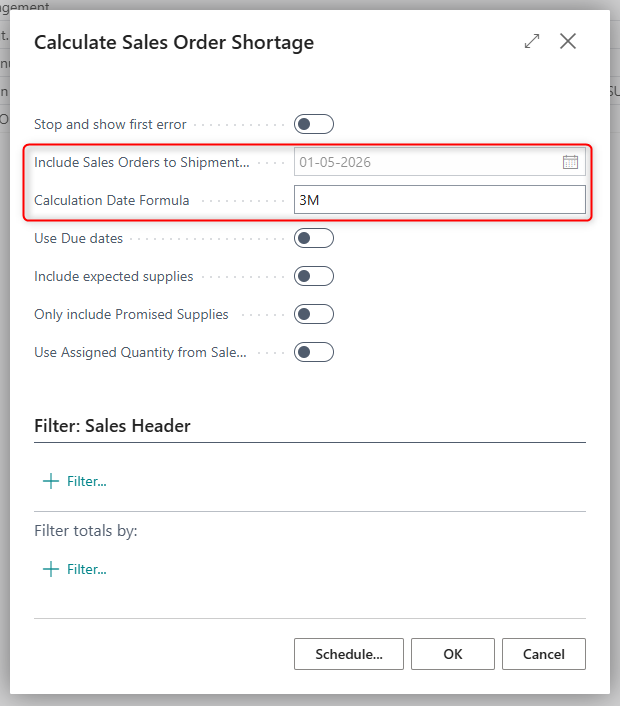
Aligned Calculation Date Formula and Include Sales Orders to Shipment Date in report 6082568 so the UI now reflects the automatically recalculated shipment date already used by the report.
This change improves the behavior and transparency of report 6082568 “Calculate Sales Order Shortage” by synchronizing the visible shipment date with the date actually used in the calculation logic and by tightening the dependency between the two related fields.
What’s changed
The existing field “Include Sales Orders to Shipment Date calculation” is renamed to “Calculation Date Formula”
When Calculation Date Formula is filled in, Include Sales Orders to Shipment Date becomes non‑editable to avoid conflicting manual changes.
On every execution of the report (both manual and via Job Queue), Include Sales Orders to Shipment Date is now recalculated and updated on the request page using:
Work Date + Calculation Date FormulaThis ensures that the UI always shows the same shipment date that the report uses internally.
Important clarification
Previously, the value shown in Include Sales Orders to Shipment Date on the request page could appear outdated or incorrect.
However, the report logic already recalculated the correct shipment date filter on execution as:
Include Sales Orders to Shipment Date = Work Date + Date Formula.The hotfix therefore primarily fixes the visible date, so users now see the correct, recalculated date that has always been applied in the shortage calculation.
Behavior examples
Work Date = 01/02‑26, Calculation Date Formula = 3M
→ Include Sales Orders to Shipment Date = 01/05‑26Work Date = 10/02‑26, Calculation Date Formula = 3M
→ Include Sales Orders to Shipment Date = 10/05‑26
This ensures consistent, predictable shortage calculations while removing confusion caused by the previously unsynchronized UI.