Release Date: 26. January 2026
 Release Summary
SCB Warehouse Picklist:
Remembers last selected Action Type to reduce repetitive input
Sorting now matches standard Business Central behavior
Proforma Invoice:
Correctly applies default templates from Sales Orders when generated via Document Output
Extended Statement report:
Full Danish translation support
Fixed errors when Show Overdue Entries is enabled
Other fixes:
Resolved Document Customizer crashes caused by special characters in Item Numbers
Overall benefit: Improved efficiency, stability, and user experience in Business Central
 Improvements
General
Possibility to save default “Action Type” selection on the SCB Warehouse Picklist report.
It is now possible to have Business Central remember the last selected “Action Type” on the SCB Warehouse Picklist (report 6082782).
The request page for the report has been updated to save the user’s option values, so warehouse employees do not need to choose the desired action type (e.g. “Take”) every time they print the Warehouse Picklist. This helps reduce clicks and minimizes the risk of miscommunication with warehouse pickers, as the report will consistently use the user’s preferred action type.
Technical note
The request page of report 6082782 "SCB Warehouse Picklist" has been updated with SaveValues = true;. Please note that values are saved when using Print; using Preview does not persist option values (standard Microsoft behavior)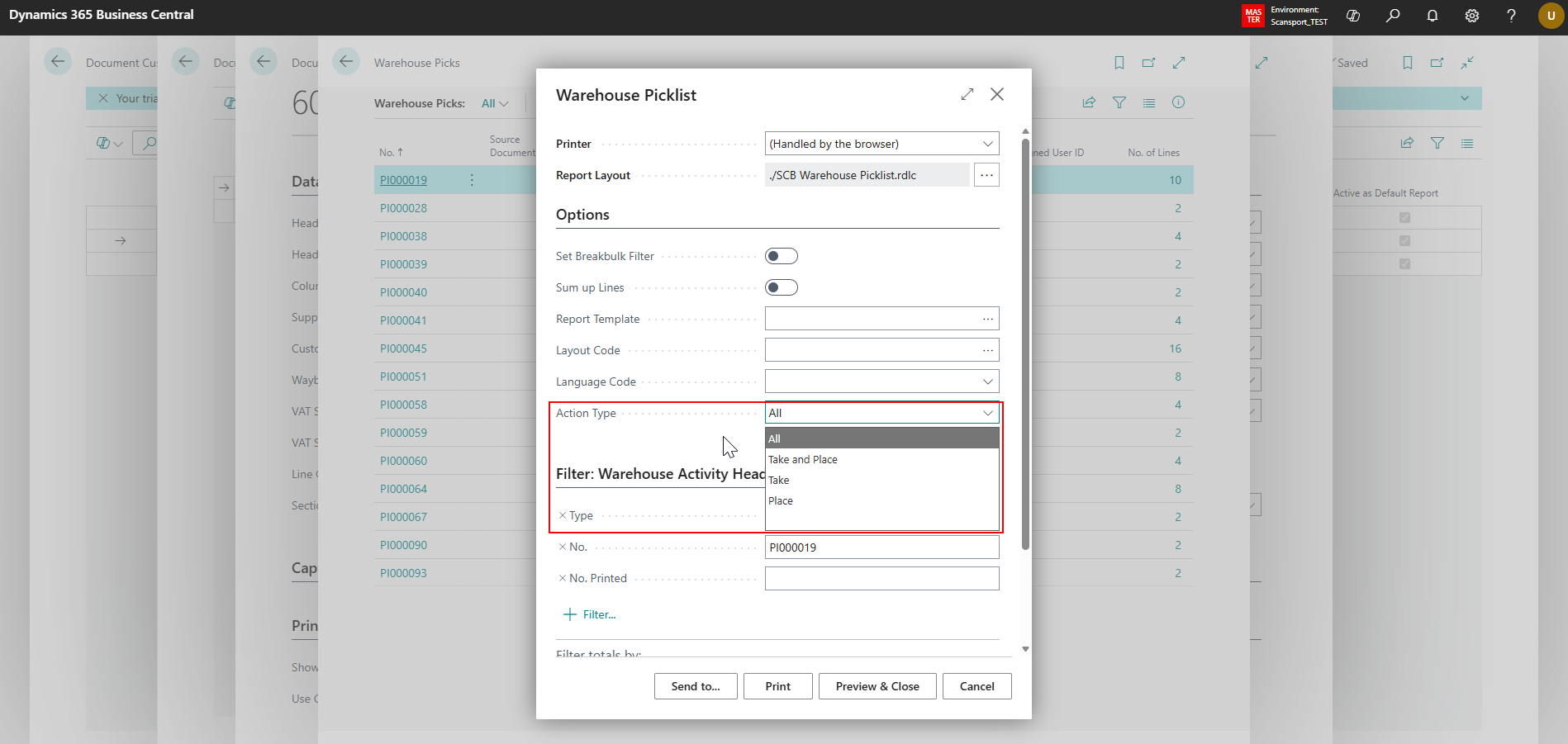
Enable Warehouse Picklist report to respect Business Central sorting in Document Customizer
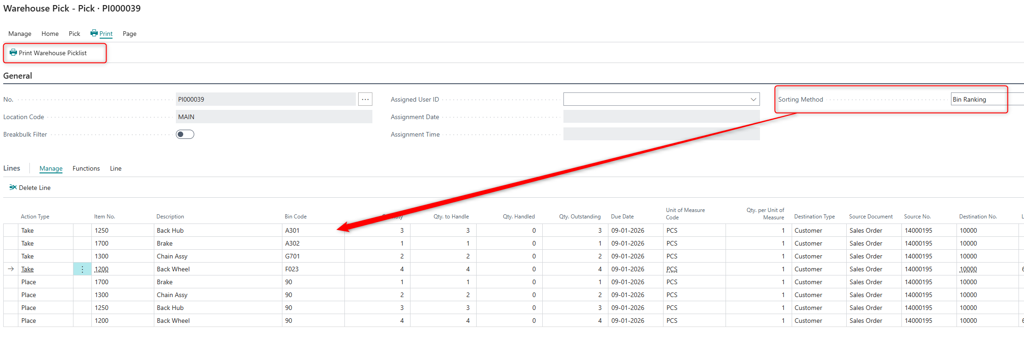
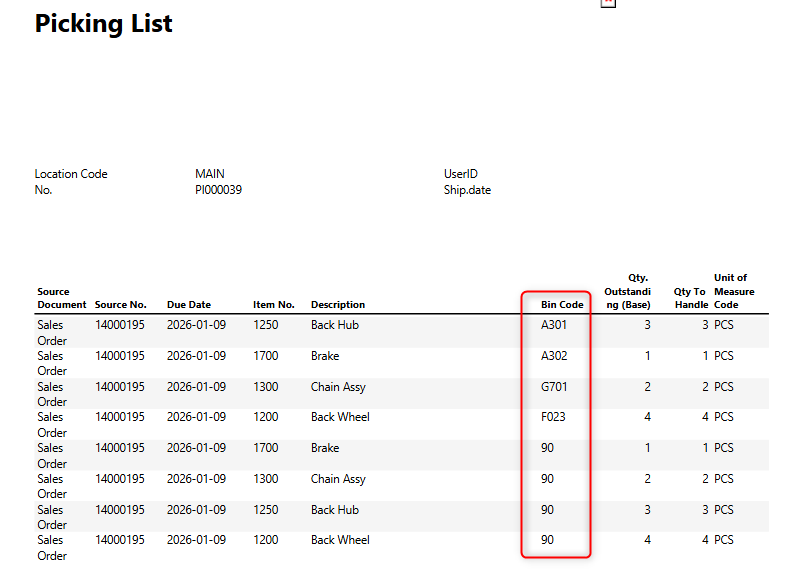
This release ensures that the Warehouse Picklist report printed via Document Customizer follows the same line sorting as shown on the Warehouse Activity in Business Central.
With this change, the Warehouse Picklist printed with Document Customizer now behaves like the standard Business Central pick report: the printed order of lines reflects the operational sorting method selected by the warehouse user, improving picking efficiency and alignment between on-screen view and printed documents.
 Bug Fixes
Report Templates
Default document template and layout from Sales Orders are now correctly applied to Proforma Invoice when the report is run via Document Output (CDO).
INSERT DESCRIPTION, DOCUMENTATION & SCREENSHOTS
Previously, when running the Proforma Invoice report from Document Output (CDO), the default report template and layout configured on the Sales Order document were not applied. The same report worked correctly when run via Document Handling.
This has been fixed by adjusting the timing of the logic that retrieves the default template and layout, so it is executed after the Sales Header / “Pre Sales Header” is fully initialized, and by correcting how the document type is retrieved from the CDO table filter.
With this change:
CDO scenarios now pick up the default template and layout from the Sales Order as expected.
Existing behaviour for other document flows (e.g. Document Handling) is preserved.
Command Lines
Fixed an issue where Command Line rounding of decimal values did not work correctly for header fields in Document Customizer.
Previously, Command Line formulas for rounding decimal values only behaved correctly on document lines. When the same Command Line logic was applied to header fields, the result could be an incorrect or “mystery” value instead of the expected rounded amount.
This has been corrected so that Command Line functionality is implemented consistently for header column values. Command Lines that round decimals now work on both header and line fields in Document Customizer, ensuring accurate and predictable results for scenarios such as Danepork and other customers using header-level rounding.
General
New Statement Extended report: added full Danish translation of the report request
The New Statement Extended report request has been updated to support full Danish translation. Previously, the report request UI remained in English even when the client was set to Danish.
With this change:
All labels and captions on the New Statement Extended report request are now available in Danish when the application language is set to Danish.
Behaviour is aligned with the previous Statement report, which already supported Danish.
This improvement removes the need to fall back to the old Statement report just to get Danish translations, while still allowing users to take advantage of the extended features of the new report.
Extended Statement report no longer fails when “Show Overdue Entries” is enabled in Document Customizer.
This release fixes an error in the Extended Statement report when the “Show Overdue Entries” option was enabled in Document Customizer.
What was the problem?
When users enabled Show Overdue Entries on the Extended Statement report, the report failed and could not be generated.
The failure was caused by how overdue entries were processed, leading to SQL server errors.
What has been changed?
The SCB Column Caption Buffer functionality has been redesigned to use a temporary table.
This change prevents the SQL errors that previously caused the report to fail.
With this fix, the Extended Statement report runs correctly even when Show Overdue Entries is enabled.
Impact for users
Users can now safely enable Show Overdue Entries on the Extended Statement report without encountering errors.
No functional changes are required from the user side; existing setups will work after upgrading to this version.
Fixed: Document Customizer crash with special characters in Item No.
Resolved an issue where Business Central could crash when printing documents using Document Customizer report layouts if an Item contained special characters (such as = in the Item No.). Standard Business Central reports were not affected. Documents that include Items with special characters in the Item No. can now be printed successfully with Document Customizer.