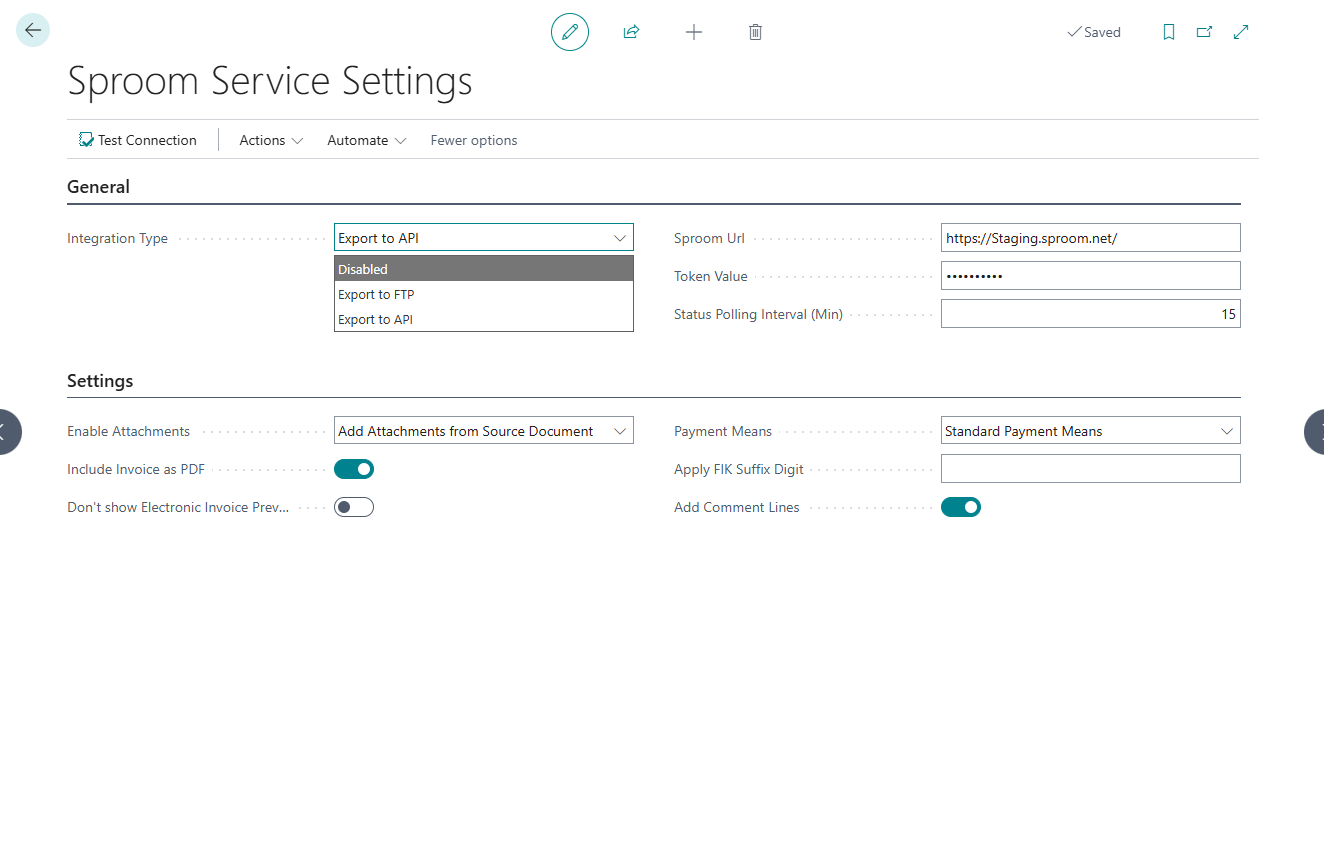
The Sproom Service Settings page enables Electronic Invoicing with Sproom to connect Business Central to the Sproom e-invoicing service, controlling which integration method is active, holding the API credentials, and determining how frequently delivery status is refreshed. Sproom Service Settings is the starting point for both initial setup and ongoing management of the Sproom connection.
Feature Overview
Sproom Service Settings consolidates all connection configuration for the Sproom integration in one place. The Integration Type field determines whether Business Central sends electronic documents via the REST API or the legacy FTP method; the settings shown on the page adjust to reflect the selected mode. For the REST API integration, the page holds the Sproom Url and Token Value that authenticate the connection, and the Status Polling Interval (Min) that controls how often Business Central checks Sproom for updated delivery states. The Test Connection action verifies that the credentials and URL are valid at any time. The Setup Status Polling action creates or refreshes the background job that drives automatic status updates. The Document Status action opens Sproom Document Activity Status directly, giving administrators a delivery overview alongside the connection settings.
Typical Use Cases / User Stories
- A consultant setting up Sproom for a new company enters the Sproom Url and Token Value on Sproom Service Settings, then uses Test Connection to confirm the connection is working before the customer sends their first live document.
- As an IT administrator, I want to reduce the polling interval during a busy invoicing period so that delivery failures are detected more quickly — I lower the Status Polling Interval (Min) on Sproom Service Settings.
- A company switching from the FTP-based method to the REST API changes the Integration Type to Export to API and enters the API credentials, migrating to the modern integration without affecting any other invoicing workflows.
- A finance manager suspects the API token may have been compromised and uses the Clear Token action on Sproom Service Settings to remove the stored credential before entering a replacement.
- An administrator wants to confirm that the status polling job is active after migrating to a new Business Central environment — she uses Setup Status Polling to create or refresh the background job queue entry.
Key Concepts
- Integration Type: Controls which delivery method is active. Export to API uses the Sproom REST API with automated status polling. Export to FTP uses the legacy file-transfer method. Disabled turns off all document sending.
- Token Value: The bearer token issued by Sproom that authenticates Business Central against the Sproom API. The token is stored securely in isolated storage and is never shown in plain text in the interface.
- Status Polling Interval (Min): How often, in minutes, the background job queries Sproom for updated delivery states on documents that have not yet reached a final status. Lower values give more frequent updates; higher values reduce API call volume.
- Setup Status Polling: Creates or updates the job queue entry that runs the background polling process. Run this action once when setting up the REST API integration for the first time, and again after any environment migration.
Relations to Other Features or Apps
- Sproom Service Settings is part of the broader Sproom API Integration. Once the connection is configured here, all document transmission and status tracking flow through the integration automatically.
- The Document Status action on Sproom Service Settings opens the Sproom Document Activity Status page, where you can monitor delivery outcomes for all sent documents.
- In addition to API-specific settings, the page also provides access to optional document-enrichment features — such as Enable Attachments, Include Invoice as PDF, Payment Means, and Add Comment Lines — which apply regardless of the active integration method and are each documented separately.
- Sproom Service Settings hooks into Business Central's standard OIOUBL send flow; documents are generated by the Danish localization and transmitted through the connection configured here.
Frequently Asked Questions
Where do I enter the Sproom API credentials in Business Central?
The Sproom Url and Token Value fields on Sproom Service Settings hold the API connection credentials. Set Integration Type to Export to API to make these fields visible, enter the values provided by Sproom, and use Test Connection to verify the connection is working before going live.
What should I do if my Sproom API token expires or needs to be replaced?
Use the Clear Token action on Sproom Service Settings to securely remove the stored token, then enter the new token in the Token Value field. The token is stored in isolated storage and is never shown in plain text, so clearing it is the safe way to replace a compromised or expired credential.
What is the Status Polling Interval and what value should I use?
The Status Polling Interval (Min) on Sproom Service Settings controls how often the background job checks Sproom for updated delivery states on pending documents. For most companies, 15 minutes balances timely failure detection with reasonable API call volume — lower the value during peak invoicing periods if you need faster updates.
When This Feature Adds Value
- You are configuring the Sproom integration for the first time and need a single location to enter and verify the API credentials before going live.
- The API token needs to be rotated and you want to update or clear the stored credential securely using Clear Token.
- You want to adjust the polling frequency — either for faster failure detection during peak periods, or to reduce API call volume during quieter periods.
- You need to confirm that the background status polling job is active after a Business Central environment migration or restart.