Reverse Planning – Flow Overview
This document describes how Reverse Planning works from setup to execution, including how planning templates are applied, how calculations inherit setup, and how planning results are handled across journals and worksheets.
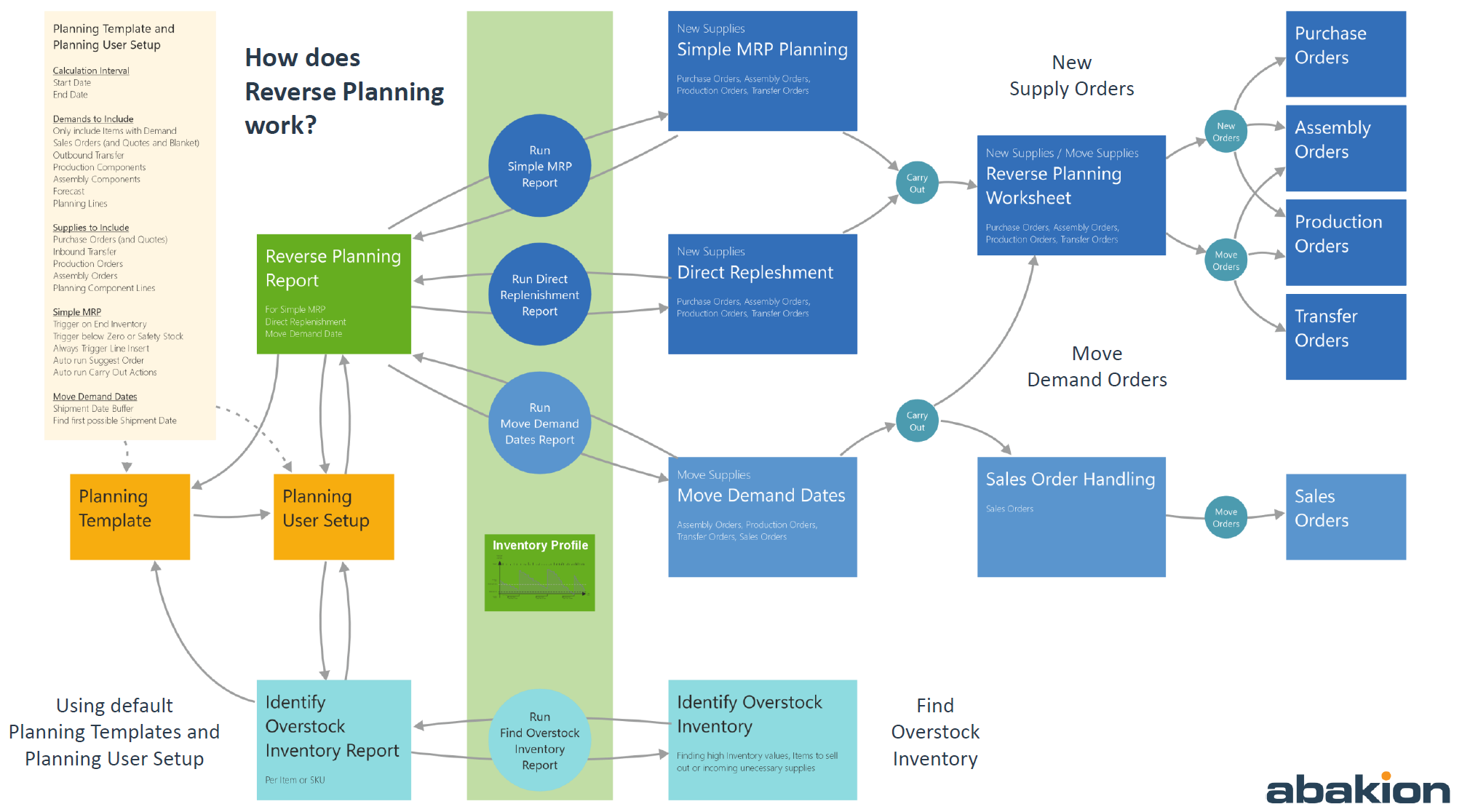
1. Planning Templates
Planning Templates define the default planning behavior used when running Reverse Planning calculations.
Purpose
Planning Templates ensure consistent planning logic by predefining key parameters that control:
- How much the system suggests to order
- When the system suggests the order should be placed
Key Setup Elements
Within a Planning Template, the following can be configured:
-
Order Quantity Template
Controls how the suggested order quantity is calculated
(e.g. fixed quantity, reorder quantity logic, demand-based quantity) -
Date Template
Controls how the suggested order date is calculated
(e.g. based on demand date, lead time, safety margin)
Each Planning Template represents a reusable planning strategy that can be selected by users when running planning calculations.
2. Selecting a Planning Template During Calculation
Reverse Planning calculations are typically started from a journal (e.g. Simple MRP, Direct Replenishment, or Move Demand Dates).
Template Selection
When a user runs a calculation:
- A Planning Template can be selected
- The selected template determines how quantities and dates are suggested
Inheritance to Planning User Setup
Once a template is selected:
- The setup from the Planning Template is copied into the Planning User Setup
- The Planning User Setup is updated for the specific user
- Each time the user selects a new template, the Planning User Setup is overwritten with the new template’s values
This ensures that the user’s planning behavior always reflects the most recently selected template.
3. Planning User Setup as the Active Configuration
The Planning User Setup acts as the active configuration during calculation.
Key Principle
- Reverse Planning calculations do not read directly from the Planning Template
- Calculations always use the setup stored in the Planning User Setup
Result
This design ensures:
- User-specific planning behavior
- Predictable results during calculation
- Consistency across multiple planning runs until the template is changed again
4. Running the Reverse Planning Calculation
When the calculation is executed:
- The system uses the values from the Planning User Setup
- Suggested quantities and dates are calculated accordingly
- Planning lines are generated based on the selected planning feature
5. Handling Planning Results (Simple MRP & Direct Replenishment)
Line Creation
When lines are created in:
- Simple MRP
- Direct Replenishment
and the user carries out these lines:
Resulting Behavior
- The lines are moved to Reverse Planning – Planning Worksheet
- This worksheet is implemented as a new page built on top of the standard Requisition Line table (Table 2465)
Reverse Planning – Planning Worksheet
From this worksheet:
- Lines behave similarly to the standard Planning Worksheet
- Users can carry out lines to create:
- Purchase Orders
- Production Orders
- Assembly Orders
- Transfer Orders
This ensures a familiar experience while extending standard planning with Reverse Planning logic.
6. Move Demand Dates – Special Handling
The Move Demand Dates journal handles different document types in different ways.
Sales Orders
- Journal lines of type Sales Order are moved to:
- Reverse Planning – Sales Order Handling journal
- Users carry out lines here to:
- Move Sales Order shipment or delivery dates
Assembly Orders & Production Orders
- Journal lines of type:
- Assembly Order
- Production Order
- Are moved to:
- Reverse Planning – Planning Worksheet
- With:
- Action Message = Reschedule
From the worksheet, users carry out lines to:
- Move the due date of Assembly or Production Orders
7. Summary of the Reverse Planning Flow
- Planning Templates define default quantity and date behavior
- User selects a template when starting a calculation
- Template setup is copied into Planning User Setup
- Calculation uses Planning User Setup values
- Simple MRP & Direct Replenishment results move to
Reverse Planning – Planning Worksheet - Move Demand Dates results are split by document type:
- Sales Orders → Sales Order Handling journal
- Assembly & Production Orders → Planning Worksheet (Reschedule)
- Users carry out lines to create or reschedule actual orders