Overview
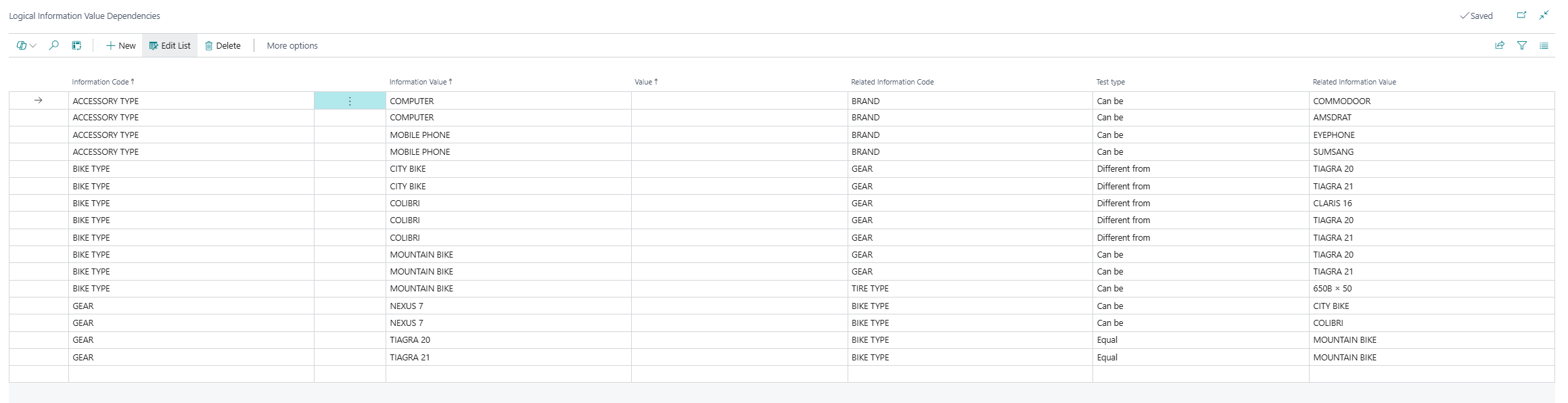
The Logical Information Value Dependencies page is a central setup list for the Sales Configurator feature within the Master Data Information app. It defines rules that determine which combinations of Information Values across different Information Codes are allowed, required, or excluded, enabling guided and validated product or data configuration. When a user selects a value for one Information Code, the system consults these dependency rules to automatically filter or validate the available values for related Information Codes, ensuring only valid combinations can be entered.
When is this Page Used
Users access the Logical Information Value Dependencies list when they need to configure or review the logical rules that govern how Information Values for different Information Codes relate to each other. Typical scenarios include:
Setting up new dependency rules — when a new Information Code or value combination is introduced and specific constraints between values are required.
Auditing existing dependency logic — to review all currently active rules and verify that the configurator behaves as expected for a given product or data structure.
Troubleshooting configurator behavior — when users report that certain value combinations are unexpectedly blocked or allowed during data entry or sales configuration.
Bulk review and maintenance — when dependencies need to be updated across many Information Codes, the list view allows filtering and navigation across all rules in a single place.
Who Are Typical Users
| Role | Why they use this page |
|---|---|
| Master Data Administrator | Creates and maintains all dependency rules across Information Codes to enforce data quality and valid value combinations. |
| Product Manager / Product Configurator Admin | Designs logical rules for product configuration scenarios (e.g., ensuring certain accessories or features are only available for specific product types). |
| IT / Business Central Implementation Consultant | Sets up and tests configurator logic during implementation or when extending the app for new use cases. |
| Quality Assurance / Data Steward | Reviews rules to ensure configurations align with business requirements, performing audits of the dependency table. |
Accessing the Page
The page is not directly searchable via the Business Central search bar (it has no UsageCategory assigned). It is opened via actions on other pages:
| Entry point | Navigation path | Notes |
|---|---|---|
| Information Code Card | Open an Information Code Card → Actions menu → Logical Dependencies | Opens the list filtered to the current Information Code. This is the primary access route. |
| Information Code List | Open the Information Codes list → Navigate menu → Logical Dependencies | Opens the full list. Filter manually to the desired code. |
Note: The Logical Dependencies action is only relevant when the Logical Dependencies field is enabled on the Information Code Card. Rules defined here are only evaluated at runtime for Information Codes where this toggle is active.
Page Components
Actions
The Logical Information Value Dependencies page has no custom actions defined. Standard Business Central list actions apply (New, Edit, Delete, and filtering capabilities).
Fields
Each row in this list represents one dependency rule. Together, rows with the same Information Code + Information Value + Related Information Code combination define the full set of constraints for that pairing. The list is sorted by Information Code, then Information Value, then Value.
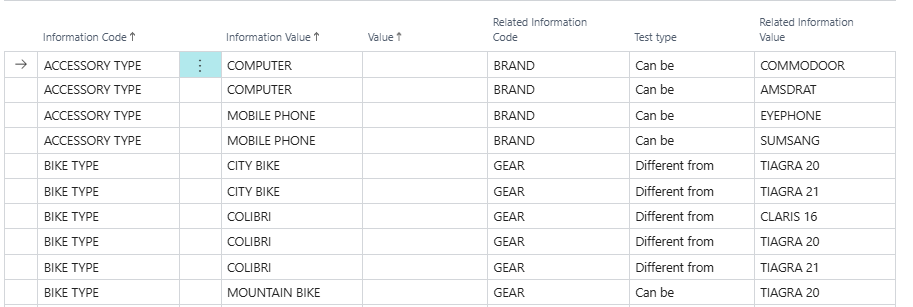
| Field | Purpose | Example | Key Information |
|---|---|---|---|
| Entry No. | System-generated unique identifier for the rule line. Not editable and not visible in the standard view. | 1 | Auto-incremented. Hidden on the page (Visible = false). |
| Information Code | The "trigger" Information Code — the code whose selected value will drive the dependency check. | BIKE TYPE | Must reference an existing Information Code. When a value is selected for this code on a record, the system checks all rules where this code appears. |
| Information Value | The specific value of the Information Code that activates this rule. When this value is selected for the Information Code above, the rule becomes active. | CITY BIKE | Validated against existing Information Values for the selected Information Code. Also supports Configuration Filters (when Information Code = FILTER). |
| Value | An optional additional value field that can carry supplementary data related to the rule. Free text. | (typically empty) | Not required for standard dependency logic. Present for advanced or custom scenarios. |
| Related Information Code | The Information Code that will be affected (filtered or validated) when the trigger rule is active. | GEAR | Must reference an existing Information Code. This is the code whose available values will be restricted based on the Test type rule. |
| Test type | Defines the type of constraint applied to the Related Information Code's value. Controls how the system evaluates whether a value combination is valid. | Can be | Options: (blank), Equal, Different from, Can be, Larger than, Less than. See detailed explanation below. |
| Related Information Value | The specific value of the Related Information Code that the Test type rule is applied to. | NEXUS 7 | Validated against existing Information Values for the Related Information Code, or against Configuration Filters. |
Understanding the Test Type Field
The Test type field determines the logic used to validate whether a given Related Information Value is allowed when the trigger rule is active:
| Test type | Meaning | Example |
|---|---|---|
| (blank) | No constraint is applied. The rule row is informational only. | — |
| Equal | The Related Information Value must be exactly the value specified on this rule. Only one Equal rule is allowed per Information Code + Information Value + Related Information Code combination. | BIKE TYPE = ELECTRIC must have GEAR = ALFINE 8 |
| Different from | The Related Information Value must NOT be the value specified. Used to exclude specific values. | GENDER = MALE must NOT have BIKE TYPE = FLOW |
| Can be | The Related Information Value is one of the allowed options. Multiple "Can be" rows for the same combination define the full whitelist. | GENDER = FEMALE can have BIKE TYPE = CITY BIKE, FLOW, TOURING BIKE, or MOUNTAIN BIKE |
| Larger than | The Related Information Value must be larger than the value specified (used for numeric comparisons). | — |
| Less than | The Related Information Value must be less than the value specified (used for numeric comparisons). | — |
Business rule enforced by the system: All rules sharing the same Information Code + Information Value + Related Information Code combination must have the same Test type. Mixing test types on the same combination will trigger a validation error.
Factboxes
The Logical Information Value Dependencies page does not include any factboxes.
Default Setup & Templates
The Master Data Information app includes demo setup data for the Logical Information Value Dependencies table. This data is loaded as part of the Demo Data installation (via the SCBSubscriber682DemoSetup codeunit) and is intended to illustrate how logical dependency rules can be configured. It is not installed automatically — it is only loaded when a user explicitly triggers the demo data setup.
Purpose of Demo Templates
The demo data provides working examples across two product domains (bicycles and electronics accessories), covering all three practical test types (Equal, Different from, Can be). Administrators and consultants can use these records to understand how to model their own dependency rules before creating production configurations.
Demo Dependency Records — Accessories (Electronics)
| Entry No. | Information Code | Information Value | Related Information Code | Test type | Related Information Value |
|---|---|---|---|---|---|
| 1 | ACCESSORY TYPE | COMPUTER | BRAND | Can be | COMMODOOR |
| 2 | ACCESSORY TYPE | COMPUTER | BRAND | Can be | AMSDRAT |
| 3 | ACCESSORY TYPE | MOBILE PHONE | BRAND | Can be | EYEPHONE |
| 4 | ACCESSORY TYPE | MOBILE PHONE | BRAND | Can be | SUMSANG |
Demo Dependency Records — Bicycles
| Entry No. | Information Code | Information Value | Related Information Code | Test type | Related Information Value |
|---|---|---|---|---|---|
| 5 | PRODUCT TYPE | BIKES | GENDER | Can be | MALE |
| 6 | PRODUCT TYPE | BIKES | GENDER | Can be | FEMALE |
| 7 | PRODUCT TYPE | BIKES | BIKE TYPE | Can be | MOUNTAIN BIKE |
| 8 | GENDER | MALE | BIKE TYPE | Different from | FLOW |
| 9 | GENDER | FEMALE | BIKE TYPE | Can be | CITY BIKE |
| 10 | GENDER | FEMALE | BIKE TYPE | Can be | FLOW |
| 11 | GENDER | FEMALE | BIKE TYPE | Can be | TOURING BIKE |
| 12 | GENDER | FEMALE | BIKE TYPE | Can be | MOUNTAIN BIKE |
| 13 | BIKE TYPE | CITY BIKE | GEAR | Can be | NEXUS 7 |
| 14 | BIKE TYPE | CITY BIKE | GEAR | Can be | SHIMANO NEXUS GEAR 7 |
| 15 | BIKE TYPE | COLIBRI | GEAR | Equal | NEXUS 7 |
| 16 | BIKE TYPE | ELECTRIC | GEAR | Equal | ALFINE 8 |
| 17 | BIKE TYPE | FLOW | GEAR | Can be | NEXUS 7 |
| 18 | BIKE TYPE | FLOW | GEAR | Can be | CLARIS 8 |
| 19 | BIKE TYPE | MOUNTAIN BIKE | GEAR | Can be | NEXUS 7 |
| 20 | BIKE TYPE | MOUNTAIN BIKE | GEAR | Can be | TIAGRA 20 |
| 21 | BIKE TYPE | RACING BIKE | GEAR | Equal | CLARIS 16 |
| 22 | BIKE TYPE | SPORT | GEAR | Can be | NEXUS 7 |
| 23 | BIKE TYPE | SPORT | GEAR | Can be | TIAGRA 21 |
| 24 | BIKE TYPE | TOURING BIKE | GEAR | Different from | ALFINE 8 |
These demo records illustrate all three test type patterns: Equal (one fixed allowed value), Can be (a whitelist of allowed values), and Different from (an excluded value). Use them as reference templates when designing your own rules.
Related Pages Documentation
Information Code Card
The Information Code Card (page 6224014) is the primary entry point for managing a single Information Code and its settings. It contains the Logical Dependencies toggle (in the Logical Dependencies group) which must be enabled for the system to evaluate dependency rules for that code at runtime. The Logical Dependencies action in the action bar opens the Logical Information Value Dependencies list filtered to the current Information Code, making it the recommended way to navigate to dependency setup.
Information Code List
The Information Code List (page 6083138) provides an overview of all Information Codes. From the Navigate menu, the Logical Dependencies action opens the full Logical Information Value Dependencies list without pre-filtering, allowing administrators to review all dependency rules across all codes.
Information Value List
The Information Value List stores the possible values for each Information Code. The Information Value and Related Information Value fields in the Logical Information Value Dependencies list are validated against this table, ensuring only existing values can be referenced in dependency rules.